Tip : Deliver your content from the edge of your architecture stack.
Imagine you have online application with Multi-tiered architecture comprising of Security Tier, Load Balancing Tier, Web tier, Application tier and Caching tier etc. Information has to travel through all these tiers to hit the caching layer and deliver the response back many times. This might take couple of hundred's of milliseconds sometimes depending upon the processing needs and network latency in the AWS infra . This overall latency might not be acceptable for certain use cases which needs sub second content delivery to the end users.
Instead of delivering your frequently accessed contents from the deep caching tier, You can re-architect your stack a little and try to deliver content from entry point itself. Solutions like Varnish, aiCache and NetScaler specialize in this caching and acceleration techniques and are widely used in AWS infra by architects. AMIs of these products are available on the AWS marketplace and many customers have already put them on production use. These products have the capability to cache/compress pages, objects, URL etc and by placing them at the entry of your architecture you will reduce the latency, save precious back end compute cycles and save costs by reducing the instance capacity needed at the backend. In case you use NetScaler Amazon EC2 it comes with sophisticated Load balancing algorithms as well, this way you can cut an extra LB tier and merge both cache+LB together to achieve high performance at low latency. Since these products are at the entry and have heavy dependency on bandwidth and memory, it is recommended to use EC2 instances with High IO and Memory capacity for these products.
This architecture implementation is a useful technique and can be widely adopted on segments like online newspapers/news, blogs ,content management systems, online classifieds use cases etc in AWS, which has lots of static content that does not change quite frequently and can be delivered again and again from the page cache-web accelerators tiers itself.
Related Articles :
Cost of Latency and Route53 LBR
Varnish Deployment Architectures in AWS
Showing posts with label Varnish. Show all posts
Showing posts with label Varnish. Show all posts
Wednesday, May 29, 2013


Friday, April 13, 2012
Auto Scaling Varnish on Amazon EC2 (AWS)
Varnish is an HTTP accelerator designed for content-heavy dynamic web sites. It sits in front of your web server. Varnish caches and stores web pages in memory so that web servers don't have to create the same web page over and over again. Varnish Cache serves pages much faster than any application server; giving the website a significant speed up. We have seen use cases with Varnish , where pages can be delivered sub-second to the browsers. Varnish is usually suitable for applications like Online Newspapers/magazines , Online Classifieds , Media sites which has more read pages and less of write operations (Publish once - Read many scenarios).
Example : In an online newspaper site , content is published once and not updated often . But it is read by millions in a day. Varnish page caching is suitable for this scenario because the fully formed-published page can be cached and served from the Varnish Layer instead of hitting the web server every time.
In online classifieds scenario , ads will be posted->published and will not change quite often. In some classified sites , the ads usually go through an approval process before publishing. In such scenarios the ads can be cached and served from Varnish itself instead of backend servers
Varnish can be scaled using following strategies in AWS:
- Varnish Scale up
- Varnish Scale out
Varnish Scale up :
This is most simplest strategy to implement in the scaling process. When your varnish cache memory or CPU is the bottleneck , we can always increase the Varnish EC2 instance to next higher capacity. This task can be done manually or automated in AWS. Follow the below steps while scaling up Varnish manually or automatically :
For example : Varnish-EC2-A (m1.large) is scaled up to (Varnish-EC2-B)
- Identify the next higher EC2 instance type based on the bottleneck , usually more RAM is better for varnish
- Take a backup of the varnishlog from Varnish-EC2-A
- Preload the Varnish-EC2-B with Varnish-EC2-A logs (or) cache warm this with frequent pages
Different EIP under Route 53:

- Attach Varnish-EC2-B with a new ElasticIP (EIP)
- Check whether Amazon Route53 is configured with round robin algorithm
- Attach Varnish-EC2-B EIP to Route53
- Detach Varnish-EC2-A EIP from Route53 once Varnish-B IP is propagated
- When you Detach Varnish-EC2-A EIP , if some end clients have cached this IP , then website access might throw errors
Same EIP under Route 53:

- If you feel Varnish-EC2-A IP might be cached in some clients , then you an attach properly warmed Varnish-EC2-B to same Varnish-A EIP.
- This action might impact the website for ~60-180 seconds till Varnish-B is attached with same Varnish-A EIP.
We will see about Varnish Scale out in the next article
Friday, March 30, 2012
Performance Tuning & Best Practices of Varnish on Amazon EC2
Varnish Cache is by default tuned for high performance on the majority of production use cases. Following tuning points and best practices are suggested based on our experience in AWS.
64 bit Instance Type for Varnish :
Varnish needs lots of memory to perform better. If you have lots of cache items and less memory , tuning will not help much . So better run your Varnish on 64 bit instances with large memory. High Memory EC2 Instance types are very good candidates for Varnish (Note : Though t1.micro is 64 bit OS , it has only 780 MB of memory so it is not ideal for Varnish in AWS)
Tuning the Hit rates :
Tuning Cache Hit rates is one of the most important parameters in Varnish. Online newspapers , magazines , classifieds are some of the applications which needs extra care in this parameter.if this parameter is not tuned properly , it will lead to Stampede of your back end heavily.
Allocate one thread pool for every CPU core of Amazon EC2 instance. Example if a m1.large Varnish EC2 instance has 2 CPU core , then configure :
thread_pools 2
Thread pool minimum can start with 100 and maximum between 1000-2500 .
Thread pool max is the maximum number of worker threads in each pool.
Configuring Thread pool max is usually based on the concurrent hits that you might expect Varnish.Do not set this higher than you have to, since excess worker threads soak up RAM and CPU and generally just get in the way of getting work done.
thread_pool_min 100
thread_pool_max 2500
Decrease the Thread pool delay to 3 seconds from 2 seconds , so that Varnish process can start up quickly without pile up.
thread_pool_add_delay 3
Tuning the Timeouts :
cli_timeout is a Timeout for the childs replies to CLI requests from the master. The default is 10 seconds.If your varnish is heavily hit, child might not answer the management thread in a timely fashion, which in turn will kill it off. To avoid that, set cli_timeout to ~20 seconds. This is recommended only for Heavy traffic Varnish sites.
Configuring malloc :
If the cache content can be accommodated in memory , then recommended option is to use -smalloc. Example , if you are using m1.large instance type (7GB RAM) for Varnish , then allocate 5.5-6 GB Cache for Varnish,Since the Varnish cache size you specify is for the cache alone, and does not include session workspace.
Cache hitting disks :
If you cannot accommodate your cache Contents in EC2 instance memory, then you have following options :
Option 1)Increase the EC2 instance type to next High Memory type. Additional cost has to be bared for using High memory EC2 instance type.
Option 2)Use -sfile when the cache starts hitting your disk. -sfile performs far better than -smalloc in this scenario.(Note:filesystem mounted with noatime is preferred sometimes). Use Ephemeral disks in Amazon EC2, it is faster than EBS. Cost is lesser than option 1 and 3.
Option 3) Scale out + distribute your Varnish behind Load Balancer in AWS. This option is recommended only for advanced applications. Cost is more.
Do not tune parameters :
Do not set “tw_reuse” to 1 (sysctl).
Do not modify lru_interval and sess_timeout.
Related Articles
Varnish Implementation Architectures in AWS
FAQ - Varnish on Amazon EC2
Configuring Varnish on AWS
Designing Web/App's with Varnish Page Cache in AWS
64 bit Instance Type for Varnish :
Varnish needs lots of memory to perform better. If you have lots of cache items and less memory , tuning will not help much . So better run your Varnish on 64 bit instances with large memory. High Memory EC2 Instance types are very good candidates for Varnish (Note : Though t1.micro is 64 bit OS , it has only 780 MB of memory so it is not ideal for Varnish in AWS)
Tuning the Hit rates :
Tuning Cache Hit rates is one of the most important parameters in Varnish. Online newspapers , magazines , classifieds are some of the applications which needs extra care in this parameter.if this parameter is not tuned properly , it will lead to Stampede of your back end heavily.
Allocate one thread pool for every CPU core of Amazon EC2 instance. Example if a m1.large Varnish EC2 instance has 2 CPU core , then configure :
thread_pools 2
Thread pool minimum can start with 100 and maximum between 1000-2500 .
Thread pool max is the maximum number of worker threads in each pool.
Configuring Thread pool max is usually based on the concurrent hits that you might expect Varnish.Do not set this higher than you have to, since excess worker threads soak up RAM and CPU and generally just get in the way of getting work done.
thread_pool_min 100
thread_pool_max 2500
Decrease the Thread pool delay to 3 seconds from 2 seconds , so that Varnish process can start up quickly without pile up.
thread_pool_add_delay 3
Tuning the Timeouts :
cli_timeout is a Timeout for the childs replies to CLI requests from the master. The default is 10 seconds.If your varnish is heavily hit, child might not answer the management thread in a timely fashion, which in turn will kill it off. To avoid that, set cli_timeout to ~20 seconds. This is recommended only for Heavy traffic Varnish sites.
If the cache content can be accommodated in memory , then recommended option is to use -smalloc. Example , if you are using m1.large instance type (7GB RAM) for Varnish , then allocate 5.5-6 GB Cache for Varnish,Since the Varnish cache size you specify is for the cache alone, and does not include session workspace.
Cache hitting disks :
If you cannot accommodate your cache Contents in EC2 instance memory, then you have following options :
Option 1)Increase the EC2 instance type to next High Memory type. Additional cost has to be bared for using High memory EC2 instance type.
Option 2)Use -sfile when the cache starts hitting your disk. -sfile performs far better than -smalloc in this scenario.(Note:filesystem mounted with noatime is preferred sometimes). Use Ephemeral disks in Amazon EC2, it is faster than EBS. Cost is lesser than option 1 and 3.
Option 3) Scale out + distribute your Varnish behind Load Balancer in AWS. This option is recommended only for advanced applications. Cost is more.
Do not set “tw_reuse” to 1 (sysctl).
Do not modify lru_interval and sess_timeout.
Related Articles
Varnish Implementation Architectures in AWS
FAQ - Varnish on Amazon EC2
Configuring Varnish on AWS
Designing Web/App's with Varnish Page Cache in AWS
Friday, March 23, 2012
FAQ : Varnish Cache on Amazon EC2 (AWS)
1)Can Varnish Web accelerator run on AWS ?
Yes , Varnish Web Accelerator can be configured and run on AWS . Please refer this URL for configuration
2)Is Varnish Cache a Web Service provided by AWS ?
No , it is not a web service . We need to Install Varnish Cache on Amazon EC2.
3)What Varnish compatible Linux distributions are available in Amazon Machine Images (AMI) ?
Red Hat , Ubuntu , Debian and FreeBSD compatible AMI's are available for Varnish
4)Should i go for S3 Backed AMI's or EBS backed AMI's for Varnish ?
5)How to choose the right Instance Type in Amazon for Varnish ?
6)How do we monitor Varnish in AWS Cloud ?
We recommend our customers to monitor Varnish in the following combinations :
Since Varnish web accelerator is used as cache and it performs well when most of the pages are served from memory and stored on disk, we should not complicate the backup process too much. Keeping simplicity in mind i suggest the following easy backup schemes in AWS for Varnish EC2:
8)What directors are supported by Varnish on AWS ?
Most popular Varnish Directors are Round Robin and Random directors. Amazon EC2 does not restrict any direction algorithms of Varnish to back end servers . So whatever directors Varnish supports it should work in AWS cloud too.
9)How do we design High Availability for Varnish EC2 in AWS ?
Yes , Varnish works inside Amazon VPC as well , place it in public subnet. if public Varnish AMI's are not available for your AWS region , you can easily build one for the community.
11)Do i need an Elastic IP for Varnish EC2 ?
It depends upon implementation architectures :
Article Under progress , Some more answers are on the way
Does Varnish Compete or Complement AWS CloudFront CDN ?
When do we need Distributed Varnish Setup in AWS ?
How do we achieve Distributed Varnish Setup in AWS ?
Any Varnish Latency benchmarks in AWS ?
Yes , Varnish Web Accelerator can be configured and run on AWS . Please refer this URL for configuration
2)Is Varnish Cache a Web Service provided by AWS ?
No , it is not a web service . We need to Install Varnish Cache on Amazon EC2.
3)What Varnish compatible Linux distributions are available in Amazon Machine Images (AMI) ?
Red Hat , Ubuntu , Debian and FreeBSD compatible AMI's are available for Varnish
4)Should i go for S3 Backed AMI's or EBS backed AMI's for Varnish ?
- S3 backed AMI's have faster IO but slower launch times . Information stored in Ephemeral disks will be lost during EC2 failure or reboot , if they are not properly backed up in S3.
- EBS backed AMI's have faster launch times and information is persisted across EC2 failures and launches. This AMI is useful if you want to preload or cache warm your Varnish from varnish logs.
- If Varnish is going to run inside VPC make sure compatible AMI distributions are available.
5)How to choose the right Instance Type in Amazon for Varnish ?
- Varnish web accelerator is a Cache and it ideally needs lots of memory, so a 64-bit OS is ideal choice to start with
- Amazon T1.micro is also 64-bit OS , but with 700+ MB of Memory. Since memory might not be enough to store enough pages in cache a larger 64bit is ideal
- M1.Large (64 bit , 7GB RAM) is an ideal candidate to start with , if your Cache requirements can be met within 7GB RAM . We have seen this capacity being used by many customers in HA mode.
- High Memory EC2 Instances are better choices than High CPU EC2 Instances for Varnish Cache
- If your Cache need is more than 7GB RAM you can choose other High memory instances from Amazon EC2
- If you need to cache TB's of page data , we suggest to distribute/shard your cache in Varnish using Reverse Proxy ( HAProxy or NginX) as entry point
6)How do we monitor Varnish in AWS Cloud ?
We recommend our customers to monitor Varnish in the following combinations :
- Using Amazon Cloudwatch + SNS alerts technique we can monitor the Varnish EC2 instance CPU and Network.
- Using Custom Cloudwatch metrics we can monitor Custom varnish Parameters and alert the Ops
- Using Munin we can monitor the VarnishStat and infer quite bit of information on Varnish EC2
Since Varnish web accelerator is used as cache and it performs well when most of the pages are served from memory and stored on disk, we should not complicate the backup process too much. Keeping simplicity in mind i suggest the following easy backup schemes in AWS for Varnish EC2:
- Bundling Varnish EC2 AMI to S3 or Periodic EBS Snapshots is a recommended approach for most use cases
- Frequent EBS Snaphots or Syncing varnishlog to S3 is recommended for cases where Varnish Pre-loading or Cache Warming is required
- Automation of above approaches is ideal for large scale systems
8)What directors are supported by Varnish on AWS ?
Most popular Varnish Directors are Round Robin and Random directors. Amazon EC2 does not restrict any direction algorithms of Varnish to back end servers . So whatever directors Varnish supports it should work in AWS cloud too.
9)How do we design High Availability for Varnish EC2 in AWS ?
- Simple use cases of Varnish does not demand Varnish running in HA mode. When Varnish is down , Route53 will try to pass the request to Varnish EC2 and error is delivered to the end user till Varnish gets back to running state.
- Use cases like online newspapers , portals , online classifieds , Magazines etc where Varnish EC2 failure can trigger huge performance impact , Cache stampede or heavy load to the back end demand Varnish to run on HA mode. For such use cases we recommend running minimum 2 Varnish EC2 on 2 Availability Zones of AWS. This avoids single point of failure at Varnish EC2 as well as Single Availability Zone level. Varnish HA Implementation architectures are discussed here.
Yes , Varnish works inside Amazon VPC as well , place it in public subnet. if public Varnish AMI's are not available for your AWS region , you can easily build one for the community.
11)Do i need an Elastic IP for Varnish EC2 ?
It depends upon implementation architectures :
- If you place Varnish behind Amazon Route53 , you will have to attach ElasticIP to the Varnish EC2
- If you place Varnish behind Amazon ELB , you need not attach ElasticIP to Varnish EC2
- If you place Varnish behind Reverse proxy, attaching ElasticIP is optional. Most use cases does not demand this need behind Reverse proxy.
12)Can i use Amazon AutoScaling to scale out my Varnish Layer ?
Yes , we can use Amazon AutoScaling to scale out Varnish layer based on CPU or some custom metric. But , still now i had not found a use case for recommending the same. Auto Scaling is suitable for scenarios where entire infrastructure needs to react to load volatility. Varnish in HA or Distributed Varnish in HA mode can usually handle this scenario. If needed we prefer controlled varnish scale out using custom programs rather than Amazon Auto Scaling . We feel an improperly warmed Varnish Cache can pass heavy load to back end servers and affect the overall website performance in Scale out scenario , hence we need to properly add warmed varnish EC2 instance in controlled manner into the acceleration layer.
Article Under progress , Some more answers are on the way
Does Varnish Compete or Complement AWS CloudFront CDN ?
When do we need Distributed Varnish Setup in AWS ?
How do we achieve Distributed Varnish Setup in AWS ?
Any Varnish Latency benchmarks in AWS ?
Friday, March 16, 2012
Varnish Deployment Architectures in AWS
Varnish is a web application accelerator. Varnish is usually placed before the web application for page caching and faster delivery. In this article lets explore in detail the various deployment / Implementation architectures of Varnish on Amazon Web Services cloud.
Architecture 1 : Varnish behind the Amazon Route53

In the above architecture , we have placed Varnish Page Cache behind the Amazon Route53 DNS. When the user request for www.yourApp.com reaches the Amazon Route53 , it uses Round Robin algorithm and sends the PublicIP address of the Varnish EC2 instances. Each Varnish EC2 instance is m1.large instance type ( 64bit , 2 cores , 7GB RAM , guaranteed IO) and attached with Amazon ElasticIP. Varnish may work on 32 bit , but it is highly recommended to run it on 64 bit OS with enough memory. In our use case we had chosen m1.large instance type because it comes with 7GB RAM and guaranteed IO. You can chose larger memory instance type in AWS depending upon the memory usage requirements.
Web apps like online News , classifieds , social sites depend a lot on Page caching for web acceleration. In such use cases it is better to run Varnish on High availability mode to avoid Cache Stampede.
Since Varnish is a critical component of this web app architecture it is deployed with High Availability mode in 2 different Availability Zones inside a single Amazon region. So even if single Varnish EC2 fails or Entire AWS AZ fails your site is still functional because of HA. The above architecture has only partial HA built in , let us see why : If User-1 is served by Varnish-A and User-2 is served by Varnish-B , if varnish-A goes down then User-1 will try to access the varnish-A IP and it will fail with error page. Since we had configured DNS round Robin at Route53 , the Secondary Varnish-B IP will also be passed to user-1 browser . Now the browser will access the website through Varnish-B. This is not a fully HA architecture because the User-1 can get server error page at times.
Each Varnish EC2 server is configured with Round Robin director , so that they deliver the non cached HTTP requests to Back end web/app servers. Varnish can be configured with only Round Robin or Random directors currently. It will be really useful if they can add Weighted or least connection directors in future. Also the Health checks are configured in the Varnish EC2 server to direct the HTTP load to healthy back end web servers.
EBS Backed Red Hat EC2 instance is used for Varnish Servers so that varnish log files can be persistently stored in EBS volumes to overcome EC2 failures.
Varnish Logs in Amazon EBS storage will be particularly helpful if you are going to power down your Varnish server, but don’t want to start over from scratch with your cache. Varnish can pre-load URL’s and perform cache warming using "varnishlog" and "varnishreplay" commands. First, you will need to capture a log file. Use the following command to write a log file
varnishlog -D -a -w /var/log/varnish.log
Flags: -D works in daemon mode, -a , then -w appends data to the proceeding file.
Once you have downed your server and erased your cache, run the following command to replay or reproduce the contents of your log file.
varnishreplay -r /var/log/varnish.log
Flags: -r defines the log file to use, which is mandatory.
We use Munin plugin in this use case to monitor the varnishstat. Munin is a monitoring tool with a plug-in framework for Varnish page cache. Munin nodes periodically report back data to a Munin server. The Munin server collects the data and generates an HTML page with graphs.
No Backup is configured for Varnish EC2 because it is not a persistence cache.
Only EBS snapshots are taken whenever there is Varnish configuration change.
Architecture 2 : Varnish behind the Amazon Elastic Load balancer

In the above architecture , we have placed Varnish Page Cache behind the Amazon ELB. When the user request for www.yourApp.com reaches the Amazon Route53 , it passes the request to Amazon Elastic Load Balancer. Amazon ELB uses Round Robin algorithm and sends requests to Varnish Cache. Each Varnish EC2 instance is m1.large instance type ( 64bit , 2 cores , 7GB RAM , guaranteed IO) and attached with Amazon Elastic Load Balancer. ElasticIP is not needed for the Varnish instances because they can talk to ELB using privateIP's. EBS Backed Red Hat EC2 instance is used for Varnish Servers like the previous architecture so that varnish log files can be persistently stored in EBS volumes and pre loaded or cache warmed quickly during EC2 failures.
Varnish is running on HA mode in 2 Availability Zones inside a Region. Amazon ELB is configured with Health checks to pass the request to healthy Varnish EC2 instances. Both the Varnish instances almost contain same page cache entries and it is not distributed setup. Varnish is not setup in Auto Scaling mode. Advantage of this setup is that in event of a Varnish EC2 failure , requests can be redirected to another Varnish Server seamlessly. In event of AZ failure in Amazon cloud , ELB will transfer the request to Varnish deployed in other AZ.
Some of the negatives of this setup are , having Amazon ELB before Varnish increases the response latency by <150ms (this latency delay might not be acceptable in some use cases). All the Varnish EC2 instances under the ELB needs to be cache warmed properly and frequently , or else it will lead to Cache stampede of the Web/App servers. Distributed Varnish Cache cannot be setup under Amazon ELB because ELB cannot redirect HTTP requests to multiple Varnish based on multiple URLs.
Like the previous architecture , Varnish EC2 servers are configured with Round Robin director in this setup, so that they deliver the non cached HTTP requests to Back end web/app servers(Varnish can be configured with only Round Robin or Random directors currently).
Munin plugin is configured in this use case to monitor the varnishstat. No Backup is configured for Varnish EC2 because it is not a persistence cache.
Only EBS snapshots are taken whenever there is Varnish configuration change.
Architecture 3 : Varnish behind the Reverse Proxy ( HAProxy or NginX)
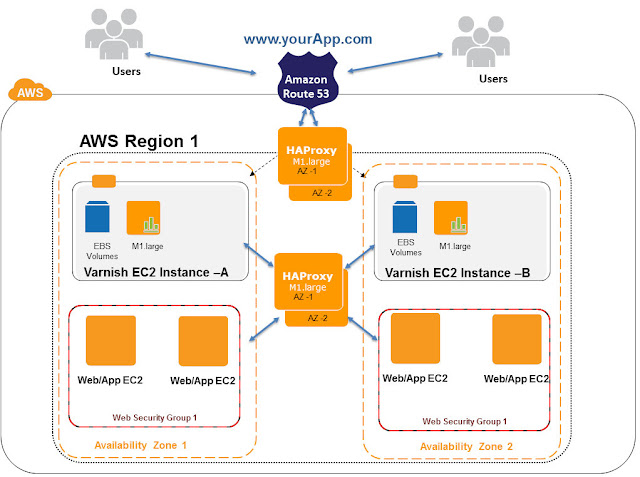
In the above architecture , we have placed Varnish Page Cache behind the Reverse Proxy - HAProxy load balancer. When the user request for www.yourApp.com reaches the Amazon Route53 , it passes the request to HAProxy. Each HAproxy is a Red Hat EC2 m1.large instance. HAProxy uses Round Robin algorithm and sends requests to Varnish Cache. Each Varnish EC2 instance is m1.large instance type ( 64bit , 2 cores , 7GB RAM , guaranteed IO) and attached with HAProxy. ElasticIP/privateIP can be used to attach Varnish EC2 to HAProxy. In this use case we have configured HAProxy with Varnish PrivateIPs. EBS Backed Red Hat EC2 instance is used for Varnish Servers like the previous architecture ,so that varnish log files can be persistently stored in EBS volumes and pre loaded or cache warmed quickly during EC2 failures.
Varnish is running on HA mode in 2 Availability Zones inside a Region. HAproxies are configured with Health checks to pass the request to healthy Varnish EC2 instances. Varnish EC2 Instances can be distributed using HAproxies in this architecture. Example www.yourApp.com/appcomp1/* can be directed Varnish-A -and www.yourApp.com/appcomp2/* can be directed to Varnish-B . Both varnishes can contain different cache entries in this setup. Varnish Cache Distribution and HA setup can be achieved in this architecture using HAProxy.
Varnish Cache can be setup in Auto Scaling mode , but usually this is not recommended because of Cache Warming and Stampede problem unless the use case demands.
Advantage of this setup is that in event of a Varnish EC2 failure , requests can be redirected to another Varnish Server seamlessly. In event of AZ failure in Amazon cloud , HAproxy will transfer the requests to Varnish deployed in another AZ seamlessly. Also Varnish Cache Distribution and HA can be achieved in this architecture. Some of the negatives of this setup are , having HAProxy before Varnish increases the response latency by <100ms (this latency delay might not be acceptable in some use cases). All the Varnish EC2 instances under the HAproxy needs to be cache warmed properly and frequently , or else it will lead to Cache stampede of the Web/App servers. Additional infra and maintenance cost for running layers of HAproxies.
Varnish EC2 servers are configured with Round Robin director to pass the requests to level-2 HAproxy servers in this setup, HAProxy Servers in Level-2 can direct load with variety of LB algorithms like Round Robin , Weighted , Least connection etc to the Web/App layer. Since the Number of web/App servers under the Varnish are abstracted through HAProxy , we can seamlessly auto scale the number of Web/App servers and hot reconfigure the HAproxies accordingly. This helps us to design Highly scalable web application layers. This architecture is recommended for use cases where Elastic Web/App layers are needed under Varnish with flexibility in LB algorithms in AWS. As seen in above cases , Munin plugin is configured to monitor the varnishstat. No Backup is configured for Varnish EC2 because it is not a persistence cache. Only EBS snapshots are taken whenever there is Varnish configuration change.
Related Articles
FAQ - Varnish on Amazon EC2
Configuring Varnish on AWS
Designing Web/App's with Varnish Page Cache in AWS
Performance tuning & Varnish Best practices on AWS
Architecture 1 : Varnish behind the Amazon Route53

In the above architecture , we have placed Varnish Page Cache behind the Amazon Route53 DNS. When the user request for www.yourApp.com reaches the Amazon Route53 , it uses Round Robin algorithm and sends the PublicIP address of the Varnish EC2 instances. Each Varnish EC2 instance is m1.large instance type ( 64bit , 2 cores , 7GB RAM , guaranteed IO) and attached with Amazon ElasticIP. Varnish may work on 32 bit , but it is highly recommended to run it on 64 bit OS with enough memory. In our use case we had chosen m1.large instance type because it comes with 7GB RAM and guaranteed IO. You can chose larger memory instance type in AWS depending upon the memory usage requirements.
Web apps like online News , classifieds , social sites depend a lot on Page caching for web acceleration. In such use cases it is better to run Varnish on High availability mode to avoid Cache Stampede.
Since Varnish is a critical component of this web app architecture it is deployed with High Availability mode in 2 different Availability Zones inside a single Amazon region. So even if single Varnish EC2 fails or Entire AWS AZ fails your site is still functional because of HA. The above architecture has only partial HA built in , let us see why : If User-1 is served by Varnish-A and User-2 is served by Varnish-B , if varnish-A goes down then User-1 will try to access the varnish-A IP and it will fail with error page. Since we had configured DNS round Robin at Route53 , the Secondary Varnish-B IP will also be passed to user-1 browser . Now the browser will access the website through Varnish-B. This is not a fully HA architecture because the User-1 can get server error page at times.
Each Varnish EC2 server is configured with Round Robin director , so that they deliver the non cached HTTP requests to Back end web/app servers. Varnish can be configured with only Round Robin or Random directors currently. It will be really useful if they can add Weighted or least connection directors in future. Also the Health checks are configured in the Varnish EC2 server to direct the HTTP load to healthy back end web servers.
EBS Backed Red Hat EC2 instance is used for Varnish Servers so that varnish log files can be persistently stored in EBS volumes to overcome EC2 failures.
Varnish Logs in Amazon EBS storage will be particularly helpful if you are going to power down your Varnish server, but don’t want to start over from scratch with your cache. Varnish can pre-load URL’s and perform cache warming using "varnishlog" and "varnishreplay" commands. First, you will need to capture a log file. Use the following command to write a log file
varnishlog -D -a -w /var/log/varnish.log
Flags: -D works in daemon mode, -a , then -w appends data to the proceeding file.
Once you have downed your server and erased your cache, run the following command to replay or reproduce the contents of your log file.
varnishreplay -r /var/log/varnish.log
Flags: -r defines the log file to use, which is mandatory.
We use Munin plugin in this use case to monitor the varnishstat. Munin is a monitoring tool with a plug-in framework for Varnish page cache. Munin nodes periodically report back data to a Munin server. The Munin server collects the data and generates an HTML page with graphs.
No Backup is configured for Varnish EC2 because it is not a persistence cache.
Only EBS snapshots are taken whenever there is Varnish configuration change.
Architecture 2 : Varnish behind the Amazon Elastic Load balancer

In the above architecture , we have placed Varnish Page Cache behind the Amazon ELB. When the user request for www.yourApp.com reaches the Amazon Route53 , it passes the request to Amazon Elastic Load Balancer. Amazon ELB uses Round Robin algorithm and sends requests to Varnish Cache. Each Varnish EC2 instance is m1.large instance type ( 64bit , 2 cores , 7GB RAM , guaranteed IO) and attached with Amazon Elastic Load Balancer. ElasticIP is not needed for the Varnish instances because they can talk to ELB using privateIP's. EBS Backed Red Hat EC2 instance is used for Varnish Servers like the previous architecture so that varnish log files can be persistently stored in EBS volumes and pre loaded or cache warmed quickly during EC2 failures.
Varnish is running on HA mode in 2 Availability Zones inside a Region. Amazon ELB is configured with Health checks to pass the request to healthy Varnish EC2 instances. Both the Varnish instances almost contain same page cache entries and it is not distributed setup. Varnish is not setup in Auto Scaling mode. Advantage of this setup is that in event of a Varnish EC2 failure , requests can be redirected to another Varnish Server seamlessly. In event of AZ failure in Amazon cloud , ELB will transfer the request to Varnish deployed in other AZ.
Some of the negatives of this setup are , having Amazon ELB before Varnish increases the response latency by <150ms (this latency delay might not be acceptable in some use cases). All the Varnish EC2 instances under the ELB needs to be cache warmed properly and frequently , or else it will lead to Cache stampede of the Web/App servers. Distributed Varnish Cache cannot be setup under Amazon ELB because ELB cannot redirect HTTP requests to multiple Varnish based on multiple URLs.
Like the previous architecture , Varnish EC2 servers are configured with Round Robin director in this setup, so that they deliver the non cached HTTP requests to Back end web/app servers(Varnish can be configured with only Round Robin or Random directors currently).
Munin plugin is configured in this use case to monitor the varnishstat. No Backup is configured for Varnish EC2 because it is not a persistence cache.
Only EBS snapshots are taken whenever there is Varnish configuration change.
Architecture 3 : Varnish behind the Reverse Proxy ( HAProxy or NginX)

In the above architecture , we have placed Varnish Page Cache behind the Reverse Proxy - HAProxy load balancer. When the user request for www.yourApp.com reaches the Amazon Route53 , it passes the request to HAProxy. Each HAproxy is a Red Hat EC2 m1.large instance. HAProxy uses Round Robin algorithm and sends requests to Varnish Cache. Each Varnish EC2 instance is m1.large instance type ( 64bit , 2 cores , 7GB RAM , guaranteed IO) and attached with HAProxy. ElasticIP/privateIP can be used to attach Varnish EC2 to HAProxy. In this use case we have configured HAProxy with Varnish PrivateIPs. EBS Backed Red Hat EC2 instance is used for Varnish Servers like the previous architecture ,so that varnish log files can be persistently stored in EBS volumes and pre loaded or cache warmed quickly during EC2 failures.
Varnish is running on HA mode in 2 Availability Zones inside a Region. HAproxies are configured with Health checks to pass the request to healthy Varnish EC2 instances. Varnish EC2 Instances can be distributed using HAproxies in this architecture. Example www.yourApp.com/appcomp1/* can be directed Varnish-A -and www.yourApp.com/appcomp2/* can be directed to Varnish-B . Both varnishes can contain different cache entries in this setup. Varnish Cache Distribution and HA setup can be achieved in this architecture using HAProxy.
Varnish Cache can be setup in Auto Scaling mode , but usually this is not recommended because of Cache Warming and Stampede problem unless the use case demands.
Advantage of this setup is that in event of a Varnish EC2 failure , requests can be redirected to another Varnish Server seamlessly. In event of AZ failure in Amazon cloud , HAproxy will transfer the requests to Varnish deployed in another AZ seamlessly. Also Varnish Cache Distribution and HA can be achieved in this architecture. Some of the negatives of this setup are , having HAProxy before Varnish increases the response latency by <100ms (this latency delay might not be acceptable in some use cases). All the Varnish EC2 instances under the HAproxy needs to be cache warmed properly and frequently , or else it will lead to Cache stampede of the Web/App servers. Additional infra and maintenance cost for running layers of HAproxies.
Varnish EC2 servers are configured with Round Robin director to pass the requests to level-2 HAproxy servers in this setup, HAProxy Servers in Level-2 can direct load with variety of LB algorithms like Round Robin , Weighted , Least connection etc to the Web/App layer. Since the Number of web/App servers under the Varnish are abstracted through HAProxy , we can seamlessly auto scale the number of Web/App servers and hot reconfigure the HAproxies accordingly. This helps us to design Highly scalable web application layers. This architecture is recommended for use cases where Elastic Web/App layers are needed under Varnish with flexibility in LB algorithms in AWS. As seen in above cases , Munin plugin is configured to monitor the varnishstat. No Backup is configured for Varnish EC2 because it is not a persistence cache. Only EBS snapshots are taken whenever there is Varnish configuration change.
Related Articles
FAQ - Varnish on Amazon EC2
Configuring Varnish on AWS
Designing Web/App's with Varnish Page Cache in AWS
Performance tuning & Varnish Best practices on AWS
Wednesday, March 14, 2012
Configuring Varnish Page Cache in Amazon EC2 (AWS)
Installing and Configuring Varnish Server
Install the varnish server and make corresponding configuration changes.
COMMAND
§ Install dependants for Varnish server installation
§ Download and Install Varnish server
§ START Varnish server and check for Varnish server run status
§ Make required configurations in default.vcl file
yum install automake
yum install autoconf
yum install libtool
yum install ncurses-devel
yum install groff
yum install pcre-devel
yum install pkgconfig
wget repo.varnish-cache.org/source/varnish-3.0.2.tar.gz
tar -zxvf varnish-3.0.2.tar.gz
cd varnish-3.0.2
sh autogen.sh
sh configure
make
make check
make install
Now Varnish server is installed, to start varnish server we need to know the IP of this server. To get the IP of the server execute command “ifconfig” and find the IP as shown in the image below,

Once you have received the IP of the instance now build the command for Varnish server launch
varnishd -f /usr/local/etc/varnish/default.vcl -s malloc,4G -T 127.0.0.1:2000 -a 10.64.43.79:80 -p thread_pool_min=500 -p thread_pool_max=4000 -p thread_pool_add_delay=2
Note: Make sure you provide the correct IP address while varnish server launch
Varnish Launch Command Explanation:
Varnishd –> Command
-f –> file location of VCL file
-s –> Backend storage specification. By default the storage is “file” we change it to “malloc” so that the information will be stored in memory
-T –> Telnet listen address and port. Host is set to localhost and port is some random port e.g. 2000
-a –> HTTP listen address and port. Host is this server’s IP and listening port is 80
-p –> Set parameter for service launch.
There are few essential performance based parameters to be set while launch they are as follows
§ thread_pool_min is the minimum number of threads for each thread pool
§ thread_pool_max is the maximum total number of threads
§ thread_pool_add_delay – Reducing the add_delay lets you create threads faster which is essential - specially at startup - to avoid filling up the queue and dropping requests
Now we should edit the default.vcl ( located at : /usr/local/etc/varnish/default.vcl ) and uncomment the backend default section.
This backend default section is the section where we will configure the host and port of the server, where varnish will send the request; if the requested content is not available in varnish cache.

Here the host is set as localhost i.e. 127.0.0.1 because, we have both web server and Varnish server running in the same Server Instance. If you wish to run the varnish in one server and the web server in another separate server, then you can do so but, make sure you provide the IP of the server instance where the web server is installed in the Varnish server’s default.vcl file’s “backend default” section accordingly.
By default in Red Hat server it has Firewall settings enabled which will block our setup from responding when requested from browser i.e. only port 22 will be open since our requests come via port 80 it will not be allowed. Hence, to allow access we block Red Hat’s Firewall settings to proceed further. Also we will configure in such a way that this firewall block will be effective even on server restarts.
Instead of blocking we can add configurations in iptables so as to allow port 80 also, but this is totally not required since our setup is in AWS. The security group settings of AWS are much secured and there is no need for another security level. Also, this additional security step will cause more latency in response so it is better to block Red Hat’s Firewall settings.
COMMAND’s for executing the above mentioned are as follows,
iptables -L
ð Checks for Red Hat Firewall status
/etc/init.d/iptables stop
ð Stop Red Hat firewall
chkconfig iptables off
ð Will make sure that the service won't start when server boots up. This removes the service from the start up list
Configure boot startup for Varnish Server
For the Varnish server to start automatically when the server reboots, we need to update the “rc.local” file in the server instance.
The commands for the same is as follows,
vim /etc/rc.local
Update these lines below in the file
/usr/local/sbin/varnishd -f /usr/local/etc/varnish/default.vcl -s malloc,4G -T 127.0.0.1:2000 -a 10.64.43.79:80 -p thread_pool_min=500 -p thread_pool_max=4000 -p thread_pool_add_delay=2
save the changes made
Related Articles
FAQ - Varnish on Amazon EC2
Varnish Implementation Architectures in AWS
Configuring Varnish on AWS
Designing Web/App's with Varnish Page Cache in AWS
Monday, March 5, 2012
Designing Web/App's with Varnish Page Cache in AWS
Varnish is an HTTP accelerator designed for content-heavy dynamic web sites. It sits in front of your web server. Varnish caches and stores web pages in memory so that web servers don't have to create the same web page over and over again. Varnish Cache serves pages much faster than any application server; giving the website a significant speed up. We have seen use cases with Varnish , where pages can be delivered sub-second to the browsers.Some of the salient features of Varnish are,
- High performance HTTP accelerator
- In-memory cache
- Flexible configuration through the power of the Varnish Configuration Language
- Load balancing based on URL, client IP, cookies and more
- Edit any HTTP request or response as it passes through Varnish
Example : In an online newspaper site , content is published once and not updated often . But it is read by millions in a day. Varnish page caching is suitable because the once formed-published page can be cached and served from the Varnish Layer instead of hitting the web server.
In online classifieds scenario , ads will be published and will not change quite often. In some classified sites , the ads usually go through an approval process before published. In such scenarios the ads can be cached and served from Varnish itself.
While architecting an high performance website on AWS we can chose to have Varnish Layer at following levels in the stack:
Level 1: Varnish is the entry point for your website
Level 2: Varnish below the Amazon ELB / Load Balancer
In the following articles we go in depth on the above architectures and the best practices in designing them in AWS.
Subscribe to:
Posts (Atom)