Whenever we are designing a highly scalable architectures on AWS running thousands of application servers and supporting millions of requests, usage of NoSQL solutions have become inevitable part. One such solution we often been using for years on AWS is Redis . We love Redis.
AWS introduced ElastiCache Redis on 2013 and we started using the same since it eased the management and operational efforts. In this article i am going to share my experience on designing large scale Redis tiers supporting billions of messages per day on AWS, step by step guide on how to deploy the same, what are the Implications you face at scale ? Best Practices to be adopted while designing sharded+replicated Redis Tiers etc.
Since we need to support billions of message requests per day and it was growing:
- the ElastiCache Redis tier was designed with Partitions( shards) to scale out as the customer grows
- the ElastiCache Redis tier was designed with Replica Slaves for HA and read scaling as the read volumes grow
When your application is growing at Rapid pace and lots of data are created every day, you cannot keep increasing (scaling up) the size of the ElastiCache Node. At one point you will hit the maximum memory capacity of your EC2 instance and you will be forced to partition. Partitioning is the process of splitting your Key Value data into multiple ElastiCache Redis instances, so that every instance will only contain a subset of your Key Value pair. It allows for much larger ElastiCache Redis data stores, using the sum of the memory of many ElastiCache Redis Nodes. It also allows to scale the computational power to multiple cores and multiple EC2, and the network bandwidth to multiple EC2 network adapters. There are two widely used partition/shard implementation techniques that are available for ElastiCache Redis Tier :
Technique 1) Client side partitioning means that the Redis clients directly select the right ElastiCache Redis node where to write or read a given key. Many Redis clients implement client side partitioning, chose the right one wisely.
Technique 2) Proxy assisted partitioning means that your clients send requests to a proxy that is able to speak the Redis protocol, which in turn sends requests directly to the right ElastiCache Redis instance. The proxy will make sure to forward our request to the right Redis instance accordingly to the configured partitioning schema. Currently the most widely used Proxy assisted partitioning tool is Twemproxy , written by Manju Raj of twitter. Git hub link https://github.com/twitter/twemproxy . Twemproxy is a proxy developed at Twitter for the Memcached ASCII and the Redis protocol. Twemproxy supports automatic partitioning among multiple Redis instances and currently it is the suggested way to handle partitioning with Redis.
In this article we are going to explore in detail about Proxy assisted partitioning technique for highly scalable and available Redis tier.
Welcome to Twemproxy
Twemproxy( nutcracker) is a fast single-threaded proxy supporting the Memcached ASCII protocol and more recently the Redis protocol.
Installing Twemproxy:
Download the Twemproxy package.
wget http://twemproxy.googlecode.com/files/nutcracker-0.3.0.tar.gz
tar -xf nutcracker-0.3.0.tar.gz
cd nutcracker-0.3.0
./configure
make
make install
Configuration:
Twemproxy (Nutcracker) can be configured through a YAML file specified by the -c or --conf-file command-line argument on process start. The configuration file is used to specify the server pools and the servers within each pool that nutcracker manages. The configuration files parses and understands the following keys:
• listen: The listening address and port (name:port or ip:port) for this server pool.
• hash: The name of the hash function.
• hash_tag: A two character string that specifies the part of the key used for hashing. Eg "{}" or "$$". Hash tag enable mapping different keys to the same server as long as the part of the key within the tag is the same.
• distribution: The key distribution mode.
• timeout: The timeout value in msec that we wait for to establish a connection to the server or receive a response from a server. By default, we wait indefinitely.
• backlog: The TCP backlog argument. Defaults to 512.
• preconnect: A boolean value that controls if nutcracker should preconnect to all the servers in this pool on process start. Defaults to false.
• redis: A boolean value that controls if a server pool speaks redis or memcached protocol. Defaults to false.
• server_connections: The maximum number of connections that can be opened to each server. By default, we open at most 1 server connection.
• auto_eject_hosts: A boolean value that controls if server should be ejected temporarily when it fails consecutively server_failure_limit times. See liveness recommendations for information. Defaults to false.
• server_retry_timeout: The timeout value in msec to wait for before retrying on a temporarily ejected server, when auto_eject_host is set to true. Defaults to 30000 msec.
• server_failure_limit: The number of consecutive failures on a server that would lead to it being temporarily ejected when auto_eject_host is set to true. Defaults to 2.
• servers: A list of server address, port and weight (name:port:weight or ip:port:weight) for this server pool.
For More details Refer: https://github.com/twitter/twemproxy
Running and Accessing Twemproxy
To start the proxy just use the command “nutcracker” with the configuration file path specified or in its default path(conf/nutcracker.yml) .
Based on the configuration the twemproxy will be running and listening. Configure your application to point to the port and address instead of the Redis cluster.
Twemproxy Deployment models:
We usually deploy Twemproxy one one of the following models in AWS :
Model 1: Twemproxy as a separate Proxy Tier: In this model Twemproxies are deployed in separate EC2 instances, The application tier is configured to point to Twemproxies . The Twemproxy tier in turn maintains the mappings to the ElastiCache redis nodes. It is better to use instances with very good IO bandwidth for twemproxy tier in AWS. In case you feel the instance CPU is underutilized, you can launch multiple Twemproxy instances inside the same single EC2 instance as well.

Though the above model looks clean and efficient there are optimizations that can be applied to this architecture :
What happens when the twemproxy01 fails, how will the Application server instances know about it ?
Why should i pay additional for twemproxy EC2 instances, Can it be minimized ?
Model 2 : Twemproxy bundled with application tier EC2's: In this model twemproxies are bundled in the same box of the application server EC2 itself. Since two twemproxies are not aware of each others existence, it is easy to architect this model even in App->Auto Scaling mode. Every application server talks to the local twemproxy deployed in the same box this saves cost and avoids managing additional tier complexity as well.

(This is a Reference deployment, the same can be scaled out to hundreds depending upon the need. It is a Redis Partitioned + replicated setup )
1. Two ElastiCache Redis nodes in AWS (twem01 and twem02)
2. Replication group for each ElastiCache redis nodes (twem01-rg and twem02-rg with one Read Replica each)
3. Two twemproxy servers running in separate EC2. (twemproxy01 and twemproxy02)
Once the above setup is done please note down the endpoints. We will be using the Replication group endpoint as the ElastiCache Redis endpoint for the twemproxy.
ElastiCache Redis Endpoints:
twem01-twem01.qcdze2.0001.usw2.cache.amazonaws.com:6379
twem02-twem02.qcdze2.0001.usw2.cache.amazonaws.com:6379
ElastiCache Redis Replication endpoints:
twem01-rg.qcdze2.ng.0001.usw2.cache.amazonaws.com:6379
twem02-rg.qcdze2.ng.0001.usw2.cache.amazonaws.com:6379

To test the Twemproxy we pumped following keys:
Pump KV data through the Twemproxy01 (1-2000 keys)
Pump KV data through the Twemproxy02(2001-4000 keys).

Configuration:
beta:
listen: 127.0.0.1:22122
hash: fnv1a_64
hash_tag: "{}"
distribution: ketama #Consistent Hashing
auto_eject_hosts: false
timeout: 5000
redis: true
servers:
- twem01-rg.qcdze2.ng.0001.usw2.cache.amazonaws.com:6379:1 server1
- twem02-rg.qcdze2.ng.0001.usw2.cache.amazonaws.com:6379:1 server2
Test 1: Testing Key accessibility . Testing "GET" operation across both the Twemproxy Instances for few sample keys.
Fetch 4 Keys spread across 4000 KV data from Twemproxy01 EC2 instance:
[root@twemproxy01 redish]# src/redis-cli -h 127.0.0.1 -p 22122
redis 127.0.0.1:22122> get 1000
"1000-data"
redis 127.0.0.1:22122> get 2000
"2000-data"
redis 127.0.0.1:22122> get 3000
"3000-data"
redis 127.0.0.1:22122> get 4000
"4000-data"
Fetch 4 Keys spread across 4000 KV data from Twemproxy02 EC2 instance:
[root@twemproxy02 redish]# src/redis-cli -h 127.0.0.1 -p 22122
redis 127.0.0.1:22122> get 1000
"1000-data"
redis 127.0.0.1:22122> get 2000
"2000-data"
redis 127.0.0.1:22122> get 3000
"3000-data"
redis 127.0.0.1:22122> get 4000
"4000-data"
From the above test it is evident that all 4000 KV data inserted using both Twemproxies are accessible from both Twemproxies( testing the sample) even though they are not aware among themselves. This is because of the same hashing and Key mapping translation done at Twemproxy level.
Test 2: Testing the ElastiCache Redis Availability and Fail over mechanism:

- Whether the Twemproxy is able to recognize the newly promoted master
- Whether the sample KV data is safely replicated and still accessible , to ensure failover is successful.
To promote ElastiCache Redis slave just click the promote Action and confirm or automate using API. During the promotion of Read Replica to master we observed that the transition happens very quickly and there is no timeout but the response time for the query is about 4-5 secs for about 3-4 minutes during the switch over. In the Twemproxy configuration we can set the timeout configuration, this value needs to be set accordingly so that during switch over there will be no connection refused. For the sample test we have set it as 5000

Repeat Test 1:
[root@twemproxy01 redish]# src/redis-cli -h 127.0.0.1 -p 22122redis 127.0.0.1:22122> get 1000
"1000-data"
redis 127.0.0.1:22122> get 2000
"2000-data"
redis 127.0.0.1:22122> get 3000
"3000-data"
redis 127.0.0.1:22122> get 4000
"4000-data"
Fetch 4 Keys spread across 4000 KV data from Twemproxy02 EC2 instance:
[root@twemproxy02 redish]# src/redis-cli -h 127.0.0.1 -p 22122
redis 127.0.0.1:22122> get 1000
"1000-data"
redis 127.0.0.1:22122> get 2000
"2000-data"
redis 127.0.0.1:22122> get 3000
"3000-data"
redis 127.0.0.1:22122> get 4000
"4000-data"
From the above test it is evident that all 4000 KV data are replicated properly between master and slaves nodes and the transition between slave to master happened successfully with all the data.
Reporting
Nutcracker exposes stats at the granularity of server pool and servers per pool through the stats monitoring port. The stats are essentially JSON formatted key-value pairs, with the keys corresponding to counter names. By default stats are exposed on port 22222 and aggregated every 30 seconds.Some best practices while designing highly scalable+available ElastiCache Redis Tier :
Practice 1 : Reduce the Number of Connections and pipeline messages:
Whenever the application instance gets a request to get/put value to the ElastiCache redis node, the client makes a connection to the Redis Tier. Imagine it is a heavy traffic site, then thousands of requests hitting translates to thousands of connections from the application instance to Redis Tier. Now when you add Auto- scaling to your application tier and you have few hundred servers scaled out , then imagine the connection complexity and overhead this architecture brings to the ElastiCache Redis Tier.
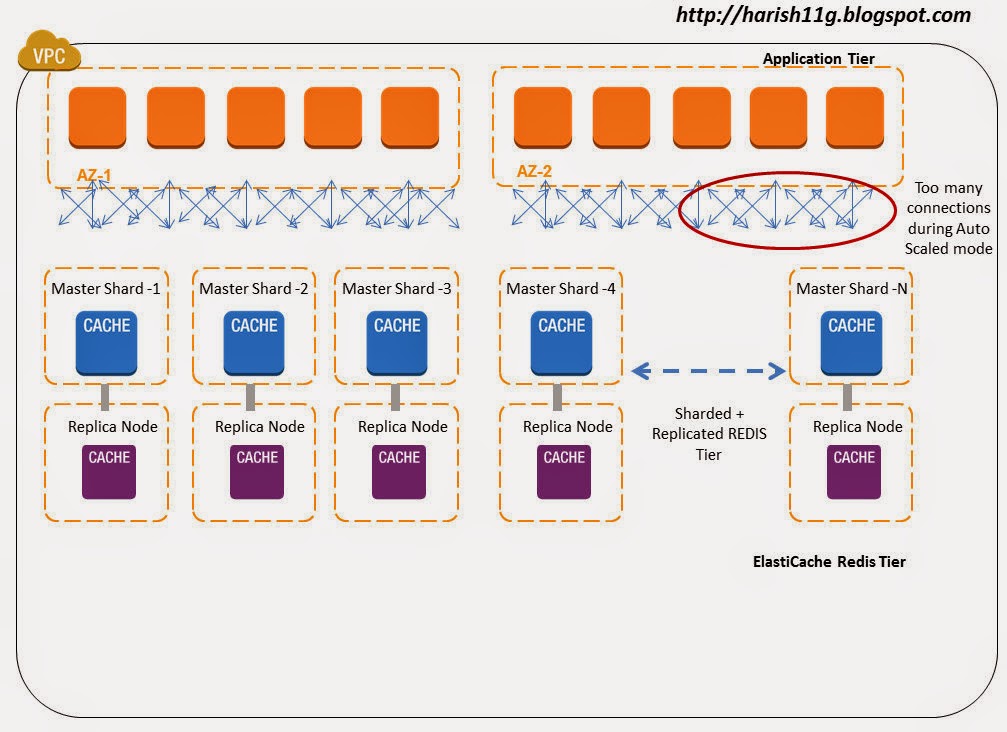
Redis also supports pipelines, where multiple requests can be pipelined and sent on a single connection. In a simple test using large Application & ElastiCache node we were able to process 125K message/sec in pipeline mode, now imagine what you could achieve on bigger instance types on AWS. The connection minimization architectural setup of twemproxy makes it ideal for pipelining requests and responses and hence saving on the round trip time. For example, if twemproxy is proxying three client connections onto a single server and we get requests - 'get key\r\n', 'set key 0 0 3\r\nval\r\n' and 'delete key\r\n' on these three connections respectively, twemproxy would try to batch these requests and send them as a single message onto the server connection.

Note : It is important to note that "read my last write" constraint doesn't necessarily hold true when twemproxy is configured with server_connections: > 1. Let us consider a scenario where twemproxy is configured with server_connections: 2. If a client makes pipelined requests with the first request in pipeline being set foo 0 0 3\r\nbar\r\n (write) and the second request being get foo\r\n (read), the expectation is that the read of key foo would return the value bar. However, with configuration of two server connections it is possible that write and read request are sent on different server connections which would mean that their completion could race with one another. In summary, if the client expects "read my last write" constraint, you either configure twemproxy to use server_connections:1 or use clients that only make synchronous requests to twemproxy.
Practice 2: Configure Auto Ejection and Hashing combination properly
Design for failure is the mantra of cloud architecture. Failures are commons when things are distributed on scale. Though partitioning when using ElastiCache Redis as a data store or cache is conceptually the same on broad lines, there is a huge difference operationally on large scale systems. When you are using ElastiCache Redis as a data store you need to be sure that a given key always maps to the same instance, Whereas if you are using ElastiCache Redis as cache if a given node is not available, then you can always start afresh using a different node in the hash ring with consistent hashing implementations.
To be resilient against failures, it is recommended that you configure Auto eject hosts false when you treat redis as a Data Store and true in when you treat redis as a cache.
resilient_pool:
auto_eject_hosts: true
server_retry_timeout: 30000
server_failure_limit: 3
Enabling auto_eject_hosts: This property ensures that a dead ElastiCache redis Node can be ejected out of the hash ring after server_failure_limit: consecutive failures have been encountered on that node. A non-zero server_retry_timeout: ensures that we don't incorrectly mark a node as dead forever especially when the failures were really transient. The combination of server_retry_timeout: and server_failure_limit: controls the tradeoff between resiliency to permanent and transient failures.
Note that an ejected node will not be included in the hash ring for any requests until the retry timeout passes. This will lead to data partitioning as keys originally on the ejected node will now be written to another node still in the pool. If ElastiCache Redis is used as a cache (in memory) then in event of a Redis Node going down, the cache data will be lost. This cache miss can cascade performance problems to other tiers and altogether bring down your system on the cloud. To minimize KV cache miss, you can design your hash ring with Ketama hashing on the Redis Proxy. This will minimize the Cache miss in event of cache node failure, also it decreases the overall re-balancing needed in your Redis tier. In addition to helping hand on availability problems, Redis Proxy+Ketama can also help your Redis farm to Scale out and Scale down easily with minimal cache miss. To know more about Ketama on ElastiCache refer http://harish11g.blogspot.com/2013/01/amazon-elasticache-memcached-internals_8.html . The below diagram illustrates a ElastiCache Redis Cache Farm with Consistent Hash Ring.

Design for failure is the mantra of cloud architecture. Failures are commons when things are distributed on scale. Though partitioning when using ElastiCache Redis as a data store or cache is conceptually the same on broad lines, there is a huge difference operationally on large scale systems. When you are using ElastiCache Redis as a data store you need to be sure that a given key always maps to the same instance, Whereas if you are using ElastiCache Redis as cache if a given node is not available, then you can always start afresh using a different node in the hash ring with consistent hashing implementations.
To be resilient against failures, it is recommended that you configure Auto eject hosts false when you treat redis as a Data Store and true in when you treat redis as a cache.
resilient_pool:
auto_eject_hosts: true
server_retry_timeout: 30000
server_failure_limit: 3
Enabling auto_eject_hosts: This property ensures that a dead ElastiCache redis Node can be ejected out of the hash ring after server_failure_limit: consecutive failures have been encountered on that node. A non-zero server_retry_timeout: ensures that we don't incorrectly mark a node as dead forever especially when the failures were really transient. The combination of server_retry_timeout: and server_failure_limit: controls the tradeoff between resiliency to permanent and transient failures.
Note that an ejected node will not be included in the hash ring for any requests until the retry timeout passes. This will lead to data partitioning as keys originally on the ejected node will now be written to another node still in the pool. If ElastiCache Redis is used as a cache (in memory) then in event of a Redis Node going down, the cache data will be lost. This cache miss can cascade performance problems to other tiers and altogether bring down your system on the cloud. To minimize KV cache miss, you can design your hash ring with Ketama hashing on the Redis Proxy. This will minimize the Cache miss in event of cache node failure, also it decreases the overall re-balancing needed in your Redis tier. In addition to helping hand on availability problems, Redis Proxy+Ketama can also help your Redis farm to Scale out and Scale down easily with minimal cache miss. To know more about Ketama on ElastiCache refer http://harish11g.blogspot.com/2013/01/amazon-elasticache-memcached-internals_8.html . The below diagram illustrates a ElastiCache Redis Cache Farm with Consistent Hash Ring.
In short to minimize the cache miss when using auto eject with true it is recommended to use "Ketama Hashing ( Consistent Hashing Algorithm)" on your Twemproxy configuration.
ElastiCache Redis as a Data Store:
What if the data stored in your Cache is important and needs to persisted across node failures and launch ? What if the date stored in your Cache cannot be lost and it needs to be replicated and promoted during failures?
Welcome to ElastiCache Redis as Data store. ElastiCache Redis offers features to persist the in memory cache data to disk and also replicate it to a slave for high availability. If ElastiCache Redis is used as a store (persistent), you need to keep the map between keys and nodes fixed, and a fixed number of nodes. Since the data stored is important when you treat ElastiCache Redis as a data store, in event one Redis node goes down, you should have immediate standby up and running in minutes. You can architect ElastiCache Redis master with one or more replication Slave launched on different AZ from Master for High Availability in AWS. In event master node failure or master AZ failure, the slave Redis node can be promoted in minutes to act as master. This whole High availability design keeps the number of nodes on the hash ring stable and simple, Otherwise, you will end up building a system to re balance the keys (which is not easy) between nodes whenever there is a addition or removal of nodes during outages. In addition to above the ElastiCache Redis supports Partial Resynchronization with Slaves - If the connection between a master node and a slave node is momentarily broken, the master now accumulates data that is destined for the slave in a backlog buffer. If the connection is restored before the buffer becomes full, a quick partial resync will be done instead of a potentially longer full resync. This really saves network bottleneck during momentary failures.
In large scale systems you will often find some partitions are heavily used than others , in event the usage is read heavy in nature you can add upto 5 Read replicas for the ElastiCache Redis Master partition. Since these replicas are used only for read they do not affect the Hash ring structure. But Twemproxy lacks the support for read scaling with Redis Replica's. So in event when you face this problem, you will have to Scale up the capacity(instance/node type) of the Master and Slave of that partition alone.
What if the data stored in your Cache is important and needs to persisted across node failures and launch ? What if the date stored in your Cache cannot be lost and it needs to be replicated and promoted during failures?
Welcome to ElastiCache Redis as Data store. ElastiCache Redis offers features to persist the in memory cache data to disk and also replicate it to a slave for high availability. If ElastiCache Redis is used as a store (persistent), you need to keep the map between keys and nodes fixed, and a fixed number of nodes. Since the data stored is important when you treat ElastiCache Redis as a data store, in event one Redis node goes down, you should have immediate standby up and running in minutes. You can architect ElastiCache Redis master with one or more replication Slave launched on different AZ from Master for High Availability in AWS. In event master node failure or master AZ failure, the slave Redis node can be promoted in minutes to act as master. This whole High availability design keeps the number of nodes on the hash ring stable and simple, Otherwise, you will end up building a system to re balance the keys (which is not easy) between nodes whenever there is a addition or removal of nodes during outages. In addition to above the ElastiCache Redis supports Partial Resynchronization with Slaves - If the connection between a master node and a slave node is momentarily broken, the master now accumulates data that is destined for the slave in a backlog buffer. If the connection is restored before the buffer becomes full, a quick partial resync will be done instead of a potentially longer full resync. This really saves network bottleneck during momentary failures.
In large scale systems you will often find some partitions are heavily used than others , in event the usage is read heavy in nature you can add upto 5 Read replicas for the ElastiCache Redis Master partition. Since these replicas are used only for read they do not affect the Hash ring structure. But Twemproxy lacks the support for read scaling with Redis Replica's. So in event when you face this problem, you will have to Scale up the capacity(instance/node type) of the Master and Slave of that partition alone.
If you are using ElastiCache redis as a Data store in the TwemProxy it is recommended to keep "auto_eject_hosts" property false so that in event of redis node failure it is not ejected from the hash ring. The hash ring can be built with both ketama or modula hash algorithms , since in event of Primary node failure, the Slave is going to be promoted and ring structure is going to be always maintained. But if you feel there is immense possibility for the number of primary node partitions to grow, or major failures to occu, it is better to choose ketama hash ring itself from beginning. The below diagram illustrates the architecture.

All memory for incoming requests and outgoing responses is allocated in mbuf in Twemproxy. Mbuf enables zero copy for requests and responses flowing through the proxy. By default an mbuf is 16K bytes in size and this value can be tuned between 512 and 16M bytes using -m or --mbuf-size=N argument. Every connection has at least one mbuf allocated to it. This means that the number of concurrent connections twemproxy can support is dependent on the mbuf size. A small mbuf allows us to handle more connections, while a large mbuf allows us to read and write more data to and from kernel socket buffers. Large Scale web/mobile applications involving millions of hits might have small size request/response and lots of concurrent connections to handle in their backend. So at such scenarios, when Twemproxy is meant to handle a large number of concurrent client connections, you should set chunk size to a small value like 512 bytes to 1K bytes using the -m or --mbuf-size=N argument.
It is always a good idea to configure Twemproxy timeout: for every server pool, rather than purely relying on client-side timeouts. Eg:
resilient_pool_with_timeout:
auto_eject_hosts: true
server_retry_timeout: 30000
server_failure_limit: 3
timeout: 400
Relying only on client-side timeouts has the adverse effect of the original request having timed out on the client to proxy connection, but still pending and outstanding on the proxy to server connection. This further gets exacerbated when client retries the original request.
Benefits of using Twemproxy for Redis Scaling
- Avoids re inventing the wheel. Thanks Manju Raj (twitter).
- reduce the number of connections to your cache server by acting as a proxy
- shard data automatically between multiple cache servers
- support consistent hashing with different strategies and hashing functions
- be configured to disable nodes on failure
- run in multiple instances, allowing client to connect to the first available proxy server
- Pipelining and batching of requests and hence saving of round-trips
Disadvantages of Partitioning Model:
Point 1) Operations involving multiple keys are usually not supported. For instance you can't perform the intersection between two sets if they are stored in keys that are mapped to different Redis instances (actually there are ways to do this, but not directly).Redis transactions involving multiple keys can not be used.
Point 2) The partitioning granularity is the key, so it is not possible to shard a dataset with a single huge key like a very big sorted set. Ideally in such cases you should Scale UP the particular Redis Master-Slave to larger EC2 instance or pro grammatically stitch up the sorted set.
Point 3)When partitioning is used, data handling is more complex, for instance you have to handle multiple RDB / AOF files, and to make a backup of your data you need to aggregate the persistence files/snapshots from multiple EC2 Redis slaves.
Point 4) Architecting a partitioned + replicated ElastiCache Redis tier not complex. What is more complex is ? supporting transparent rebalancing of data with the ability to add and remove nodes at runtime. Systems like client side partitioning and proxies don't support this feature. However a technique called Presharding helps in this regard with limitations. Presharding technique ->Since Redis is lightweight, you can start with a lot of EC2 instances since the beginning itself. For example if you start with 32 or 64 EC2 instances (micro or small Cache Node instance type) as your node capacity , it will provide enough room to keep scaling up the capacity when your data storage needs increase. It is not a highly recommended technique. But still can be used in production if your growth pattern is very predictable.
Redis Cluster is the preferred way to get automatic sharding and high availability. It is currently not production ready. Once Redis Cluster / Client is available on Amazon ElastiCache, it will be the de facto standard for Redis partitioning. It uses a mix between query routing and client side partitioning.
References:
http://redis.io/documentation
https://github.com/twitter/twemproxy
This article was co-authored with Senthil
Other Amazon ElastiCache Articles :
Caching architectures using Memcached & Amazon ElastiCache
Highly Available ElastiCache Redis replication cluster in AWS VPC
Deep dive into Amazon Elasticache
Distributed Cache On Steroids: Amazon ElastiCache
Launching Amazon ElastiCache in 3 Easy Steps
AWS Performance Tip 3: Use Amazon ElastiCache to improve application performance
http://redis.io/documentation
https://github.com/twitter/twemproxy
This article was co-authored with Senthil
Other Amazon ElastiCache Articles :
Caching architectures using Memcached & Amazon ElastiCache
Highly Available ElastiCache Redis replication cluster in AWS VPC
Deep dive into Amazon Elasticache
Distributed Cache On Steroids: Amazon ElastiCache
Launching Amazon ElastiCache in 3 Easy Steps
AWS Performance Tip 3: Use Amazon ElastiCache to improve application performance