Showing posts with label MapReduce. Show all posts

Sunday, June 30, 2013

AWS Cost Saving Tip 12: Add Spot Instances with Amazon EMR

In continuation to my post on "How elastic thinking can save costs on Amazon EMR cluster ?" i have explored in this post how we can exploit Amazon EMR by introducing Spot EC2 into the cluster and achieve more cost savings.

Most of us know that Amazon Spot EC2 instances are usually good choice for Time-flexible and interruption-tolerant tasks. These instances gets traded frequently on a Spot market price and you can fix your Bid Price using AWS API's or AWS Console. Once free Spot EC2 instances are available for your Bid Price, AWS will allot them for use in your account. Spot instances are usually available way cheaper than On-Demand EC2 instances most of the times. Example: On-Demand m1.xlarge per hour price is 0.48 USD and on spot market you can find them sometimes @ 0.052 per hour. This is ~9 times cheaper than the on-demand price; imagine if you can bid competitively and get hold of spot EC2 even around 0.24 USD most of the times, you are saving 50% from the on-demand price straight away. In Big data use cases usually you might need lots of EC2 nodes for processing, adopting such techniques can vastly make difference in your infra cost and operations in long term. I am sharing my experience on this subject as tips and techniques you can adopt to save costs while using EMR clusters in Amazon for big data problems. 
Note : While dealing with spot you can be sure that you will never pay more than your maximum bid price per hour.  

To know more about real implementation of these tips, read the following case study. Lock, Stock and X Smoking EC2's. 

Tip 1: Make right choice (Spot vs On-Demand) for the cluster components
Data Critical workloads: For workloads which cannot afford to lose data you can have the Master + Core on Amazon On-Demand EC2 and your task nodes on Spot EC2. This is the most common pattern while combining Spot and On-Demand on Amazon EMR cluster.  Since task nodes are operating on spot prices depending upon your bidding strategy you can save ~50% costs from running your task nodes using On-Demand EC2. You can further save(if you are lucky) by reserving your Core and Master Nodes , but you will be tied to an AZ. According to me this is not a good or common technique, because some AZ's can be very noisy with high spot prices.  
Cost Driven workloads: When solving big data problems, sometimes you might have to face scenarios where cost is very important than time. Example: You are processing archives of old logs as low priority jobs, where cost of processing is very important and usually with abundant time left. Such cases you can have all the Master+Core+Task run on Spot EC2 to get further savings from the data critical workloads approach. Since all the nodes are operating on spot prices depending upon your bidding strategy you can save ~60% or more costs from running your nodes using On-Demand EC2. The below mentioned table published by AWS gives an indication of the Amazon EMR + Spot combinations that are widely used:
Tip 2: There is free lunch sometimes
Spot Instances can be interrupted by AWS when the spot price reaches your bidding price. What interruption means is that, AWS can pull out the Spot EC2's assigned to your account when the price matches/exceeds. If your Spot Task Nodes are interrupted you will not be charged for any partial hour of usage by AWS i.e. if you have started the instance @ 10:05 am and if your instances are interrupted by spot price fluctuations @ 10:45 am you will not be charged for the partial hour of usage. If your processing exercise is totally time insensitive, you can keep your bidding price at closer level to spot price which are easily interrupt-able by AWS and exploit this partial hours concept. Theoretically you can get most of the processing done through your task nodes for free* exploiting this strategy.

Tip 3: Use the AZ wisely when it comes to spot
Different AZ's inside an Amazon EC2 region has different spot prices for the same Instance type. Observe this pattern for a while, build some intelligence around the price data collected and rebuild your cluster in the AZ with lowest price. Since the Master+Core+Task need to run on the same AZ for better latency, it is advisable to architect your EMR clusters in such a way they can be switched(i.e.recreate) to different AZ's according to spot prices. If you can build this flexibility in your architecture you can save costs by leveraging the Inter AZ price fluctuations. Refer the below images for Spot Price variations in 2 AZ's inside the same Region for same time period. "Make your choice wisely time to time"


Tip 4: Keep your Job logic small and store intermediate outputs in S3
Breakdown your complex processing logic into small jobs and design your jobs and tasks in EMR cluster in such a way that they run for very small period of time (example few minutes). Store all the intermediate job outputs in Amazon S3. This approach is helpful in EMR world and gives you following benefits:

  • When your Core+ Task nodes are interrupted frequently, you can still continue from the intermediate points. Data accessed from S3.
  • You now have the flexibility to recreate the EMR clusters in multiple AZ depending upon the Spot price fluctuations
  • You can decide the number of nodes needed for your EMR cluster(even every hour) depending upon the data volume, density and velocity

All the above 3 points when implemented contribute to elasticity in your architecture and there by helps you save costs in Amazon cloud. The above recommendation is not suitable for all Jobs, it has to be carefully mapped with right use cases by the architects.

To know more about real implementation of the above tips, read the following case study. Lock, Stock and X Smoking EC2's. 

Other Tips

Cost Saving Tip 1: Amazon SQS Long Polling and Batch requests
Cost Saving Tip 2: How right search technology choice saves cost in AWS ?
Cost Saving Tip 3: Using Amazon CloudFront Price Class to minimize costs
Cost Saving Tip 4 : Right Sizing Amazon ElastiCache Cluster
Cost Saving Tip 5: How Amazon Auto Scaling can save costs ?
Cost Saving Tip 6: Amazon Auto Scaling Termination policy and savings
Cost Saving Tip 7: Use Amazon S3 Object Expiration
Cost Saving Tip 8: Use Amazon S3 Reduced Redundancy Storage  
Cost Saving Tip 9: Have efficient EBS Snapshots Retention strategy in place 
Cost Saving Tip 10: Make right choice between PIOPS vs Std EBS volumes and save costs 
Cost Saving Tip 11: How elastic thinking saves cost in Amazon EMR Clusters ? 
Cost Saving Tip 12: Add Spot Instances with Amazon EMR 
Cost Saving Tip 13: Use Amazon Glacier for archive data and save costs (new)
Cost Saving Tip 14: Plan your deletion in Amazon Glacier and avoid cost leakage (new)

Thursday, June 27, 2013

Lock, Stock and X Smoking EC2's - Cloud Connect 2013 Presentation


This case was presented @ Cloud Connect 2013 . You can view this in Slide share as well.

To know more about Amazon EMR + Spot refer the following articles. They will set the technical context right before you go through this presentation. Posts are listed below:

Post 1: How elastic thinking saves cost in Amazon EMR Clusters ?
Post 2: Add Spot Instances with Amazon EMR


Case :
Mobile advertising company based in USA. They have Forbes 1000 clientele using their mobile advertising product. The company approached us for architecture and implementation help for their Clicks, Ad and other analytic's hosting and processing on AWS.

The LOCK ?
Variety of unstructured logs and semi structured files have to be processed for data analysis. It includes logs from CDN, server logs,  XML Files, Text files, Geo Data Files and Structured DB records. The logs flow every hour from variety of sources into AWS. It amounts to few hundred GB's -> ~ 1 TB @ peak hours/seasons.

The STOCK ?
Mobile Ad company wanted an efficient architecture and infrastructure on AWS for collecting, storing, processing and share the data. They wanted to avoid cost leakages because of bad architectural practices in AWS and save $$$ wherever possible.

Challenges:
Their analysis patterns can be categorized into Hourly, Monthly and Historical. Some of the major challenge were:
  • How do we Transfer, Store, Analyze and Share ?
  • How to optimize costs at this scale ?
Solution:
  • Architect their entire front end analysis module in AWS. Use the AWS technologies like ELB, EC2, R53, RDS ,Cache for delivering their analysis  results to online users.
  • Use Amazon Elastic MapReduce with Spot EC2 instances for their back-end processing jobs.
  • Automate their infrastructure using Chef, Scripts and Custom Java Modules wherever applicable. 
Stage 1: Transfer the Data :
First time data was transferred using AWS Import/Export. On going data was transferred to AWS using Tsunami UDP. High Bandwidth EC2's were installed with Tsunami UDP on AWS side for receiving data faster. The Data collected is stored temporarily in the Receiver EC2's , some pre-processing tasks were run on them and files are moved to S3 Buckets post that.
For more details about using Tsunami UDP and Aspera on AWS refer these articles: Tsunami UDP on AWS and Aspera on AWS

Some of the other popular models are :
AWS Direct Connect: Establishes a dedicated connection between Data centers to AWS using Direct Connect. This model is little costlier and is suitable only enterprises.
WAN Optimization: Use WAN optimization tools like Riverbed Steel head, aryaka etc to speed up the transfer between source endpoints to AWS.

Stage 2: Storage of Data:  
Temporarily data was stored on Receiver EC2's. After Pre-processing tasks they were moved to S3. Amazon S3 is a default choice because of its inherent fault tolerance and scalability features. Around ~2 TB of compressed logs are stored in Amazon S3 Daily for processing. Amazon S3 Reduced Redundancy Storage option was used for storing intermediate log outputs. S3 Automatic Object Expiry was used for efficiency and cost savings. Archival data is moved to Amazon Glacier periodically.

Stage 3: Analysis using Amazon EMR + Spot EC2
Amazon EMR was used for log processing and analysis. Amazon Elastic MapReduce (EMR) is a web service that helps customers with big data processing using Hadoop framework on EC2 and S3. Amazon Elastic MapReduce lets customers focus on crunching data instead of worrying about time-consuming set-up, management or tuning of Hadoop clusters or the EC2 capacity upon which they operate. This in built automation provided by AWS already saves huge labor cost for the customers. At peak hours some jobs run with 2000 Mappers/ 750 Reducers. For peak periods ~250 m1.xlarge or equivalent EC2 capacity was used for processing the logs. We developed a Custom EMR manager to introduce Spot EC2 into the Amazon EMR equation. Our Spot Bidding strategy was either on-Demand price or 20% above On-demand price. Since the Spot prices vary in different AZ's we collected the past price history, current market price etc and chose the right AZ's appropriately. Choosing right AZ sometimes mean creating the entire EMR Cluster on low priced AZ (All Master,Core & Task should reside on Same AZ).  The Master and Core Nodes were running On-Demand EC2 and Task Nodes were running on Spot EC2 or On-Demand EC2. The Custom EMR Manager has the capability to increase the Core nodes depending upon the Log Data Volume + Create the entire EMR cluster (with revised Core+task Node numbers) in New AZ depending upon the Spot prices. This decision was made by the Custom EMR manager periodically depending upon the log data volume fluctuations and Log Volume patterns.   

Learning:
  • Spot+On Demand EC2 for EMR is deadly combination for Cost Savings. Though this combination is suitable for Time in-sensitive jobs, but if some intelligence and imagination can be applied in your architecture and design, you can use this for certain time sensitive jobs as well.
  • Bigger files are better, so we merge the files into Bigger chunks before proccesing in Amazon EMR.
  • In Pre processing stage, we split files with ratio of 1 file per mapper. This gives us better time predictability during processing. Also the file transfer was faster between S3 and EMR because of this manageable size splits.
  • Data is compressed at all possible levels. Snappy and .lzo compression was used.
  • We dynamically increase/decrease the task nodes using the Custom job manager. If no Spot EC2 available for Task nodes, then Custom EMR manager adds on-Demand task nodes to the cluster.
  • The jobs were designed to be small in processing logic size and intermediate output data is stored in S3. This way we can re-create the cluster with reproducible data. Only Processing data was kept in EMR cluster, rest of the data were kept in S3.
  • The EMR clusters can be sized according to the log data volumes. This intelligence was built in the custom EMR manager based on the past patterns, Data Density tests etc, during pre processing phase.
  • Certain Intermediate reducers were designed to create number of result files according to number of Mappers in next jobs. This helped us in optimum utilization of capacity inside a hour.
  • Decision to re-size clusters are made nearest to the hour. If AWS brings per minute pricing , it will help such use cases to save more costs.
  • Every API call and millisecond matters in big data programming, tune the MR code and test the 3rd party APIs for performance before integrating them into your code.
  • Understand NW capacities of to/fro data transfer to S3, m1.Xlarge EMR Nodes (Memory Sizing, Mapper / reducer numbers) and work leveraging the strengths of AWS.
  • If your processing requirements are totally time insensitive, you can bid very close to spot price and have AWS interrupt(mostly) within the hour and literally get entire processing stuff done for free. (If AWS interrupts the Spot EC2 you will not be charged for any partial hour of usage). This strategy was not used by us. If any of you use this, please write to me, will be happy to discuss.
Value :

  • EMR with Spot brought ~56% cost savings from pure On-Demand model for Core+ Task Nodes.
  • Customer CXO's were happy !!!

Wednesday, June 26, 2013

AWS Cost Saving Tip 11: How elastic thinking saves cost in Amazon EMR Clusters ?


Introduction: Amazon Elastic MapReduce (EMR) is a web service that helps customers with big data processing using Hadoop framework on EC2 and S3. Amazon Elastic MapReduce lets customers focus on crunching data instead of worrying about time-consuming set-up, management or tuning of Hadoop clusters or the EC2 capacity upon which they operate. This in built automation provided by AWS already saves huge labor cost for the customers.

What does the word Elastic mean in Hadoop/EMR context ? Ans: You can dynamically increase the number of processing nodes depending upon the volume/velocity of the data. Adding or removing servers takes minutes, which is much faster than making similar changes in clusters running on physical servers. Let us explore this in detail and analyse how it will help you save costs in AWS Big data processing. 

Components:
Before getting into the savings part, lets understand the composition of an Amazon EMR Cluster. An Amazon EMR cluster consists of following server components. They are:
Master Node: This node Manages the cluster, it coordinates the distribution of the MapReduce executable and subsets of the raw data, to the core and task nodes. There is only one master node in a cluster. You cannot expand or reduce your Master Node in the EMR Cluster.
Core Node(s): A core node is an EC2 instance that runs Hadoop map/reduce tasks and stores data using the Hadoop Distributed File System (HDFS). Core nodes are managed by the master node.  You can add more core nodes to running cluster, but you cannot remove them from a cluster because since it stores data you have an risk of losing data. 
Task Node(s): As the name suggests these nodes run tasks and they map to equivalent of Hadoop slave node.  These nodes are optional in nature.  Task nodes are managed by the master node. While a cluster is running you can increase and decrease the number of task nodes. Because they don't store data and can be added and removed from a cluster, you can use task nodes to manage the EC2 instance capacity your cluster, by increasing capacity to handle peak loads and decreasing it later when there is no load.

Analysis :
Imagine the log volume flow is not constant and it varies every hour, some hours you receive few hundred GB's and some hours few GB's of logs for processing. For peak hours your use case needs around 192 mappers/72 reducers and normal hours you need ~64 mappers/24 reducers or less. The peak and normal numbers can be arrived based on the analysis done on the past data. This elasticity in log volume scenario is a usual occurrence in many big data projects and it is source of cost leakage. Simple approach what many architects take is that they run their cluster infrastructure @ peak capacity always since the operation is time sensitive, but this might not be an optimal approach in amazon cloud-big data world. Since you can elastically increase/decrease the number of nodes in an Amazon EMR cluster it is optimal if you can size the number of nodes dynamically every hour. Since you pay by usage in amazon cloud, having this elasticity built in your architecture will save costs. 

Based on the number of mappers/reducers required, we have chosen the node capacity to be in m1.xlarge EC2 units. So during Peak hours you will need 24 processing nodes and normal (avg) hours it will be reduced to 8 processing nodes. 

Elastic Approach-1: Vary the Task Nodes: 
In this approach, number of Master and Core nodes are maintained constant. 1 - master node and 4- core nodes are used for processing and data storage always. The task nodes are increased and decreased between 4->20 every hour depending upon the log volume flow. Since the data is present in the core nodes and only tasks/jobs are assigned in the task nodes, adding/removing task nodes will not cause problems. You can engineer a custom Job manager using AWS API's and manage this entire cluster easily. If you do a simple math that in average only 8 processing nodes are needed (4 core + 4 task nodes) and during peak hours you need ( 4 core + 20 task nodes) with this approach you can save ~60 % costs by not running your cluster in ALWAYS peak capacity. This model is a recommended approach for many elastic big data use cases in AWS. Refer the below table for cost savings:


Scenario
No. of Processing Nodes
Hourly rate
Node Type
Monthly
Peak hours
24
0.48
M1.Xlarge
~8570.88
Normal hours
8
0.48
M1.Xlarge
~2856.96
  

Elastic Approach-2: Vary both the Core and Task Nodes:
In this approach, the number of both Core and Task nodes are varied dynamically. Since the Core nodes can be only increased and cannot be decreased in a running cluster(because it could lead to data loss), this approach is recommended only for advanced use cases. Since the entire data is stored in S3(is reproducible) and can be moved to the EMR cluster every hour, using the custom Job manager an entire cluster can be created(even every hour) depending upon the log data volume (GB's). Example: Imagine first hour: 4 Core + 10 Task nodes are used for processing, second hour data volume is increased and 4 Core + 20 Task nodes are added in the cluster, third/fourth hour etc there is hardly few GB's of data flow and only 8 Mappers/3 reducers are needed for processing, instead of running 20 task + 4 core nodes(of prev hour),  a new EMR cluster can be created with just 1 master and 1-2 Core nodes. This approach requires engineering a custom job manager using AWS API's for managing the cluster. Though this approach is little complex to engineer, it saves more cost than approach-1 on medium to long term.

Note:The approaches illustrated are not theoretical in nature. I have put both the above techniques to production use for some customers and they are already seeing huge cost savings. 

Coming Soon - Adding Spot to this equation gives brutal savings ... 

Other Tips

Cost Saving Tip 1: Amazon SQS Long Polling and Batch requests
Cost Saving Tip 2: How right search technology choice saves cost in AWS ?
Cost Saving Tip 3: Using Amazon CloudFront Price Class to minimize costs
Cost Saving Tip 4 : Right Sizing Amazon ElastiCache Cluster
Cost Saving Tip 5: How Amazon Auto Scaling can save costs ?
Cost Saving Tip 6: Amazon Auto Scaling Termination policy and savings
Cost Saving Tip 7: Use Amazon S3 Object Expiration
Cost Saving Tip 8: Use Amazon S3 Reduced Redundancy Storage  
Cost Saving Tip 9: Have efficient EBS Snapshots Retention strategy in place 
Cost Saving Top 10: Make right choice between PIOPS vs Std EBS volumes and save costs 
Cost Saving Top 11: How elastic thinking saves cost in Amazon EMR Clusters ? 
Cost Saving Top 12: Add Spot Instances with Amazon EMR 
Cost Saving Top 13: Use Amazon Glacier for archive data and save costs (new)
Cost Saving Top 14: Plan your deletion in Amazon Glacier and avoid cost leakage (new)


Wednesday, May 30, 2012

How Enterprises are leveraging Mobile Cloud Computing?


This article is a descriptive version of the Slide deck i presented at Cloud Connect, India on May 24th, 2012.

Mobile App development is big business and everyone from graduate students to large corporations are making huge investments. The key to good app development - is engagement and architecture. One of the ways to keep users engaged is to keep data fresh at all times, which requires a strong mobile backend that is both scalable and always on. This requires cloud. let's see in this article how some enterprises are leveraging Cloud for mobile applications to provide dynamic, feature rich applications without breaking the bank. This article will be beneficial for enterprise product managers, technology and innovation leaders, mobile app architects and anyone interested in understanding how cloud computing can deliver unique experiences to end users with minimal cost and time investment. We will see how to architect a mobile cloud application for an enterprise in a case based approach, What are the characteristics of this application, What are the unique challenges and intricacies that Enterprise requirements brings into the table for Mobile cloud Architectures? What are the best practices that need to be adopted? How we can solve those using AWS or other clouds?


Now lets set the context of this presentation by answering the question What is Mobile Cloud Computing ? According to Wikipedia "Mobile cloud computing is the usage of cloud computing in combination with mobile devices. In this article we are going to see how companies are designing their mobile apps with cloud as backend ?, Why they are choosing cloud as their backend in comparison to Traditional hosting platforms ? What are some of the important criteria one should know while selecting a cloud provider? what are the best practices one should adopt ?

Planet of the Apps and Mobile cloud- Appnomy Facts
  • iTunes App Store 570K+ approved apps , Android Market 300K+ apps
  • iPhone owner has 50+ apps Android owners have 35+ apps
  • Over 300,00 mobile apps have been developed in three years
  • One in four mobile apps once downloaded is never used again
  • Cellular subscriptions worldwide: 6 billion
  • Market for cloud-based mobile apps is expected to grow 88% from 2009 to 2014 -Juniper Research
  • More than 240 million business customers will access cloud computing services via mobile devices by 2015 - ABI Research
  • IDC/Appcelerator conducted a research survey on what are the top new or existing cloud -based services that users are planning to connect or extend . The outcome of the research findings is attached below:


From the above data and pointers it is clear that mobile cloud computing is emerging and will play a significant role for applications designed in future.
Now lets try to understand the mobile cloud computing in detail through a case based approach.

About the Case :
Case Name : Mobile Cloud for an Airline/Travel company
Description: (Characteristics of the Mobile app) 
Mobile App developed by the X-Enterprise was a trending app @ Android / iPhone stores. The app was downloaded and used by millions of users around the region.The Mobile app communicates with the backend systems using JSON over HTTP/S protocol. The mobile app has a constantly growing user base and it drives huge traffic during sales promotion periods. Heavy spikes and valley traffic pattern are observed in the server infrastructure during the sales promotion period.The Mobile app heavily depends upon the backend for processing and information storage. Also this Mobile app is not an isolated app and it communicates to various other enterprise systems through the backend infra. This adds extra integration complexity while architecting this solution.  


Sample Screen Shots of the Mobile App:


Now lets see what are the problem scenarios and challenges this case presents to the enterprise.
The enterprise launches a big sales promotion every quarter and during these period massive visitor concurrency is observed from the mobile app. The content will be accessed from multiple devices and data should be fresh and accessible always between devices. Since the Load Volatility nature of this application is very high, massive utilization and under utilization patterns are observed in the backend infra. Provisioning the mobile backend infrastructure before every promotion with such highly elastic demands takes weeks of time/efforts for the IT ops team.


If the backend infrastructure and systems can be auto scaled according to the elastic needs of the traffic then significant cost leakage can be avoided by the company.
Identity access, Encryption, SSL, Authe/Autho, DMZ, Firewalls and VPN's are some of the security requirements which the mobile application has to meet for protecting the data.

Because of the above elastic and scalable requirements, the customer chose cloud based backend as an obvious choice in comparison to traditional infrastructure. 

Now let us explore the solution approach taken in detail:

Step1 : Choosing the Right Cloud provider for the Mobile Backend is the toughest part in this whole exercise. Some of the essential points to be compared during this exercise are :
  • Public vs Private Cloud 
  • IAAS vs BAAS
  • In Public Cloud : AWS vs Azure vs Rackspace
  • Adherence to the use case requirements
  • Cloud provider security
Public vs Private Cloud : Since the enterprise wants to reduce the IT ops expense, Scale infrastructure without Capex, avoid leakages and save costs, no Problem with Multi-tenancy, Public cloud provider was an obvious choice in this case compared to private cloud.
IAAS vs BAAS : Whether to adopt Infrastructure As a Service (or) Backend As a Service architecture for this case. We have heard about IAAS like AWS, Rackpace etc, but what is BAAS? The most recent trend in Mobile app development has been "Backend as a service." Companies and startups have recognized the need of the average developer for support when it comes to server stacks and storage, data migration middleware managements. These services make possible things like authentication, push notifications, in-app purchases and other services that consumers take for granted. There are a lot of new back-end services available like Parse,Kinvey,StackMob,appMobi etc in this segment. Though these BAAS systems will take care of your Mobile app scalability, HA, Elasticity headaches they are not very matured meeting the enterprise integration and security standards. IAAS was the choice.

Why AWS (over others)?
AWS has Global Infrastructure: AWS currently operates at 7 regions around the world and they are constantly expanding their infrastructure as I write this article. Following diagram illustrates their current regional infrastructure:


AWS has Variety:
  • AWS has SDK's for android and iOS. The SDK's provides library , code samples and documentation for developers to build connected mobile applications using Amazon Web Services.
  • AWS supports wide variety of protocols like JSON, BSON, TCP, SOAP, REST, HTTP/S, RTMP used in Mobile Applications
  • Developers have the flexibility to chose the language of their choice for Mobile Server side development :Java, Python, PHP, Ruby,.Net, Node.JS
AWS has Adherence to customer requirements :
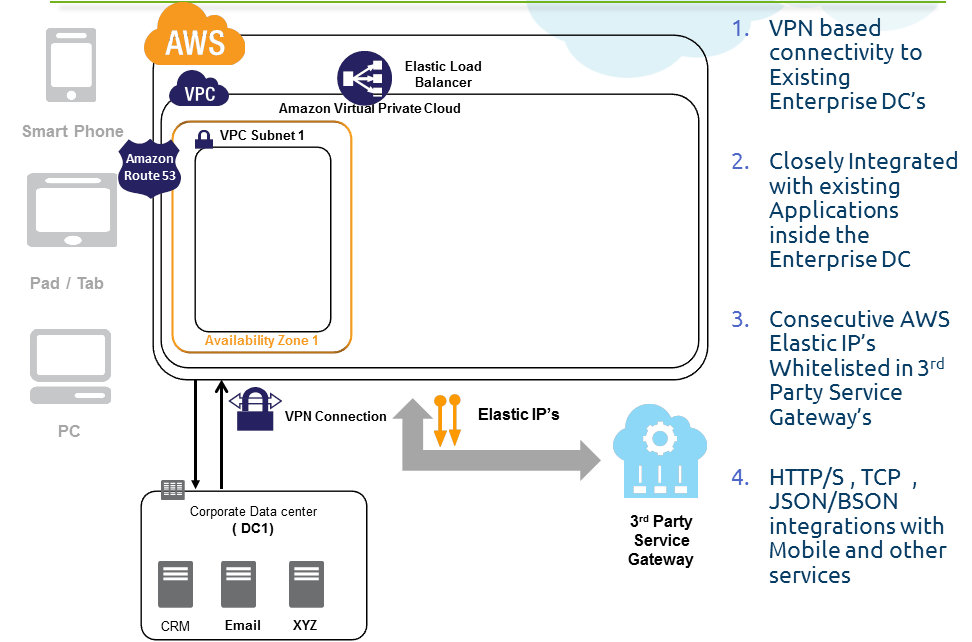
  • Enterprise wanted their Entire setup inside a Virtual Private Cloud with VPN integration to their Existing Data centers (branch office concept)
  • Enterprise wanted Static IP's of the EC2 VM's to be registered in the 3rd party Service gateways
AWS has cost flexibility: AWS offers flexible cost options through On Demand, Reserved and Spot Instances

Note:Click here to know more about Amazon Web Services

Step 2: Securing the Mobile Cloud Application

Security is the main concern for any Enterprise deploying their mobile backend solution on cloud. Now let us see how this point can be addressed in our AWS solution
AWS Meets Enterprise Security Standards:
AWS is one of the most secure cloud providers in the public cloud industry. They have following certifications : SOC 1 Type 2 (formerly SAS-70), ISO 27001,PCI DSS for EC2, S3, EBS, VPC, RDS, ELB, IAM ; FISMA Moderate Compliant Controls, HIPAA & ITAR Compliant Architecture. AWS cloud meets the following Physical security guidelines in their infrastructure 
  • Datacenters in nondescript facilities 
  • Physical access strictly controlled 
  • Must pass two-factor authentication at least twice for floor access 
  • Physical access logged and audited
In terms Hardware, Software and Networks following practices are adopted by AWS
  • Systematic change management 
  • Phased updates deployment 
  • Safe storage decommission 
  • Automated monitoring and self-audit 
  • Advanced network protection
For more details refer AWS Security White Paper Available at http://aws.amazon.com/security
Let us see how some of the security aspects are addressed in this solution


  • Encrypt the communication between Mobile and Backend infra in AWS 
  • Setup the Entire Mobile backend application inside Amazon Virtual Private Cloud. Amazon VPC is a isolated section of the Amazon Web Services (AWS) Cloud where we can launch AWS resources in a virtual network that we define. 
  • Create DMZ's using public and private subnets inside the Amazon VPC
  • Create Access Control rules, port and IP range access restrictions between each layer of the application using AWS Security Groups
  • Harden the OS (AMI) used by EC2 instances
  • Terminate the SSL in the Web Layer with back end authentication, create Load Balancers with Multiple Elastic Network Interfaces for segregating between private/public networks
  • Create Identity Access Management (IAM) users, rights and policies in AWS console
  • Secure the integration between AWS and other enterprise data centers using Amazon VPN
  • Encrypt the data stored in S3 and Database
  • Encrypt the data stored in NFS/GlusterFS (through TrendMicro's SecureCloud)
  • Perform Log Analysis(Web,App,GlusterFS etc) using Splunk
Step 3: Managing the External Integrations


  • Extend the Enterprise DC network IP range in the Amazon Virtual Private Cloud. This enables seamless communication between Enterprise Internal systems and AWS cloud. Systems in AWS Cloud will now act as a seamless extension to your existing DC infrastructure systems. Example: The Mobile backend and internal DNS talks to the Active Directory, SMTP, CRM etc deployed inside the Enterprise DC over the VPN tunnel in same NW range.
  • VPN Integration: Multiple VPN connections from the single Amazon VPC can be attached to multiple customer gateways located in multiple geographies (simulating "branch office" architecture) of the Enterprise. This VPN integration enables secured communication between your existing DC's and AWS, using this enterprises can safely transfer their critical data in/out of AWS cloud. 
  • Consecutive AWS Elastic IP’s of the Application Servers are Whitelisted in 3rd Party Service Gateway’s. This is a very critical point for an enterprise  on choosing a cloud provider. Not many Public cloud providers can provide this feature in their infrastructure. This point if overseen will lead to last minute integration problems with 3rd party gateways of your infra, customers, suppliers etc
  • Logs were pushed to S3 from inside VPC through the Elastic IP and not through NAT EC2 instance.
  • Mobile communicates to the AWS Cloud Backend using JSON /HTTP protocol
Step 4: Scaling the Mobile Cloud backend

The backend application was architected using simple multi-tiered Java, MySQL stack. The application had file storage, Cache and other layers which are commonly found on any enterprise system. Let us see how scalability was addressed in this solution: 


Auto Scaling Web/App EC2: Scale out/down of Web/App EC2 elastically depending upon the traffic was done using Amazon Auto Scaling/custom programs. Amazon Auto Scaling of the Web/App EC2 layer was configured based on the CPU utilization levels. Auto Scaled EC2 instances were automatically attached with the ELB. The ELB uses VPC/PIP and not Elastic IP to Load Balance Web/App EC2 under it. The scale out was done across Multiple-AZ's inside Amazon VPC.
RDS MySQL was set on Multi-AZ mode with RDS Read replica's inside VPC. Since the application was read intensive and at times it needs read scaling, the Read Replica's were scaled out using custom scripts based on the need. HAProxy was used for Internal Load balancing between Read Replica's and Web/App Tier. Note: AWS has recently introduced internal Load balancing inside VPC through ELB;can be used for this purpose
AWS Building blocks like S3, ELB, Route53, CloudWatch were used in the architecture. These building blocks are inherently fault tolerant and highly scalable.(Example: ELB keeps expanding the LB EC2 instances in its layer dynamically depending upon the traffic).Usage of these appropriate building blocks enhances the overall scalability of the application.
Points to remember while scaling :
  • Ensure adequate IP addresses are available for your ELB and Web/App EC2 to auto scale inside your AWS VPC
  • Since the Web/App EC2 needs Elastic IP for 3rd Party Gateway white listing, a custom program and discovery API was developed to achieve this.
  • Connection Pool parameters (Max connection) has to carefully configured in the Tomcat in Auto Scaling Scenarios and in RDS MySQL. Badly configured connection parameters will end up with "max connections exceeded" scenario.
  • Logs have to be periodically synchronized to S3 for analysis. Logs can be shipped through Elastic IP or NAT instance. In our case, since the Web/App EC2 already had Elastic IP's the former route was taken.
  • Nagios Monitoring and Auto scaling will creep new problems for IT ops because of Auto Discovery and Noise created by EC2 Terminations. We managed to solve it. (Consult with us !!) 
Note: Click here to know more in depth about Amazon Auto Scaling


Step 5: Building High Availability for the Mobile Cloud

High Availability (HA) is a important architectural parameter for such a mission critical application. HA was built on multiple layers and levels on this application. Lets explore :


Amazon inherently fault tolerant and Highly available building blocks are used at DNS(Route53), Load Balancing(ELB), Monitoring(CloudWatch), Storage(S3) in this architecture
Multiple Web/App EC2's are deployed, in event an EC2 instance becomes unhealthy, the traffic is still served by other healthy EC2 instances in Web/App Layer. This avoids Single point of failure. The web session information is synchronized in the MemCached for statelessness.
Web/App EC2's are deployed across Multiple Availability zones inside a Amazon VPC region. This reduces the dependency of AZ location(DC) failures.
RDS MySQL is deployed in Multi-AZ mode, so that in event of Master DB Server failure, The Active standby will take over in ~minutes RTO from another available AZ. The Read Replica's are also deployed in multiple Availability Zones for read scalability as well as High Availability.

Note: Click here to know more in depth about architecting solutions overcoming outages in AWS

Step 6: Refining the IT ops


  • Log Analysis through Amazon Elastic MapReduce (custom) or splunk (SAAS)
  • Monitoring using CloudWatch(Standard and Custom Metrics), Nagios and PingDom
  • Launch and Deployment using Puppet and Golden AMIs
  • Backups using RDS Backup, Automated AMI Snapshots, Periodic backups to S3


Before and After Comparisons:


If you need help in AWS consulting or mobile cloud app development contact Harish11g.aws@gmail.com


Wednesday, May 9, 2012

Retail Analysis using Hive + Flume


People always look for convenience! In the early 20th century, retail industry was still in its infancy taking baby steps across Europe and North America. But the latter half of the 20th century saw the emergence of the hypermarket and the supermarket as they truly simplified the all-in-one-stopshopping experience.
Retail industry today is big business and will continue to remain so for the foreseeable future. Recent estimates put world-wide retails sales at USD 7.5 trillion. Wal-Mart has been the leader at the global stage since its inception. The world’s top 5 retailers are Wal-Mart (USA), Carrefour (France), Royal Ahold (The Netherlands), Home Depot (USA) & Kroger (USA).
In India, retail industry is growing at a rapid pace. Major Indian retailers in this league include Future Group, Reliance Industries, Tata Group and Aditya Birla Group.
One of the retail groups, let’s call it BigX in this article, wanted their last 5 years semi- structured dataset to be analyzed for trends and patterns. Let us see how they can solve their problem using Hadoop. 
Original Article written by the author can be found at cloudstory.in 
About BigX
BigX is a chain of hypermarket in India. Currently there are 220+ stores across 85 cities and towns in India and employs 35,000+ people. Its annual revenue for the year 2011 was USD 1 Billion. It offers a wide range of products including fashion and apparels, food products, books, furniture, electronics, health care, general merchandise and entertainment sections.
One-third of their stores have daily sales of USD 25K+. The remaining two-thirds have daily sales of USD 14K+ and USD 10K+. On an average, 1200+ customers walk in and purchase products from each of these stores daily.
Problem Scenario
  • One of BigX log datasets that needs to be analyzed was approximately 12TB in overall size and holds 5 years of vital information in semi structured form.
  • Traditional business intelligence (BI) tools are good up to a certain degree, usually several hundreds of gigabytes. But when the scale is of the order of terabytes and petabytes, these frameworks become inefficient. Also, BI tools work best when data is present in a known pre-defined schema. The particular dataset from BigX was mostly logs which didn’t conform to any specific schema.
  • It took around 12+ hours to move the data into their Business Intelligence systems bi-weekly. BigX wanted to reduce this time drastically.
  • Querying such large data set was taking too long
Solution
This is where Hadoop shines in all its glory as a solution! Let us see how Hadoop was used to solve this problem.
Since the size of the logs dataset is 12TB, at such a large scale, the problem is 2-fold:
Problem 1: Moving the logs dataset to HDFS periodically
Problem 2: Performing the analysis on this HDFS dataset
We had options like Sqoop, Flume , Chukwa etc when we need to move the dataset into HDFS. Since logs are unstructured in this case, Sqoop was of little or no use. So Flume was used to move the log data periodically into HDFS. Once the dataset is inside HDFS, Hive was used to perform various analyses.
Let us see the overall approach in detail below
Problem 1: How Flume solved the data transfer problem?
Flume is a distributed, reliable, and available service for efficiently collecting, aggregating, and moving large amounts of log data. It has a simple and flexible architecture based on streaming data flows. The primary use case for Flume is as a logging system that gathers a set of log files on every machine in a cluster and aggregates them to a centralized persistent HDFS store.
Sample Architecture of Flume Implementation is illustrated below:

Flume’s typical dataflow is as follows: A Flume Agent is installed on each node of the cluster that produces log messages. These streams of log messages from every node are then sent to the Flume Collector. The collectors then aggregate the streams into larger streams which can then be efficiently written to a storage tier such as HDFS.
Logs from all the nodes can be sent into HDFS on a real-time / daily / weekly / monthly basis. We chose to send certain logs bi-weekly mainly because of the analytical aspect of the requirement and hence daily basis was not warranted in this regard.
Problem 2: Analysis using Hive
Hive is a data warehouse infrastructure built on top of Hadoop for providing data summarization, query and analysis. It provides an SQL-like language called HiveQL and converts the query into MapReduce tasks.
Sample Architecture of Hive Implementation is illustrated below:

Hive uses “Schema on Read” unlike a traditional database which uses “Schema on Write”. Schema on Write implies that a table’s schema is enforced at data load time. If the data being loaded doesn’t conform to the schema, then it is rejected. This mechanism might slow the loading process of the dataset usually, Whereas Schema on Read doesn’t verify the data when it’s loaded, but rather when a query is issued. For this precise reason, once the dataset is in HDFS moving it into Hive controlled namespace is usually instantaneous. Hive can also perform analysis on dataset in HDFS or local storage. But the preferred approach is to move the entire dataset into Hive controlled namespace(default location – hdfs://user/hive/warehouse) to enable additional query optimizations.
While reading log files, the simplest recommended approach during Hive table creation is to use a RegexSerDe. It uses regular expression (regex) to serialize/deserialize. It deserializes the data using regex and extracts groups as columns. It can also serialize the row object using a format string.
Caveats:
  • With RegexSerDe all columns have to be strings. Use “CAST (a AS INT)” to convert columns to other types.
  • While moving data from HDFS to Hive, do not use the keyword OVERWRITE
Overall Solution Architecture using Flume + Hive
Below figure shows the overall solution architecture implemented for this problem
  • Flume was used to collect and transfer log files to HDFS
  • Hive was used for analysis

The merchandize details, user information, time of transaction, area / city / state information, coupon codes (if any) , customer data and other related details were collected and aggregated from various backend servers. Flume was installed on these backend servers to transfer the various log files into HDFS. Flume was configured to transfer data on a bi-weekly basis in this case.
As mentioned earlier, the dataset to be analyzed was 12TB. Using the Hadoop default replication factor of 3, it would require 12TB * 3 = 36TB of storage capacity. After a couple of iterations on a smaller sample dataset and subsequent performance tuning, it was decided to go with the following cluster configuration and capacities –
  • 45 virtual instances, each with
    • 64-bit OS platform
    • 12 GB RAM
    • 4-6 CPU cores
    • 1 TB Storage
Flume configuration:  Following Flume parameters were configured (sample)
  • flume.event.max.size.bytes uses the default value of 32KB.
  • flume.agent.logdir was changed to point to an appropriate HDFS directory
  • flume.master.servers: 3 Flume Masters – flumeMaster1, flumeMaster2, flumeMaster3
  • flume.master.store uses the default value – zookeeper
Hive configuration:  Following Hive parameters were configured (sample)
  • javax.jdo.option.ConnectionURL
  • javax.jdo.option.ConnectionDriverName: set the value to “com.mysql.jdbc.Driver”
  • javax.jdo.option.ConnectionUserName
  • javax.jdo.option.ConnectionPassword
By default, Hive metadata is usually stored in an embeddedDerbydatabase which allows only one user to issue queries. This is not ideal for production purposes. Hence, Hive was configured to use MySQL in this case.
Using the Hadoop system, log transfer time was reduced to ~3 hours bi-weekly and querying time also was significantly improved.
Since this case demands complex querying, Snowflake schema approach was adopted while designing the Hive tables. In a Snowflake schema, dimension tables are normalized usually up to 3NF and facttables are not affected.
Some of the schema tables that were present in the final design were – facts, products, customers, categories, locations and payments. Some sample Hive queries that were executed as part of the analysis are as follows –
  • Count the number of transactions
Select count (*) from facts;
  • Count the number of distinct users by gender
Select gender, count (DISTINCT customer_id) from customers group by gender;
Only equality joins, inner & outer joins, semi joins and map joins are supported in Hive. Hive does not support join conditions that are not equality conditions as it is very difficult to express such conditions as a MapReduce job. Also, more than two tables can be joined in Hive.
  • List the category to which the product belongs
Select products .product_name, products .product_id, categories.category_name from products JOIN categories ON (products.product_category_id = categories.category_id);
  • Count of the number of transactions from each location
Select locations.location_name, count (DISTINCT facts.payment_id) from facts JOIN locations ON (facts.location_id = locations.location_id) group by locations .location_name;
Interesting trends / analysis using Hive
Some of the interesting trends that were observed from this dataset using Hive were:
  • There was a healthy increase in YoY growth across all retail product categories
  • Health & Beauty Products saw the highest growth rate at 65%, closely followed by Food Products(55 %) and Entertainment (54.6%).
  • Northern India spends more on Health & Beauty Products andSouth India spends more on Books and Food Products
  • Delhiand Mumbai take the top spot for the purchase of Fashion & Apparels
  • Karnataka tops the list for the purchase of Electronics and Andhra Pradesh & Tamil Nadu for the purchase of Food Products
  • A very interesting and out-of-the-ordinary observation was that men shop more than women! Though the difference isn’t much, it’s quite shocking J (Note: when a couple comes together, that transaction is treated as the man doing the business)
About the authors:
Harish Ganesan is the Chief Technology Officer (CTO) and Co-Founder of 8KMiles and is responsible for the overall technology direction of its products and services. Harish Ganesan holds a management degree from Indian Institute of Management, Bangalore and Master of Computer Applications from Bharathidasan University , India.
Vijay is the Big Data Lead at 8KMiles and has 5+ years of experience in architecting Large Scale Distributed Web Systems and engineering Information Systems – Retrieval, Extraction & Management. He holds M. Tech in Information Retrieval from IIIT-B

Need Consulting help ?

Name

Email *

Message *

DISCLAIMER
All posts, comments, views expressed in this blog are my own and does not represent the positions or views of my past, present or future employers. The intention of this blog is to share my experience and views. Content is subject to change without any notice. While I would do my best to quote the original author or copyright owners wherever I reference them, if you find any of the content / images violating copyright, please let me know and I will act upon it immediately. Lastly, I encourage you to share the content of this blog in general with other online communities for non-commercial and educational purposes.

Followers