Showing posts with label Akamai. Show all posts

Monday, December 10, 2012

Part 2: Understanding Amazon ElastiCache Internals:Elasticity Implication and Solutions


In this article we will explore the implications of Elasticity which Amazon ElastiCache brings to the architecture. The Amazon ElastiCache nodes use memcached engine currently and they are not aware of other memcached nodes running inside the cache cluster. Since the cache nodes are not aware of the data distribution among its peers, the balancing act has to be done by the clients. Usually cache clients use a simple hashing algorithm to PUT/GET values from the corresponding cache nodes. This works well if the cache cluster size is static, but for any growing web application being static will not serve the purpose. Let us assume an online business decides to run a promotion where nearly 6X more visitors are expected to hit the site during this period. It is natural that for any heavy cache dependent site their memory needs will also increase correspondingly during this period. Amazon ElastiCache service understands this elastic behavior in the online business and provides an easy mechanism using API or console to add / remove cache nodes in existing cluster. Whenever your cache memory needs grow, you can simply add “N” new cache nodes into the Amazon ElastiCache cluster. But as an IT architect you need to understand this elastic action comes with certain side effects in a distributed caching scenario with Memcached-Amazon ElastiCache Nodes. They may cause swamping of your backend with requests if it is not dealt properly. Let us understand effects in detail:

Effect 1: Cold Cache: Amazon ElastiCache nodes using Memcached engine are ephemeral in nature. The KV data is stored in the memory and it is not persisted to the disk. Whenever you add new cache nodes you need to understand the proportion of increase % and accordingly take a cache node scale out strategy.  Imagine you have 2 cache nodes each with cache.m1.large capacity, now if you decide to add 2 more cache nodes of the same type into the cluster, you are adding close to 50% of capacity in cold state without  proper cache warming. This action may bring undesirable consequences and swamp your backend with heavy requests until the Amazon ElastiCache Nodes are properly warmed. Whereas if you have 100 cache.m1.large nodes running your cluster and if you are planning to add 5 more nodes into your cluster , it will not have a big impact if the backend is designed to handle this little spike variation. Some best practices that can be followed in this aspect are:
Plan for the addition of the nodes well in advance before the promotion, so that enough time is given for warming the cache nodes adequately. 
Add the cache nodes in right proportions which your backend can optimally take without performance disruption. Example: Instead of adding 2 cache nodes in 2 X m1.large cache cluster, adding one by one with enough time to warm will add only ~25% load to your backend. For some advanced strategies using cache redundancy, Maintenance windows etc in AWS to address this situation refer this URL: http://harish11g.blogspot.in/2012/11/amazon-elasticache-memcached-ec2.html

Effect 2: Object Remapping: The most common approach used by clients of Amazon ElastiCache nodes is to distribute object “o” among multiple cache nodes “n” by putting object o in cache node number hash(o) mod n function( result of this function). This approach is good for static cache node scenarios, but when you add or remove cache nodes then object “o” may need to be hashed to a new location every time the “n” nodes change. This operation can thunder your backend with heavy load and cause undesirable consequences. Ideally it would be nice, if a new cache node is added/removed only fair share of objects were remapped to other cache nodes in the Amazon ElastiCache. This can be achieved by using “Consistent Hashing” in the cache node clients. Since Amazon ElastiCache nodes are not peer aware, it does not require any change, it is only in the cache clients we need to apply this intelligent hashing approach. Consistent Hashing was introduced by David Karger et al in the paper “Consistent Hashing and Random Trees: Distributed Caching Protocols for Relieving Hot Spots on the World Wide Web”. The paper can be found here. http://www.akamai.com/dl/technical_publications/ConsistenHashingandRandomTreesDistributedCachingprotocolsforrelievingHotSpotsontheworldwideweb.pdf
Consistent hashing was first implemented by last.fm team on memcached library as “ketama”. Refer URL: http://www.last.fm/user/RJ/journal/2007/04/10/rz_libketama_-_a_consistent_hashing_algo_for_memcache_clients
Now let us explore what is Consistent hashing? How it helps and so on. The idea behind the consistent hashing algorithm is to hash both objects and cache nodes using the same hash function and consistently maps objects to the same cache node, as much as possible. Consistent hashing uses a mechanism that acts like a clock. The hash function actually maps objects and cache nodes to a number range. The number range values wrap around like a circle, that's why we call this circle a continuum. Imagine in the below picture a circle with number of objects 1,2,3,4 and cache nodes A,B and C. To assign which cache node an object goes in, you move clockwise round the circle until you find an appropriate cache node. So in the below diagram, you can see object 1 and 4 belong to cache node A, object 2 belongs to cache node B and object 3 belongs in cache node C.


Consider what happens if cache node C is removed from the cache cluster: object 3 now belongs will be remapped to cache node A, and all the other object mappings are unchanged. Same way, If we add another cache node D in the position marked below in the diagram it will take objects 3 and 4, only object 1 belonging to A.


The principle advantage of consistent hashing is that departure or arrival of a node only affects its immediate neighbors and other nodes remain unaffected .This approach reduces the remapping of the objects between the cache nodes and there by significantly decrease the swamping of backend servers in event of cache elasticity.
Consistent Hashing implementation is available in most of the popular Amazon ElastiCache-Memcached clients we use every day. There is a saying “everything comes with a consequence”; since the approach used in consistent hashing is random, it is possible to have a very non-uniform data and load distribution of objects between cache nodes inside/across a cluster.
To address this issue, more advanced KV systems like Membase and Amazon Dynamo uses a variant of consistent hashing.  Instead of mapping a node to a single point in the circle, each node gets assigned to multiple points in the ring (Amazon Dynamo uses the concept of “virtual nodes”). A virtual node looks like a single node in the system, but each node can be responsible for more than one virtual node. Effectively, when a new node is added to the system, it is assigned multiple positions (henceforth, “tokens”) in the ring. To know more about this approach read Amazon Dynamo paper. I hope in future Amazon ElastiCache Team implements this concept in their distributed caching service as well, because it will help us optimally use nodes.  


Related Articles

Saturday, October 6, 2012

Part 3: Cost of Latency Series:Sample technical architecture using Route53 LBR


Complexities and Best Practices behind Geo Distributed + R53 LBR

Let us take a simple Geo distributed online app stack and explore the technicalities and best practices a bit:


DNS and CDN Layer: Configure Route 53 to manage the DNS entries,map Domain Names to CloudFront distributions to and Latency Based Routing entries. LBR records point to the Amazon Elastic Load Balancer's endpoint in Europe and Singapore. Amazon Route 53’s Latency Based Routing (LBR) feature will route Amazon CloudFront origin requests to the AWS Region that provides the lowest possible latency. Internally Amazon Route 53 is integrated with Amazon CloudFront to collect latency measurements from each Amazon CloudFront edge location, resulting in optimal performance for origin fetches and improving overall performance

Load Balancing Layer: Amazon Elastic Load Balancing (ELB) is used as the Load Balancing layer. ELB can elastically expand its capacity to handle load during peak traffic. Amazon ELB should be configured with SSL termination @ Apache Backends, for meeting Security and Compliance in case sensitive information gets passed. Round Robin Algorithm is ideal for most scenarios. ELB should be configured to load balance across Multiple –AZ inside an Amazon EC2 Region. For more details about architecting using ELB refer http://harish11g.blogspot.in/2012/07/aws-elastic-load-balancing-elb-amazon.html

Web/App Layer: Apache Tomcat EC2’s are launched from S3 backed Linux AMI’s in Multiple-AZ’s. Logs periodically shipped to S3. Amazon Auto Scaling can be configured based on CPU or custom metrics to elastically increase/decrease the EC2 instances across Multiple AZ (recommended approach for Scalability and HA). ELB, Amazon Auto Scaling, CloudWatch and Route 53 work together. Session State is synchronized on MemCached. For more details on Amazon EC2 Availability Zones refer http://harish11g.blogspot.in/2012/07/amazon-availability-zones-aws-az.html

Solr Search Layer: Solr Search Instances are launched as EBS backed AMI’s. Solr EC2 can be replicated between Multiple –AZ’s or sharded inside an AZ depending upon need. High Memory instances with RAID levels (EBS Striping) + EBS optimized + Provisioned IOPS give better performance on AWS. Periodic Snapshots are taken and moved across regions. Sync Solr and DB periodically. For more details on Solr Sharding refer http://harish11g.blogspot.in/2012/02/apache-solr-sharding-amazon-ec2.html

Database Layer:
If the use case demands the Data to be localized inside an Amazon EC2 region then one of the following approaches are recommended:

  • ·   RDS with Multi-AZ for HA, HAProxy Load balanced RDS Read Replicas across Multiple AZ’s for Read scaling are recommended approaches
  • ·   MySQL Master with 1-2 Slaves spread across multiple AZ’s inside a Region , RAID 0 with XFS + EBS optimized + PIOPS for performance
If the use case demands the unidirectional Data synchronization across Amazon EC2 regions then:

  • MySQL Master can sync data to a MySQL Slave in another Amazon EC2 region. Data can be sent over SSL or clear according to the requirements. 
  • If the MySQL is inside VPC (private subnet) then IPSEC tunnel should be established across 2 Amazon EC2 regions for communication.
If the use case demands the Bi directional Data synchronization across Amazon EC2 regions then:

  • MySQL Master-Master across regions and Master-Slave inside Regions can be configured. Though the bi directional data synch can be achieved, transactional integrity will become complex. Overall this model is not very efficient when the number of AWS regions increase.
  • Usually the best practice is to streamline and avoid bidirectional sync and expose the function as common data web service that can be consumed over web. This way the Geo distributed applications in both the Amazon EC2 regions can consume that function for information.
Note: Geographically distributed Database is a hot field and lots of stuff are happening/emerging everyday like Google Spanner, Yahoo PNUTS, NuoDB, TransLattice Elastic Database, Cloudant, ClearDB etc. In coming days you will be using these systems which will make your life easier for architecting Geo Distributed applications. I also hope AWS product team comes with solution for this Geo distributed database problem.

Caching Layer: Use MemCacheD/ElastiCache for storing Sessions, results of Heavy queries, frequently used queries and complex queries of DB/Solr and thereby significantly reducing the database load . ElastiCache cannot be distributed over AZ. MemCacheD over Amazon EC2 with Multi-AZ distribution is recommended for website which heavily relies on Caching Layer. Cache need not be replicated across regions, in case needed you need to sync Master/Slave DB's replication with MemCacheD to ensure some consistency.

Storage Layer: S3 for storing Images, JS and other static assets. S3 can be the CloudFront origin. All logs, user uploaded files will be synched to S3 in Amazon EC2 region. 

View Full Detailed article at http://harish11g.blogspot.in/2012/09/geo-distributed-route53-lbr-latency.html

Part 2: Cost of Latency Series: Welcome to Geo Distributed Architecture using Route53 LBR


Welcome to Geo Distributed Architecture (Using Route53 LBR)

In this architecture, the web/app infrastructure of the XYZ Airlines is geo distributed across multiple AWS regions (example Singapore, Japan, Europe etc). 


User requests originating all around the world are directed to the nearest AWS region or AWS region with lowest network latency (more precisely). For example, suppose you have Load balancers in the Singapore, Japan and Europe Amazon EC2 region and we have created a latency resource record set in Route 53 for each load balancer. An end user in Dubai enters the name of our domain in their browser, and the Domain Name System routes their request to a Route 53 name server. Route 53 refers to its data on latency between Dubai and the Europe EC2 region and between Dubai and the Singapore EC2 region. If latency is lower between Dubai and the Europe region( most of the times), Route 53 responds to the end user's request with the IP address of your load balancer in the Amazon EC2 data center in Europe EC2 region. If latency is lower between Dubai and the Singapore region, Route 53 responds with the IP address of the load balancer in the Amazon EC2 data center in Singapore. This architecture rapidly cuts down the latency and gives the user a better experience. Also in case one of the regions is facing network problems, the requests can be routed to alternate low latency region achieving High Availability at overall website level. Though this architecture has benefits it comes with various complexities depending upon the use case and technical stack used, we will uncover some of them in this article.
If the XYZ airline follows GEO distributed architecture and has data centers in Singapore, Japan and Europe, let us see what it takes as the roundtrip latency measurements to access their website:

The XYZ airlines website is hosted on multiple AWS region with LBR configured
From Japan (ms)
From Germany(ms)
From Malaysia (ms)
From Rio (ms)
12
21
30
75

Note: The above measurements are not constant and may keep varying every few seconds.
From the above table we can observe that using the Geo Distributed architecture the HTTP/S and AJAX calls are delivered from the AWS regions with lowest latency (usually nearest region), the round trip latency measurements have significantly dropped and overall performance has increased for the users.

View Full Detailed article at http://harish11g.blogspot.in/2012/09/geo-distributed-route53-lbr-latency.html

Part 1: Cost of Latency Series: Why do we need Latency Based Routing ?


Why do we need Latency Based Routing (LBR) ?

Imagine a XYZ Low Cost Airlines from Singapore which operates 100+ destinations around the globe (rapidly expanding its operations every year) with following characteristics :
  • Majority of the bookings and business happens through online and mobile medium
  • Their Website and online services are visited by users from Japan, Singapore, Australia, Europe and Middle East all over the year
  • During Sales promotions and holiday seasons they will have visitors from more locations around the world

Since their business has heavy dependence upon the online mediums (web and mobile), their site needs to be highly available, scalable with better performance. Like most of the online companies, the XYZ airlines started their operations with the - Centralized Architecture


Effect of Centralized Architecture 

The entire web/app infrastructure is provisioned inside a single AWS region (example Singapore region). User requests originating all around the world are directed to the centralized infrastructure launched at single region. This architecture may be optimum to start with, but when your user base is distributed across multiple geographies things start crumbling. The users accessing the site from different geographies will have different response times because of the network latency in the internet, Also there is single point of failure if the network link to that particular Amazon EC2 region is broken (though the latter is a very rare occurrence).Example: Users from Singapore and Malaysia will have faster response times with AWS Singapore Servers than Users from Europe, MEA regions (they might feel the latency creeping up).
Since the XYZ airline follows a simple centralized architecture and has a data center in Singapore and all the visitors are distributed across the globe, let us see what it takes as the roundtrip latency measurements to access their website in centralized infrastructure:

Website is hosted on Singapore region (centralized architecture)
From Japan (ms)
From Germany(ms)
From Malaysia (ms)
From Rio (ms)
74
121
30
176

Note: The above measurements are not constant and may keep varying every few seconds.
If a single round trip takes 121ms from Europe imagine content heavy pages loading multiple images, JS, scripts, HTTP/S, hundreds of AJAX calls etc. It is sure they will land in problems when they expand.


View Full Detailed article at http://harish11g.blogspot.in/2012/09/geo-distributed-route53-lbr-latency.html

Wednesday, June 27, 2012

Part 8: AWS High Availability Patterns : Multiple Cloud Providers


Architecting High Availability across Cloud and Hosting Providers/DC

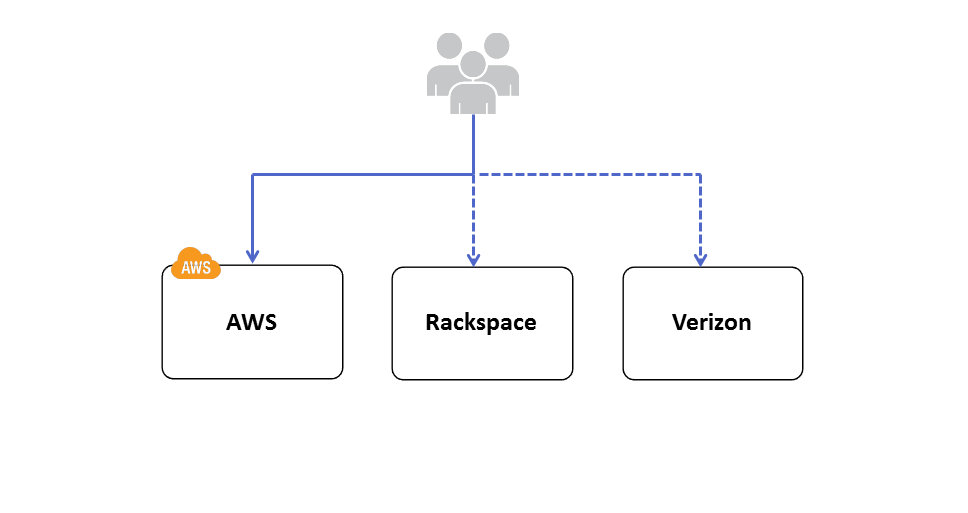
I have seen many articles where people talk about Multi Cloud Provider Deployments for High availability. It is a very complex architecture use case and according to me following are some of the probable reasons why a company might evaluate this HA architecture: 
  • Large enterprises who already have invested heavily on their existing data centers/providers may want AWS to be their HA/DR cloud partner. Enterprises have Private clouds like Eucalyptus, Open Stack, Cloud Stack or vCloud installed in their existing DC and in event of DC outage, AWS is used as the HA/DR infrastructure. Eucalyptus is the most compatible providers of all these private clouds with AWS because of the API level compatibility. Many workloads can be easily integrated between AWS and Eucalyptus. Example: Let us imagine the enterprise has developed some automation scripts for Amazon EC2 using AWS API’s in Eucalyptus Private cloud infra ; it can be migrated to AWS infrastructure as well easily during HA situation; Whereas if the enterprise is using Open Stack or other Private Cloud providers in their DC they might have to redevelop/test/release this script. This effort might not be cost effective option to develop and maintain for complex systems.   
  • Companies which find their infrastructure not able to meet the Scalability/Elasticity demands will want AWS to be their primary cloud infra and existing DC/providers as their HA/DR.
  • Companies which are not satisfied with the stability and robustness of their existing Public Cloud Providers may want Multi Cloud Provider deployments. This use case occurrence is very rare currently, may become central point when cloud dependencies and common standards emerge and mature in future. 


Most of the considerations listed in above section of AWS Multi region HA will also apply in this Multi Cloud HA Architecture as well. In designing High Availability Architectures across Multiple Cloud providers/DC we need to consider the following points closely:


Data Synch: Usually this step will not be a big problem if the Data stores can be installed /deployed on Multiple Cloud Providers. Compatibility of Database software, Tools, utilities will matter a lot and if they can be feasibly installed, then this challenge can be effectively addressed in Multi Cloud High Availability.

Network Flow :

  • The switch between Multiple Cloud providers should be usually done on the Managed DNS level – Akamai, Route53, UltraDNS etc. Since these solutions are not Cloud Provider REGION dependent, they can be used to effectively switch user network traffic between Cloud Providers/DC for High Availability.
  • Fixed IP address can be provided by DC / Hosting providers whereas many Cloud Providers cannot give a Static Fixed IP address for a VM currently. This might be a major bottleneck while architecting HA between cloud providers.
  • Many times VPN tunnel needs to be established between Cloud Providers /DC to migrate and synch sensitive data across clouds. There might be compatibility or feasibility problems on supporting this feature from some Cloud Providers. This needs to be carefully evaluated while architecting Multi Cloud High Availability Architectures.


Workload Migration: 

  • Amazon Machine Images are not compatible across Cloud providers; New VM images needs to be created again for Multiple Cloud Providers. This might lead to additional efforts and cost
  • Complex Automation Scripts using Amazon API’s needs to Redeveloped for Other Cloud Providers using their own API’s. Some Cloud Providers will not even provide API based management, in such cases it will become Maintenance mess.
  • OS , Software , NW Compatibility Issues needs to be carefully analyzed for feasibility before taking this Multi-Cloud HA decision
  • Unified Management of Infrastructure will be a big problem in Multi Cloud HA scenario unless tools like RightScale are used for management

Related Articles : AWS High Availability Patterns Series


Part 3: AWS High Availability Patterns : DNS Load Balancing Tier


High Availability @ Load balancing /DNS Layer

DNS and Load Balancing(LB) layer are the main entry points for a web application. There is no point in building sophisticated clusters, replications and heavy server farms in the Web/App and DB layer without building High Availability in the DNS/LB layer. If the LB is built with Single Point of Failure (SPOF) it will bring down the entire site during outage. 
Following are some of the common architecture practices for building highly available Load Balancing Tier in AWS:


Practice 1)Use Amazon Elastic Load Balancers for the Load Balancing tier for HA. Amazon Elastic Load Balancing automatically distributes incoming application traffic across multiple Amazon EC2 instances. It enables you to achieve even greater fault tolerance in your applications, seamlessly providing the amount of load balancing capacity needed in response to incoming application traffic. It can handle thousands of concurrent connections easily and can elastically expand when more loads hit. ELB is an inherently fault tolerant building block and it can handle the failure in its layer automatically. When the load increases usually more EC2 Load balancer instances are automatically added in the ELB tier. This automatically avoids SPOF and overall site will be operational even if some LB EC2 instances in ELB tier have failed. Also Amazon ELB will detect the health of the underlying Web/App EC2 instances and will automatically route requests to the Healthy Web/App EC2 in case of failure. Amazon ELB can be configured with Round Robin in case the Web/App EC2 layer is Stateless and can be configured with Session Sticky for State full application layers. If the Session Synchronization is not done properly in the app layer then even Session Sticky balancing cannot save failover error pages and website failures.

Practice 2) Sometimes the application demands the need of : 
  • Sophisticated Load balancers with Cache feature (like Varnish)
  • Load balancing Algorithms like least connection, Weighted
  • Have heavy sudden load spikes 
  • Most of the request load generated from specific source IP range servers ( Example : Load Generated from System A IP to AWS)
  • Require the Fixed IP address of the Load Balancer to registered 
For all the above mentioned cases, having Amazon ELB in your Load Balancing tier will not be right choice. Hence for such scenarios we recommend usage of Software Load Balancers/Reverse Proxies like Nginx, HAProxy, Varnish, Zeus etc in the Load balancing tier configured on EC2 instances. Such architecture can pose SPOF at the load balancing tier. To avoid this, usually it is recommended to have multiple Load Balancers in the LB tier. Even if a single Load balancer fails other load balancers are still operational and will take care of the user requests. Load Balancers like Zeus comes with inbuilt HA and LB Cluster Sync capability. For most use cases, inbuilt HA between LB is not needed and can be handled efficiently combining it with DNS RR load balancing technique. Let us see about this technique in detail below, before that there are certain points to be considered while architecting a robust LB tier in AWS:
  • Multiple Nginx and HAProxy can be configured for HA in AWS, they can detect the health of the underlying Web/App EC2 instances and can automatically route requests to the Healthy Web/App EC2 instances
  • Nginx and HAproxy can be configured with Round Robin algorithm in case the Web/App EC2 instances are Stateless and can be configured with Session Sticky for Stateful application servers. If the Session Synchronization is not done properly in the app layer then even Session Sticky balancing cannot save error pages.
  • Scale out of Load Balancers is better than Scale UP in AWS. Scale out model inherently adds new LB’s into this tier avoiding SPOF. Scale out of Load balancers like Nginx, HAProxy requires custom scripts/templates to be developed. It is not recommended to use Amazon AutoScaling for this layer.
  • Load Balancers placed under the DNS needs the AWS Elastic IP to be attached. Since ElasticIP attach/Detach takes around ~120 seconds or more in some AWS regions, it is not advisable to run 2 LB’s switched between single ElasticIP model. It is recommended to run 2 or more LB EC2 instances attached individually with ElasticIP’s all running in active-active model under DNS/Route53.
  • In event a Load Balancer EC2 has failed, we can detect this using CloudWatch or Nagios alerts and can manually or automatically launch another LB EC2 in few seconds ~ minutes in AWS for HA.
Now lets get a layer above LB -> The "DNS" ,Amazon Route 53 is a highly available and scalable Domain Name System (DNS) web service. Route 53 effectively connects user requests to infrastructure running in Amazon Web Services (AWS) – such as an Amazon Elastic Compute Cloud (Amazon EC2) instance, an Amazon Elastic Load Balancer, or an Amazon Simple Storage Service (Amazon S3) bucket – and can also be used to route users to infrastructure outside of AWS. AWS Route 53 is AWS inherently fault tolerant building block and a Managed DNS service. Amazon Route53 can be configured using Console , API's to do DNS level Load Balancing. RR or Weighted algorithms can be configured at Route53 level and requests can be load balanced between the Multiple Load Balancer EC2 or ELB configured under the Route53. Route53 DNS RR cannot check the health of the Load balancers and direct the request; hence it relies on the browser or the web clients to do the transparent retry in case they encounter error pages. 


Monday, June 25, 2012

Overcoming Outages in AWS : High Availability Architectures

This article was enhanced on 26-Oct-2014

“Design for Failure“, we hear this Slogan and importance of this philosophy in many cloud forums and conferences.  Yet, every day many applications are Deployed/Architected on AWS without this point in mind. The reasons could be ranging from technical awareness of designing High availability(HA) Architectures to Cost of Operating a complex global HA setup in AWS. In this article, i have shared some of my prior experience on architecting High Availability systems on AWS avoiding and overcoming outages. I feel this small gesture will create HA awareness and help the strong AWS user community to build better solutions.

A typical Web App stack consists of DNS, Load Balancer, Web, App, Cache and Database layer. Now let us take this stack and see what are the major points that needs to be considered while building High Availability Architectures in AWS:

  • Architecting High Availability in AWS
    • High Availability @ Web/App tier
    • High Availability @ Load balancing tier
    • High Availability @ DNS tier
    • High Availability @ Caching tier
    • High Availability @ Database tier
    • High Availability @ Search tier (in progress)
    • High Availability @ NoSQL tier (in progress)
    • High Availability @ Monitoring tier (in progress)
    • High Availability @ Storage tier (in progress)
  • Architecting High Availability across Amazon AZ’s
  • Architecting High Availability across AWS Regions
  • Architecting High Availability across Cloud and Hosting Providers/DC


High Availability @ Web/App tier

To avoid Single Point of Failure in the Web/App layer it is a common practice to launch the Web/App layer in minimum two or more EC2 instances. This is fault tolerant than the single EC2 instance design and offers better application stability. Usually the Web/App Servers are designed either with Stateless or State full models.  Following are some of the common architecture patterns for HA in Web/App Layer in AWS Infra:


Following points needs to be considered while designing Highly Available and State full App Layer on AWS:
  • Since AWS Infrastructure does not support Multicast protocol as of current date, the application layer software should synchronize data using Unicast TCP mechanism. Example: Java based App servers can use JGroups or Terracotta NAM or Hazel Cast to synchronize the data inside their cluster in AWS
  • In case the Web/App servers are written on PHP, .Net , Python etc then all the user and session data can be stored on centralized systems ElastiCache -MemCached/Redis or Amazon DynamoDB. Deploy redundant ElastiCache Nodes in different Availability Zones for HA in AWS.
  • ElasticIP based App Server switch will take ~120 seconds, not recommended for mission critical environments. It is advised to place the App servers under Load Balancers like Amazon ELB, HAProxy, Appcito etc for instant switch to healthy nodes.
  • Session and User data can be stored on Database as well, i do not recommend this option. This can be followed as last option for software which are tightly built with databases.
  • Uploaded User files and documents should be stored on common NFS or Gluster Storage Pool or Amazon S3. Lots of FUSE solutions are available in market which treats Amazon S3 as your disk, this provides good alternative for treating Amazon S3 as your disk. Note : Please carefully evaluate the latency requirements before treating Amazon S3 as Disk. 
  • Enable Session Sticky Policy in Amazon ELB or Reverse Proxies if Session Synchronization is not configured. This approach offers HA but not fail over transparency in App layer.

High Availability @ Load balancing tier

DNS and Load Balancing(LB) layer are the main entry points for a web application. There is no point in building sophisticated clusters, replications and heavy server farms in the Web/App and DB layer without building High Availability in the DNS/LB layer. If the LB is built with Single Point of Failure (SPOF) it will bring down the entire site during outage. 
Following are some of the common architecture practices for building highly available Load Balancing Tier in AWS:
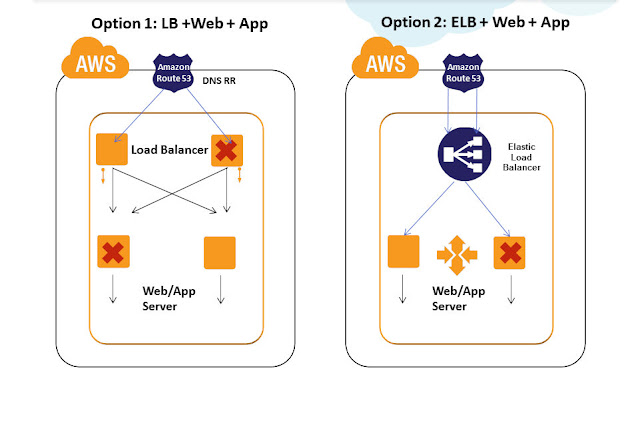


Practice 1)Use Amazon Elastic Load Balancers for the Load Balancing tier for HA. Amazon Elastic Load Balancing automatically distributes incoming application traffic across multiple Amazon EC2 instances. It enables you to achieve even greater fault tolerance in your applications, seamlessly providing the amount of load balancing capacity needed in response to incoming application traffic. It can handle thousands of concurrent connections easily and can elastically expand when more loads hit. ELB is an inherently fault tolerant building block and it can handle the failure in its layer automatically. When the load increases usually more EC2 Load balancer instances are automatically added in the ELB tier. This automatically avoids SPOF and overall site will be operational even if some LB EC2 instances in ELB tier have failed. Also Amazon ELB will detect the health of the underlying Web/App EC2 instances and will automatically route requests to the Healthy Web/App EC2 in case of failure. Amazon ELB can be configured with Round Robin in case the Web/App EC2 layer is Stateless and can be configured with Session Sticky for State full application layers. If the Session Synchronization is not done properly in the app layer then even Session Sticky balancing cannot save failover error pages and website failures.
Practice 2) Sometimes the application demands the need of : 
  • Sophisticated Load balancers with Cache feature (like Varnish)
  • Load balancing Algorithms like least connection, Weighted
  • Have heavy sudden load spikes 
  • Most of the request load generated from specific source IP range servers ( Example : Load Generated from System A IP to AWS)
  • Require the Fixed IP address of the Load Balancer to registered 
For all the above mentioned cases, having Amazon ELB in your Load Balancing tier will not be right choice. Hence for such scenarios we recommend usage of Software Load Balancers/Reverse Proxies like Nginx, HAProxy, Varnish, Zeus, Appcito etc in the Load balancing tier configured on EC2 instances. Such architecture can pose SPOF at the load balancing tier. To avoid this, usually it is recommended to have multiple Load Balancers in the LB tier. Even if a single Load balancer fails other load balancers are still operational and will take care of the user requests. Load Balancers like Zeus comes with inbuilt HA and LB Cluster Sync capability. For most use cases, inbuilt HA between LB is not needed and can be handled efficiently combining it with DNS RR load balancing technique. Let us see about this technique in detail below, before that there are certain points to be considered while architecting a robust LB tier in AWS:
  • Multiple Nginx and HAProxy can be configured for HA in AWS, they can detect the health of the underlying Web/App EC2 instances and can automatically route requests to the Healthy Web/App EC2 instances
  • Nginx and HAproxy can be configured with Round Robin algorithm in case the Web/App EC2 instances are Stateless and can be configured with Session Sticky for Stateful application servers. If the Session Synchronization is not done properly in the app layer then even Session Sticky balancing cannot save error pages.
  • Scale out of Load Balancers is better than Scale UP in AWS. Scale out model inherently adds new LB’s into this tier avoiding SPOF. Scale out of Load balancers like Nginx, HAProxy requires custom scripts/templates to be developed. It is not recommended to use Amazon AutoScaling for this layer. Note : One problem with scaling out HAProxy is that there is no common single dashboard to control multiple scaled out HAProxy nodes.
  • Load Balancers placed under the DNS needs the AWS Elastic IP to be attached. Since ElasticIP attach/Detach takes around ~120 seconds or more in some AWS regions, it is not advisable to run 2 LB’s switched between single ElasticIP model. It is recommended to run 2 or more LB EC2 instances attached individually with ElasticIP’s all running in active-active model under DNS/Route53.
  • In event a Load Balancer EC2 has failed, we can detect this using CloudWatch or Nagios alerts and can manually or automatically launch another LB EC2 in few seconds ~ minutes in AWS for HA.
  • Appcito offers load balancers as a Service. It is like Amazon ELB but with much more powerful features packed in the areas of Security, Performance, Access Controls for making IT ops life easier.  

High Availability @ DNS Tier

HA at DNS Tier is an age old topic and been available for years. We used to architect HA solutions using Neustar -UltraDNS between AWS regions and DC before Amazon R53 became mature.
The "DNS" ,Amazon Route 53 is a highly available and scalable Domain Name System (DNS) web service. Route 53 effectively connects user requests to infrastructure running in Amazon Web Services (AWS) – such as an Amazon Elastic Compute Cloud (Amazon EC2) instance, an Amazon Elastic Load Balancer, or an Amazon Simple Storage Service (Amazon S3) bucket – and can also be used to route users to infrastructure outside of AWS. AWS Route 53 is AWS inherently fault tolerant building block and a Managed DNS service. Amazon Route53 can be configured using Console , API's to do DNS level Load Balancing. 

Latency Based Routing and HA: LBR works by routing your customers to the AWS endpoint that provides the least latency. You can run applications on multiple AWS regions and LBR decides which region will give the fastest experience to the user based on actual performance measurements and directs them there. In event the primary region fails , LBR automatically directs the requests to alternative AWS region with next least latency. This automatic switch over provides inherent HA capability. DNA Failover can be configured with Active-Active Failover Using Amazon Route 53 Latency record sets
Refer http://harish11g.blogspot.in/2012/09/geo-distributed-route53-lbr-latency.html to know more in depth on this service

R53 Weighted Policy and HA: DNS Failover can be configured with Active-Active or Active-Passive Failover Using Amazon Route 53 Weighted mode, where the switching between infrastructure during outage takes place based on the weights configured. This is particularly useful when you are running a massive Geo distributed infrastructure on AWS. 

DNS Failover can also be configured with Active-Passive Failover Using Amazon Route 53 Failover and Failover Alias Resource Record Sets. In this case, the secondary is passive and only when primary fails the secondary takes over. This Active-Passive Failover mode at Amazon R53 tier is useful for switching over to passive DR environments in event of outage. 


High Availability @ Cache tier

ElastiCache Redis - Amazon ElastiCache Redis provides HA for persistent cache data. At times when your application grows rapidly some of them become so dependent on Cache tier with 100's of EC2 and TB of memory dedicated for caching. In event of such architectures, we cannot afford to lose the cache nodes easily in AWS. Amazon ElastiCache Redis has a HA solution in the form Read replica's and Slave promotion to Master. Refer the below articles to get in depth view for architecting HA on Cache tier :
Billion Messages - Art of Architecting scalable ElastiCache Redis tier

Architecting Highly Available ElastiCache Redis replication cluster in AWS VPC


High Availability @ Database tier

Data is the most valuable part of any application and designing High Availability for the Database tierr is the most critical priority in any Fault tolerant architecture. To avoid Single Point of Failure in the Database tier it is a common practice to launch the Multiple Database server's in Master-Slave replication or Cluster mode. Now let us see some of the common architecture practices and considerations for the same in AWS: 

Master Slave Replication:
We can configure 1 MySQL EC2 as master and 1 or more MySQL EC2 as Slaves in this architecture. If they are deployed in AWS public cloud, then the Database Servers needs Elastic IP, if they are deployed in AWS Virtual Private Cloud, then we can work with internal VPC Network IP itself. Master and Slave will use Asynchronous replication of data between themselves in this mode. When the Master DB EC2 fails, using custom scripts we can promote one of the slave DB EC2 as master and ensure HA in this layer. We can have Master- Slave architecture running in Active-Active(A-A) or Active-Passive(A-P) HA mode. In A-A mode, all writes and immediate write-read txns should be done in Master DB EC2, independent reads are done from slave DB. In A-P mode all writes and reads should be done on master, only when master fails, slave is promoted and made active. It is recommended to use EBS backed AMI’s for all Database EC2 server instances for stability on disk level. For additional performance and data integrity we can configure MySQL EC2-EBS with various RAID levels as well in AWS. 

MySQL NDBCluster:
We can configure 2 or more MySQL EC2 for SQLD + Data nodes and 1 MySQL EC2 as management node in this cluster architecture in AWS. Both the nodes in cluster will use Active Synchronous Data Replication between themselves. Write/Reads can be performed on both the nodes simultaneously. When one EC2 DB node in cluster fails other will be active to take the txn requests. If they are deployed in AWS public cloud, then the Database Servers needs Elastic IP, if they are deployed in AWS Virtual Private Cloud, then we can work on internal VPC Network IP itself. It is recommended to use EBS backed AMI’s for all Database EC2 server instances for stability on disk level. For additional performance and data integrity we can configure MySQL EC2 cluster-EBS with various RAID levels as well in AWS. 

Multi-AZ RDS HA:
If we use Amazon RDS MySQL for the database layer, then we can configure 1 Master in Amazon AZ-1and 1 Hot Standby in another Amazon AZ-2 (will explain AZ concepts in detail in coming sections). We can additionally have multiple Read Replica Slaves attached to the RDS Master-Slave combination. For Additional HA, we can distribute RDS Read Replicas in Multiple AZ’s as well. RDS Master and Slave nodes will use Synchronous Data Replication between themselves. Read Replica Slaves will use asynchronous replication. When the RDS Master fails, RDS Hot Standby will get promoted automatically in minutes with the same endpoint URL. All writes and immediate write-read txns should be done in RDS Master, Independent reads can be done from RDS Read Replica’s. All RDS instances are currently built over EBS; RDS also offers point in time recovery and automated backups for stability. RDS can work inside Amazon VPC as well.


Architecting High Availability across AZ’s


Amazon Availability Zones are distinct physical locations having Low latency network connectivity between them inside the same region and are engineered to be insulated from failures from other AZ’s. They have Independent power, cooling, network and security. Following diagram illustrates the current distribution of Amazon AZ's(Purple boxes) inside a AWS Region(Blue boxes).
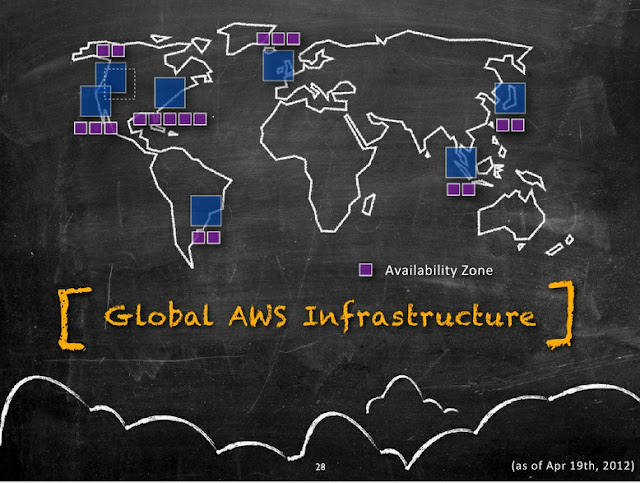


Most of the higher-level services, such as Amazon Simple Storage Service (S3), Amazon SimpleDB, Amazon Simple Queue Service (SQS), and Amazon Elastic Load Balancing (ELB), have been built with fault tolerance and high availability in mind. Services that provide basic infrastructure, such as Amazon Elastic Compute Cloud (EC2) and Amazon Elastic Block Store (EBS), provide specific features, such as availability zones, elastic IP addresses, and snapshots, that a fault-tolerant and highly available system must take advantage of and use correctly. Just moving a system into the AWS cloud doesn’t make it fault-tolerant or highly available; it is usually recommended to architect applications leveraging multiple availability zones of Amazon inside a region as best practice. Availability zones (AZs) are distinct geographical locations that are engineered to be insulated from failures in other AZs and come really handy during outages. By placing Amazon EC2 instances in multiple AZs, an application can be protected from failure or outages at a single location. Following diagram illustrates the various tiers (with sample software's) that should be architected with Multi-AZ concept.
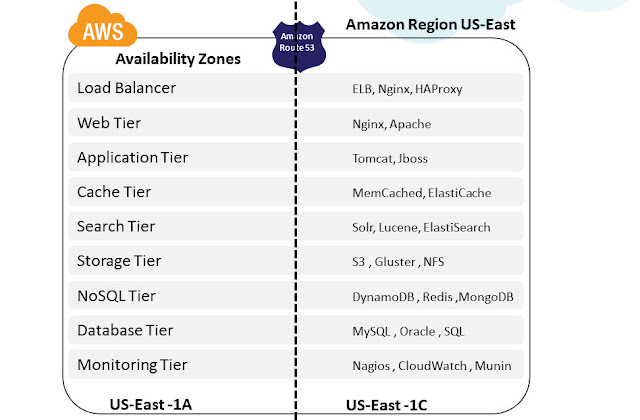


It is important to run independent application stacks in more than one AZ, either in the same region or in another region, so that if one zone fails, the application in the other zone can continue to run. When we design such a system, we will need a good understanding of zone dependencies.


Example:

A typical Web application consists of DNS, Load Balancer, Web, App, Cache and Database layer. All these tiers can be distributed and deployed to run on at least 2 or more availability zones inside an AWS region as described in the below architectures


Also most of the AWS building blocks are already built with Multi-AZ capability inherently. Architects and developers can use them in their Application architecture and leverage inbuilt HA capabilities. 

Architecting High Availability using AWS Building Blocks

AWS offers infrastructure building blocks like 
  • Amazon S3 for Object and File storage
  • Amazon CloudFront for CDN
  • Amazon ELB for Load balancing
  • Amazon AutoScaling for Scaling out EC2 automatically
  • Amazon CloudWatch for Monitoring
  • Amazon SNS and SQS for Messaging
as Web Services which developers and Architects can use in their App Architecture. These building blocks are inherently fault tolerant, robust and scalable in nature. They are in built with Multi-AZ capability for High availability. Example: S3 is designed to provide 99.999999999% durability and 99.99% availability of objects over a given year. It is designed to sustain the concurrent loss of data in two facilities. Applications architected using these building blocks can leverage the experience of Amazon engineers for building highly available systems in the form of simple API calls. Everyday amazon team is working internally on improving these building blocks by adding more features, making them robust and usable. These building blocks have their own advantages and limitations and have to be carefully used in the architecture based on the use case and fitment. Ideal usage of these building blocks drastically cuts down the cost of developing and maintaining a complex system infrastructure and helps the teams focus on the product rather than infrastructure.


Architecting High Availability across AWS Regions

AWS currently operates at 7 regions around the world and they are constantly expanding their infrastructure as I write this article. Following diagram illustrates their current regional infrastructure:


Architectures using Multiple AWS regions can be broadly classified into following categories:Cold, Warm, Hot Standby and Hot Active . 
Since the Cold and Warm Architectures are majorly classified under DR strategy/practices with RTO and RPO’s, the Hot Standby and Hot Active architectures alone are dealt in this article context as High Availability Architectures for Multi-Region AWS. 
In designing High Availability Architectures using Multiple AWS regions we need to address the following set of challenges:

  • Workload Migration - ability to migrate our application environment across AWS regions
  • Data Synch - ability to migrate real time copy of the data between the two or more regions
  • Network Flow - ability to enable flow of network traffic between two or more regions
The Following diagram illustrates a sample AWS Multi Region HA architecture.


Now lets see how to address the above mentioned challenges:

Workload Migration: Amazon S3 or EBS backed AMI’s will operate only in regional scope inside AWS. We need to create the same AMI’s in another AWS  region again for inter region HA architectures. Every time when a code deployment is made, applications need to synchronize the executable /jars/configuration files across the AWS regions. Use of Automated deployments like Puppet, Chef will make things easier for such ongoing deployment cases.  Point to Note: In addition to AMI's ; Amazon EBS, ElasticIP’s etc also operate in AWS Regional scope.


Data Synch: Any complex system will have data distributed in variety of Data sources like Database, NoSQL, Caches and File Storage.  Some of the preferred techniques which we recommend for AWS Multi Region Synch are:

  • Database: MySQL Master-Slave replication, SQL Server 2012 HADR replication, SQL Server 2008 replication, Programmatic RDS replication
  • File Storage: Gluster File Storage Replication, S3 Programmatic replication 
  • Cache: Since Cache replication across regions are too costly for many use cases, it is recommended to follow Cache warming inside every AWS Regions. 
  • Aspera for High Speed File Transfer

Since most these techniques are relying on Asynchronous Replication model, companies need to be aware of the Data loss, RPO and RTO they can incur in Architecting Multi Region AWS High Availability.

Network Flow: It is the ability to enable flow of network traffic between multiple AWS regions. Now let us see the points to consider in this:

  • Since Amazon Elastic Load Balancers currently cannot transfer requests across AWS regions, it cannot be used for this Inter AWS Region High Availability Architecture
  • Load Balancers/RP’s like Nginx or HAProxy deployed on EC2 on an AWS Region can do this, but during outages where an entire amazon region itself is affected, there are chances that the RP EC2’s are also affected and they cannot direct the requests to another AWS region effectively. This will lead to website failure.
  • It is usually a recommended practice to achieve this User Network traffic re-direction at Managed DNS level. Using solutions like UltraDNS, Akamai or Route53 LBR (Latency based routing) we can shift or balance traffic between infrastructures hosted on different AWS regions. 
  • Using Amazon Route 53’s Latency Based Routing (LBR) feature, we can now have instances in several AWS regions and have requests from our end-users automatically routed to the region with the lowest latency. We need to enter the EC2 instance public IP, Elastic IP, or Elastic Load Balancer target in the Route 53 console for LBR to happen. This LBR feature can be used for designing GEO Distributed Infrastructures and High Availability Architectures across AWS regions. Behind the scenes, AWS is constantly gathering anonymous internet latency measurements and storing them in a number of Relational Database Service instances for processing. These measurements help them build large tables of comparative network latency from each AWS region to almost every internet network out there. 
  • Amazon ElasticIP’s are also not transferrable across AWS regions. FTP and other IP Based TCP endpoints used or hardcoded for App-to-App communication needs to be re-mapped or resolved using DNS accordingly. This is an important point to be considered in AWS Multi Region Deployments.
Architecting High Availability across Cloud and Hosting Providers/DC

I have seen many articles where people talk about Multi Cloud Provider Deployments for High availability. It is a very complex architecture use case and according to me following are some of the probable reasons why a company might evaluate this HA architecture: 
  • Large enterprises who already have invested heavily on their existing data centers/providers may want AWS to be their HA/DR cloud partner. Enterprises have Private clouds like Eucalyptus, Open Stack, Cloud Stack or vCloud installed in their existing DC and in event of DC outage, AWS is used as the HA/DR infrastructure. Eucalyptus is the most compatible providers of all these private clouds with AWS because of the API level compatibility. Many workloads can be easily integrated between AWS and Eucalyptus. Example: Let us imagine the enterprise has developed some automation scripts for Amazon EC2 using AWS API’s in Eucalyptus Private cloud infra ; it can be migrated to AWS infrastructure as well easily during HA situation; Whereas if the enterprise is using Open Stack or other Private Cloud providers in their DC they might have to redevelop/test/release this script. This effort might not be cost effective option to develop and maintain for complex systems.   
  • Companies which find their infrastructure not able to meet the Scalability/Elasticity demands will want AWS to be their primary cloud infra and existing DC/providers as their HA/DR.
  • Companies which are not satisfied with the stability and robustness of their existing Public Cloud Providers may want Multi Cloud Provider deployments. This use case occurrence is very rare currently, may become central point when cloud dependencies and common standards emerge and mature in future. 


Most of the considerations listed in above section of AWS Multi region HA will also apply in this Multi Cloud HA Architecture as well. In designing High Availability Architectures across Multiple Cloud providers/DC we need to consider the following points closely:


Data Synch: Usually this step will not be a big problem if the Data stores can be installed /deployed on Multiple Cloud Providers. Compatibility of Database software, Tools, utilities will matter a lot and if they can be feasibly installed, then this challenge can be effectively addressed in Multi Cloud High Availability.

Network Flow :

  • The switch between Multiple Cloud providers should be usually done on the Managed DNS level – Akamai, Route53, UltraDNS etc. Since these solutions are not Cloud Provider REGION dependent, they can be used to effectively switch user network traffic between Cloud Providers/DC for High Availability.
  • Fixed IP address can be provided by DC / Hosting providers whereas many Cloud Providers cannot give a Static Fixed IP address for a VM currently. This might be a major bottleneck while architecting HA between cloud providers.
  • Many times VPN tunnel needs to be established between Cloud Providers /DC to migrate and synch sensitive data across clouds. There might be compatibility or feasibility problems on supporting this feature from some Cloud Providers. This needs to be carefully evaluated while architecting Multi Cloud High Availability Architectures.


Workload Migration: 

  • Amazon Machine Images are not compatible across Cloud providers; New VM images needs to be created again for Multiple Cloud Providers. This might lead to additional efforts and cost
  • Complex Automation Scripts using Amazon API’s needs to Redeveloped for Other Cloud Providers using their own API’s. Some Cloud Providers will not even provide API based management, in such cases it will become Maintenance mess.
  • OS , Software , NW Compatibility Issues needs to be carefully analyzed for feasibility before taking this Multi-Cloud HA decision
  • Unified Management of Infrastructure will be a big problem in Multi Cloud HA scenario unless tools like RightScale are used for management


Need Consulting help ?

Name

Email *

Message *

DISCLAIMER
All posts, comments, views expressed in this blog are my own and does not represent the positions or views of my past, present or future employers. The intention of this blog is to share my experience and views. Content is subject to change without any notice. While I would do my best to quote the original author or copyright owners wherever I reference them, if you find any of the content / images violating copyright, please let me know and I will act upon it immediately. Lastly, I encourage you to share the content of this blog in general with other online communities for non-commercial and educational purposes.

Followers