Showing posts with label Solr. Show all posts

Tuesday, April 22, 2014

Loading Big Index Data into newly launched Amazon CloudSearch engine

Search tier is the most critical section of many online verticals like travel, e-commerce, classifieds etc. If users cannot search products efficiently they will not make their buying decisions properly, which in turn massively affects the revenues of these companies. Most of them are usually powered by Apache Solr, FAST , Autonomy, ElastiSearch etc.  AWS also has a Search Service called CloudSearch which is a fully-managed service in the cloud that makes it easy to set up, manage, and scale a search solution for your website. Amazon CloudSearch relieves you from the worry of hardware provisioning, setup, and maintenance. As your volume of data and traffic fluctuates, Amazon CloudSearch automatically scales to meet your needs.

In AWS infrastructure Apache Solr has been the king and the software to beat till now, recently it has got heavy competitor in the form of Amazon CloudSearch - API 2013-01-01
API version 2013-01-01 of Amazon CloudSearch is internally powered by customized version of Apache Solr Engine, and it is specifically designed for running highly scalable and available search on Amazon Web Services Cloud. This 2013 CloudSearch API has lots of similarities with Apache Solr and customers can easily migrate to this version and leverage the benefits of Amazon Cloud Infrastructure. We are already hearing many AWS customers are planning their migration from FAST, Solr and A9 Engine into the Amazon CloudSearch - 2013-01-01 API engine. 

My team is already migrating couple of customers into this Amazon CloudSearch 2013-01-01 API and i have shared our experience on this process for the benefit of AWS community.

Reference Migration Architecture and requirements:
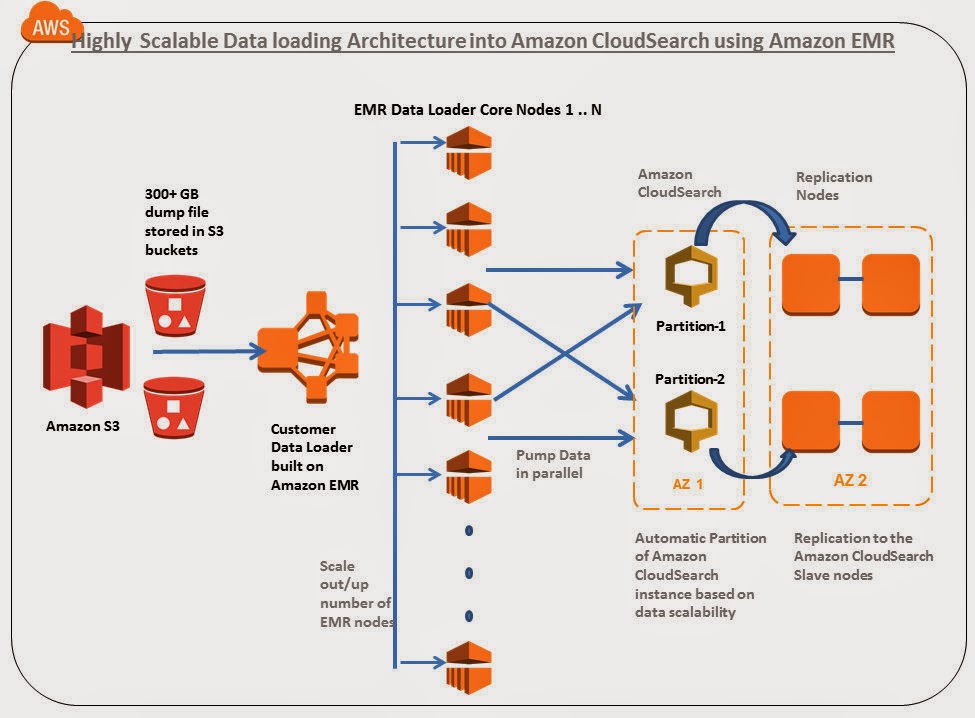


In this article i am going to explore how to 

  • Migrate a 300+ GB index containing close to 247+ million records distributed in 105 searchable fields in a highly scalable /parallel manner in AWS infrastructure.
  • 300 + GB index file is stored in Amazon S3
  • Custom Data loader program built on Amazon Elastic MapReduce is used for parallel loading
  • Around ~6 Search.M2.2Xlarge are created with 2 partitions and 5 replication count
  • Around 10+ M1.large EMR Core nodes are for Data loading. This loader can be increased to hundreds of nodes depending upon the volume and velocity of data pump required.
  • Amazon CloudSearch Infrastructure provisioning, Automated partitioning, replication count are handled by AWS.   

Lets get into the details below:

Step 1)Create a new Amazon CloudSearch Domain: We have named the search domain as "bigdatasearch" and chose the search instance type as search.m2.2xlarge.  Since we are planning to pump and query a 300 GB index with millions of document, it did not make sense for us to chose a smaller instance type of Amazon CloudSearch.  Usually the base instance type can be selected based on the number and size of the documents you are planning to maintain in the Amazon CloudSearch. 
Note: Here we have chosen replication count as 5.  This is little strange in a distributed architecture because usually more replication count for the master decreases the speed of document upload. But when we were playing with Amazon CloudSearch we observed that it is increasing the speed of uploads. In addition we also observed the following :

  • If we keep the replication count 0 or less, use a smaller search instance type and pump documents in parallel from multiple nodes, either the Amazon CloudSearch Server is failing sometimes or error rates are high.
  • If we keep the replication count 0 or less , use a larger search instance type and pump documents in parallel from multiple nodes, internally Amazon Cloud Search itself is creating 3-5 nodes and it shows in the replication count. Waiting to discuss with AWS SA folks on this behavior.


We will be utilizing distributed uploading technique which we custom built using Amazon Elastic MapReduce to pump data to the Amazon CloudSearch server. This technique enables us to write more Index data in parallel.  

Step 2) Select how you would like to create the Amazon CloudSearch Schema: Here we have chosen Manual setup, since we already have schema to be migrated to Amazon CloudSearch.


Next step is to Add index fields to create your Amazon CloudSearch Schema configuration.

Step 3)Adding Amazon CloudSearch Index Fields: Once all the fields have been configured in the schema, click on continue button. In the schema file used we have 100+ fields to be indexed for this particular search domain.


Step 4) Review the setup configurations and launch:
We have 100+ Index fields with scaling options instance type as m2.2xlarge and replication count 5 in the "bigdatasearch" domain.


Step 5 ) Wait till the Amazon CloudSearch Infrastructure is provisioned for you on the back. Usually it takes 10 minutes, it will also list if there is any error encountered when creating the index fields.


Once the Amazon CloudSearch infrastructure is provisioned at the back end , you should notice the "bigdatasearch" domain is "Active". The search and Document endpoints are published and currently no of searchable document is "0". There is only 1 CloudSearch Index Partition (Shards) and 5 search.m2.2xlarge instances.


Step 6)Configuring Synonyms: We have 2+ MB of Synonyms which needs to be configured into the Amazon CloudSearch domain. For this, we used Cloud Search cli-toolkit to upload synonyms to Cloud Search.

cs-configure-analysis-scheme -d bigdatasearch --name customanalysisscheme --lang en -e cloudsearch.ap-southeast-1.amazonaws.com --synonyms customsynonyms.txt


Since the volume of index data is huge (300+ GB) we have created a Custom Data Loader built on Amazon Elastic MapReduce to pump the data in parallel into Amazon CloudSearch. Since it is built on Amazon Elastic MapReduce,  we can use the same program without modification for scale to upload TB's of index into the search system with hundreds of Data loader EMR core/task nodes. 

Step 7) Create Amazon Elastic MapReduce Data Loader Cluster Configuration:


Step 8) Configure the Elastic MapReduce (EMR) Capacity: We are using 10 M1.Large core node instances for uploading the data from inside AWS VPC. Depending upon the Data size (GB->TB) and Upload hours we can increase the EMR core nodes capacity and number to speed up the data pump (upload) process.


To know more about How Spot instances can save cost on Amazon EMR ? refer URL AWS Cost Saving Tip 12: Add Spot Instances with Amazon EMR

Step 9)Add Custom data loader program Jar to EMR: 
We have exported the data from a MSSQL server as flat UTF-8 dump file and stored it in Amazon S3. We are giving the 300+ GB Dump file as the input for the Amazon EMR CloudSearch Data Loader program to upload into Amazon CS in parallel. Buckets configurations of the Data Loader jar, Input, output and log files are configured in this screen


Step 10) Configure Amazon CloudSearch Access Policies:  We need to open Cloud Search security group access policies to accept upload requests from EMR cluster inside VPC. Configure static IP’s of all the instances or IP range of the data loader clients


Step 11)Run the Amazon Elastic MapReduce Data loader job :


Step 12) Analyzing the Amazon EMR Data loader Job Output:
Output of the JOB can be seen in the AWS EMR JOB logs. Here are few details:

  • “Map output records” in the log tells how many records are inserted into the Amazon CloudSearch , we can observe close to 247,681,520 documents(247+ million) are pumped.
  • “Bytes Read” in the output tells what is size of data set which the JOB has read. We can observe 322387978332 bytes which is equivalent to 300+ GB of index in the Amazon CloudSearch
  • The entire pumping process took ~30 hours with 10 m1.large core nodes for us. We observed that increasing the number of Data loader EMR nodes or their capacity improves the upload speed drastically.


Step 13) Clean up : Reset Replication Count to level of HA needed ideally 1-2 nodes. Once the Job is completed, Revert back the Security Access Policies in Amazon cloud search. Terminate the EMR Cluster and clean any leftover resources.

Step 14) Analyzing the CloudSearch Dashboard :
We observed that it takes some time for cloud search to reflect actual count of the indexed documents.
After the pumping of 300 + GB index you can observe that currently 2 Amazon CloudSearch partitions ( shards) are used to distribute 247+ million documents with 100+ index fields. This is tremendous cost savings compared to A9 powered Amazon CloudSearch. Amazon CloudSearch has automatically created shards based on the volume of data pumped in to the system. This is cool !!!, it reduces the maintenance headache of the infra admins. If the Amazon CloudSearch team can make this partition concept as configurable parameter in future it will be useful. 


Step 15) Executing a Sample Search queries: We are executing a some sample product search queries on the "bigdatasearch" domain to check whether everything is fine. Distributed query was fired and Results came Sub Second from one of the partitions.


In short, It is cost effective compared to old A9 powered CloudSearch, Automated scaling of replication counts for request scalability, automated scaling of partitions for data scalability relieves the infra admin headaches, strong apache Solr pedigree and its long list of feature additions in coming months will make it more interesting.  

After working with this service few weeks, we feel it is going to become the major search service on AWS in coming years, giving tough fight for Apache Solr and ElastiSearch deployments on EC2. 

This article was co authored with Ankit @8Kmiles.

Tuesday, April 23, 2013

Apache Solr 4 Cook Book Review

Book Review : Apache Solr 4 Cookbook Review
Author: Rafal Kuc
Reviewed by : Harish Ganesan and Vijay Olety
Book URL : http://www.packtpub.com/apache-solr-4-cookbook/book

Comments : 

I recently read this book and i am really impressed! This book provides good understanding of Apache Solr for both developers as well as consultants.
The book starts off well with an introduction to Apache Solr, the web / app servers required, the role of Zookeeper, why clustering your data is vital ?, the various directory implementations, performance-oriented caching mechanisms, a sample crawler module which coupled with Solr gives a complete end-to-end solution, the role of Apache Tika as a extracting toolkit and the ease of customizing Solr. From then on, the book dwells into the details.
The first step is indexing. It plays a vital part in the entire search solution. Data can be in the form on .txt, .pdf or any other format. It is imperative that all such formats are easily indexable. One of the widely used tools for extracting metadata and language detection is Apache Tika. Data can also be present in a database, for which the Data Import Handler is handy. It comes in two variants – full and delta. Every detail is nicely explained with examples which can make the development time faster. DIH also helps us to modify the data while importing which I felt is a pretty neat feature! One of the nicest features included in Solr 4 is the ability to update single field in a document. I am not sure why this was included in the earlier versions but it’s a classic case of better late than never.
The next step in the pipeline is the data analysis which is achieved through the use of analyzers and tokenizers. Various use cases include elimination HTML and XML tags, copying the contents of one field to another and stemming words amongst others. The detailing that has gone into explaining every concept, the examples and the associated step-by-step explanation is really helpful.
Now that the data is indexed and the data preparation is completed, it’s time to query Apache Solr! Searches can be performed on individual words or on a phrase. You can boost or elevate certain documents over others based on your requirements. Simple concepts such as sorting and faceting of results to complex ones such as ignoring typos using n-grams and detecting duplicates are very simple to understand and perform. Faceting, in particular, is gaining momentum as it helps in implementing the auto-suggest feature and narrowing down the search criteria. A newly introduced feature called the pivot faceting was a much needed one and it vastly simplifies certain use cases related to faceting. Solr provides immense capabilities when it comes to querying and this book explains each of them in great detail taking real-world examples.
We indexed and queried the data. But as our application scales, we have to get our hands dirty and start fine-tuning the performance metrics in order to give a good user experience to our customers. This is where caches and its various flavors and granularities starts to make sense. Cache always plays a major role in any deployment and it is necessary to monitor Solr at all times to gauge its performance. This book can done a great job in clearly explaining the various types of caches, the commit operation and its impact on searchers and how to overcome these. This topic is really important for any Solr real-world deployment and this book has not let me down!
Apache Solr 4.0 introduced the most-awaited SolrCloud feature that allows us to use distributed indexing and searching. Setting up of SolrCloud cluster along with a Zookeeper ensemble to enable replication, fault-tolerance and high availability along with disaster recovery is a piece-of-a-cake now. I really appreciate the time and effort spent on documenting and explaining how to set up two collections inside a single cluster. It was a nightmare to find information on this particular topic when we implementing SolrCloud for one of our customers. But I am rest assured that others referring this book will save precious time of theirs. Adding / deleting nodes from a cluster is no longer a tedious task as the entire process is automated through the presence of Zookeeper nodes. The in-depth knowledge of the author in these topics is clearly visible and is of great help to all the readers. A touch on Zookeeper Rolling Restart, though off-topic, might enable readers to get a complete birds-eye view of the entire cluster. Certain features such as soft commit and NRT search have been explained in detail afterwards (under Real-life Situations) but I felt that at least a mention earlier on would have provided a much needed continuity in that section. For the geeky readers like me, a detailed description about load balancing across shards and replicas and their customizations, if any, would have added an extra amount of spice to this well-cooked food!
As with any other tool, Solr deployment too will run into some kind of a problem. This section details the common problems that are encountered and effective ways to overcome these. Shrinking the size of the index and allocating enough memory in advance amongst others are some of the solutions explained in detail and is clearly documented in this book.
Lastly, as every developer would have wanted it, the real-world scenarios are described and the various Solr concepts that were explained in earlier sections are put together as part of a complete end-to-end solution.
Any one trying Solr 4.0 must read this book in its entirety before recommending a Solr production architecture. As mentioned above, there are a few suggestions which if incorporated in this book would benefit readers. All in all, this book will be really helpful for the developers and consultants alike!


Wednesday, March 6, 2013

Apache SolrCloud on Amazon EC2 FAQ


Apache SolrCloud on Amazon EC2 FAQ:

  1. How are the Solr replicas assigned to shards?
    1. When a new Solr server is added, it is assigned to the shard with the fewest replicas, tie-breaking on the lowest shard number.
  2. Why should I specify all the ZooKeepers for the parameter –DzkHost?
    1. TCP connections are established between the Solr instance and the ZooKeeper servers. When a ZooKeeper server goes down, the corresponding TCP connection is lost. However, other existing TCP connections are still functional and hence this ensures fault tolerance of the SolrCloud cluster even when one or more ZooKeeper servers are down.
  3. What is a Solr transaction log?
    1. It is an append-only log of write operations maintained by each node. It records all write operations performed on an index between two commits. Anytime the indexing process is interrupted, any uncommitted updates can be replayed from the transaction log.
  4. When does the old-style replication kick in?
    1. When a Solr machine is added to the cluster as a replica, it needs to get itself synchronized with the concerned shard. If more than 100 updates are present, then an old-style master-slave replication kicks off. Otherwise, transaction log is replayed to synchronize the replica.
  5. How is load balancing performed on the Solr client side?
    1. Solr client uses LBHttpSolrServer. It is a simple round-robin implementation. Please note that this should NOT be used for indexing.
  6. What will happen if the entire ZooKeeper ensemble goes down or quorum is not maintained?
    1. ZooKeeper periodically sends the current cluster configuration information to all the SolrCloud instances. When a search request needs to be performed, the Solr instance reads the current cluster information from its local cache and executes the query. Hence, search requests need not have the ZooKeeper ensemble running. Please bear in mind that any new instances that are added to the cluster will not be visible to the other instances.
    2. However, a write index request is a bit more complicated. An index write operation results in a new Lucene segment getting added or existing Lucene segments getting merged. This information has to be sent to ZooKeeper. Each Solr server must report to ZooKeeper which cores it has installed. Each host file is of the form host_version. It is the responsibility of each Solr host/server to match the state of the cores_Nfile. Meaning, each Solr server must install the cores defined for it and after successful install, write the hosts file out to ZooKeeper. Hence, an index write operation always needs ZooKeeper ensemble to be running.
  7. Can the ZooKeeper cluster be dynamically changed?
    1. ZooKeeper cluster is not easily changed dynamically but is part of their roadmap. A workaround is to do a Rolling Restart.
  8. Is there a way to find out which Solr instance is a leader and which one is a replica?
    1. Solr 4.0 Admin console shows these roles in a nice graphical manner.
  9. How much time does it take to add a new replica to a shard?
    1. For a shard leader index size of 500MB, an m1.medium EC2 cold-start replica instance takes about 30 seconds to synchronize its index with the leader and become part of the cluster.
  10. Is it possible to ensure that the SolrCloud cluster is HA even when an entire AZ goes out of action?
    1. When an entire AZ is down and the cluster is expected to be running successfully, the simplest and recommended approach is to have all leaders in one AZ and replicas in other AZs with the ZooKeeper ensemble spanning across AZs.


Original article was authored by vijay . He can be reached @ in.linkedin.com/in/vijayolety/


Tuesday, March 5, 2013

Apache Solr Master-Slave Replication & Mitigation Strategies


Solr is the open source enterprise search platform from the Apache Lucene project. Its major features include powerful full-text search, hit highlighting, faceted search, near real-time indexing, dynamic clustering, database integration, rich document (e.g., Word, PDF) handling, and geospatial search. Solr is highly reliable, scalable and fault tolerant, providing distributed indexing, replication and load-balanced querying, automated failover and recovery, centralized configuration and more. Solr powers the search and navigation features of many of the world’s largest internet sites.
To know more about Apache Solr Features in detail and where it stands in comparison with other popular cloud search engines refer article: http://harish11g.blogspot.in/2013/01/amazon-cloudsearch-vs-apache-solr_16.html
A single Solr server can handle only a certain number of requests without affecting performance. In such, not so uncommon, scenarios it is best to set up a Solr master-slave cluster so that the load can be balanced effectively among them. Master usually takes up the task of index updates whereas the slaves’ responsibilities are to poll the master for updates and handle the ever-increasing search requests.
This article explains the index replication that works over HTTP and how to set it up using Solr 3.6. Let’s get started!
Solr has launched 4.X with better features on replication, sharding and High Availability. Please check this post to understand more about SolrCloud 4.x


Index Replication
A master-slave replication includes both index replication and (an optional) configuration files replication. Index replication, as the phrase indicates, is the replication of Lucene index from the master to the slaves. The slaves poll the master for any updates and the master sends a delta of the index so that everyone can be in sync.
Setting up master-slave replication
Open the file solrconfig.xml and add the following -

<requestHandler name="/replication" class="solr.ReplicationHandler">
   <lst name="master">
      <!--Replicate on 'startup' and 'commit'. 'optimize' is also a valid value for replicateAfter. -->
      <str name="enable">${enable.master:false}</str>
      <str name="replicateAfter">startup</str>
      <str name="replicateAfter">commit</str>
      <str name="commitReserveDuration">00:00:10</str>
   </lst>
   <lst name="slave">
      <str name="enable">${enable.slave:false}</str>
      <str name="masterUrl">http://master_server_ip:solr_port/solr/replication</str>
      <str name="pollInterval">00:00:20</str>
   </lst>
</requestHandler>

Note that ${enable.master:false} and ${enable.slave:false} are false indicating that currently this machine is neither set up as a master nor a slave. These settings HAVE to be overridden by specifying the values in the file solrcore.properties which is located under the conf directory of each core’s instance directory.
On the master server, open the file solrcore.properties and add the following -
enable.master=true
enable.slave=false
On the slave server, open the file solrcore.properties and add the following -
enable.master=false
enable.slave=true
Fire up these machines and you have a master-slave Solr cluster ready!
Repeater
A master may be able to serve only so many slaves without adversely affecting performance. Some organizations have deployed slave servers across multiple Data centers. If each slave downloads the index from a remote data center, the resulting download may consume too much network bandwidth. To avoid performance degradation in cases like this, you can configure one or more slaves as repeaters. A repeater is simply a node that acts as both a master and a slave. (enable.master=true
enable.slave=true)
Note: Be sure to have replicateAfter ‘commit’ setup on repeater even if replicateAfter is set to optimize on the main master. This is because on a repeater (or any slave), only a commit is called after index is downloaded. Optimize is never called on slaves.
As with our lives, nothing is certain in the lives of machines too! Any machine can go down at any time and there is nothing we can do about it except to plan for such inevitable cases and have a mitigation strategy in place.
Mitigation Strategies when master is down
Since master-slave replication is done pull-style, there are always inconsistencies with the indices of the master and the slaves. When some loss of updates are acceptable -

Mitigation Plan 1: Every machine is either a master or a slave and not BOTH
1. Nominate one of the slaves as master
2. Stop the Solr server on the new master
3. Change the 
solrcore.properties to promote it as master.
4. Start the Solr server of new master
5. Detach the EIP from the failed master and associate with the new nominated master.
6. That’s it!

Mitigation Plan 2: Every machine is both master and slave (Concept of Repeater)
1. Nominate one of the instances as master
2. Detach the EIP from the failed master and associate with the new nominated master.
3. That’s it!
In each of the mitigation plans, the first step is to nominate a slave. The obvious question arises – How do we decide which slave is the best-fit?
We have to choose that slave whose index is closest to master. To carry out this operation, use the LukeRequestHandler (enabled by default) and query the version parameter. This parameter shows the timestamp in milliseconds of the last index operation. Pick the slave which satisfies the following conditions -
1. Retrieve the version attribute on the master from S3. (Aside: Since the master is down currently, there is no way you can get the version of the master. Hence, you have to query and store the master version in S3 periodically when the master was running!)
2. Query the 
version on all solr slaves.
3. Among the slaves, pick the slave that has the highest 
version. That is the best nomination.
4. As a double check, check that the nominated slave’s 
version is closest or equal to that of the master (Replicating a master index means copying index as-is from the master to slaves. That’s why lastModified and version are the same on a slave once replication is successful. This is the reason why slave version can never be greater than that of the master)
However in production environments, any loss of updates is not acceptable and hence more robust mitigation plans need to be in place.
Mitigation Plan 1
1. Detach EBS from master and mount to any slave in the same AZ. (This is because of EBS restriction)
2. Reattach EIP from master to the slave
3. That’s it!
Mitigation Plan 2
1. Use GlusterFS as network file system. Index is automatically replicated across AZ and regions.
2. Reattach EIP to the secondary master.
3. That’s it!

Mitigation Plan 3
1. Use SolrCloud feature of Solr 4.0!. To know more about SolrCloud deployment strategies check : http://harish11g.blogspot.com/2013/03/Apache-Solr-cloud-on-Amazon-EC2-AWS-VPC-implementation-deployment.html

Original article was authored by vijay . He can be reached @ in.linkedin.com/in/vijayolety/
References

Related Articles:

Need Consulting help ?

Name

Email *

Message *

DISCLAIMER
All posts, comments, views expressed in this blog are my own and does not represent the positions or views of my past, present or future employers. The intention of this blog is to share my experience and views. Content is subject to change without any notice. While I would do my best to quote the original author or copyright owners wherever I reference them, if you find any of the content / images violating copyright, please let me know and I will act upon it immediately. Lastly, I encourage you to share the content of this blog in general with other online communities for non-commercial and educational purposes.

Followers