Showing posts with label Amazon EMR. Show all posts

Tuesday, April 22, 2014

Loading Big Index Data into newly launched Amazon CloudSearch engine

Search tier is the most critical section of many online verticals like travel, e-commerce, classifieds etc. If users cannot search products efficiently they will not make their buying decisions properly, which in turn massively affects the revenues of these companies. Most of them are usually powered by Apache Solr, FAST , Autonomy, ElastiSearch etc.  AWS also has a Search Service called CloudSearch which is a fully-managed service in the cloud that makes it easy to set up, manage, and scale a search solution for your website. Amazon CloudSearch relieves you from the worry of hardware provisioning, setup, and maintenance. As your volume of data and traffic fluctuates, Amazon CloudSearch automatically scales to meet your needs.

In AWS infrastructure Apache Solr has been the king and the software to beat till now, recently it has got heavy competitor in the form of Amazon CloudSearch - API 2013-01-01
API version 2013-01-01 of Amazon CloudSearch is internally powered by customized version of Apache Solr Engine, and it is specifically designed for running highly scalable and available search on Amazon Web Services Cloud. This 2013 CloudSearch API has lots of similarities with Apache Solr and customers can easily migrate to this version and leverage the benefits of Amazon Cloud Infrastructure. We are already hearing many AWS customers are planning their migration from FAST, Solr and A9 Engine into the Amazon CloudSearch - 2013-01-01 API engine. 

My team is already migrating couple of customers into this Amazon CloudSearch 2013-01-01 API and i have shared our experience on this process for the benefit of AWS community.

Reference Migration Architecture and requirements:
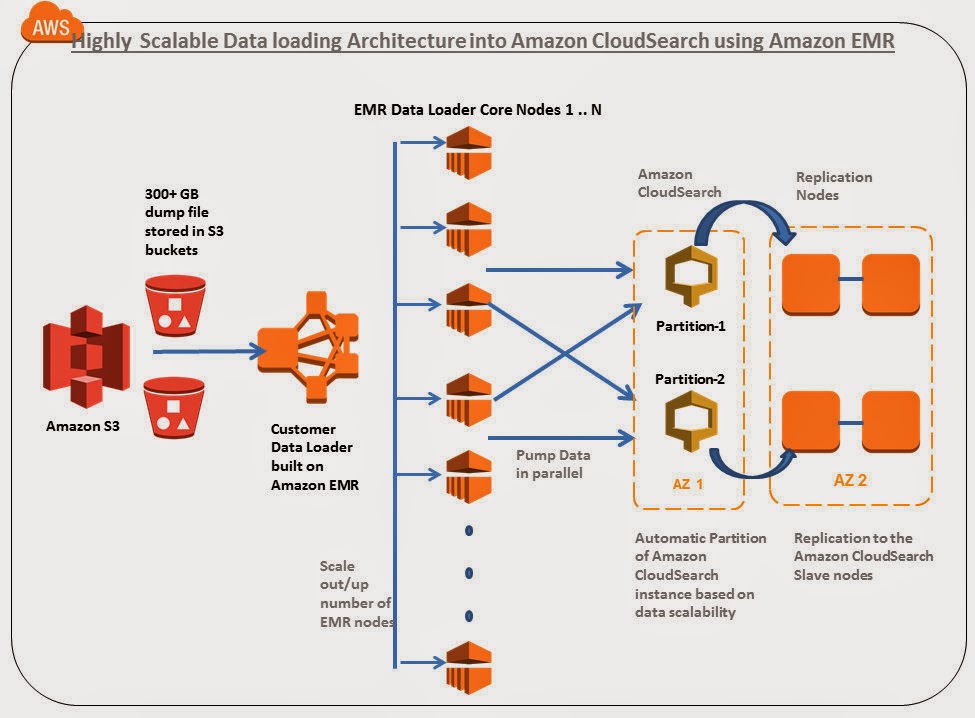


In this article i am going to explore how to 

  • Migrate a 300+ GB index containing close to 247+ million records distributed in 105 searchable fields in a highly scalable /parallel manner in AWS infrastructure.
  • 300 + GB index file is stored in Amazon S3
  • Custom Data loader program built on Amazon Elastic MapReduce is used for parallel loading
  • Around ~6 Search.M2.2Xlarge are created with 2 partitions and 5 replication count
  • Around 10+ M1.large EMR Core nodes are for Data loading. This loader can be increased to hundreds of nodes depending upon the volume and velocity of data pump required.
  • Amazon CloudSearch Infrastructure provisioning, Automated partitioning, replication count are handled by AWS.   

Lets get into the details below:

Step 1)Create a new Amazon CloudSearch Domain: We have named the search domain as "bigdatasearch" and chose the search instance type as search.m2.2xlarge.  Since we are planning to pump and query a 300 GB index with millions of document, it did not make sense for us to chose a smaller instance type of Amazon CloudSearch.  Usually the base instance type can be selected based on the number and size of the documents you are planning to maintain in the Amazon CloudSearch. 
Note: Here we have chosen replication count as 5.  This is little strange in a distributed architecture because usually more replication count for the master decreases the speed of document upload. But when we were playing with Amazon CloudSearch we observed that it is increasing the speed of uploads. In addition we also observed the following :

  • If we keep the replication count 0 or less, use a smaller search instance type and pump documents in parallel from multiple nodes, either the Amazon CloudSearch Server is failing sometimes or error rates are high.
  • If we keep the replication count 0 or less , use a larger search instance type and pump documents in parallel from multiple nodes, internally Amazon Cloud Search itself is creating 3-5 nodes and it shows in the replication count. Waiting to discuss with AWS SA folks on this behavior.


We will be utilizing distributed uploading technique which we custom built using Amazon Elastic MapReduce to pump data to the Amazon CloudSearch server. This technique enables us to write more Index data in parallel.  

Step 2) Select how you would like to create the Amazon CloudSearch Schema: Here we have chosen Manual setup, since we already have schema to be migrated to Amazon CloudSearch.


Next step is to Add index fields to create your Amazon CloudSearch Schema configuration.

Step 3)Adding Amazon CloudSearch Index Fields: Once all the fields have been configured in the schema, click on continue button. In the schema file used we have 100+ fields to be indexed for this particular search domain.


Step 4) Review the setup configurations and launch:
We have 100+ Index fields with scaling options instance type as m2.2xlarge and replication count 5 in the "bigdatasearch" domain.


Step 5 ) Wait till the Amazon CloudSearch Infrastructure is provisioned for you on the back. Usually it takes 10 minutes, it will also list if there is any error encountered when creating the index fields.


Once the Amazon CloudSearch infrastructure is provisioned at the back end , you should notice the "bigdatasearch" domain is "Active". The search and Document endpoints are published and currently no of searchable document is "0". There is only 1 CloudSearch Index Partition (Shards) and 5 search.m2.2xlarge instances.


Step 6)Configuring Synonyms: We have 2+ MB of Synonyms which needs to be configured into the Amazon CloudSearch domain. For this, we used Cloud Search cli-toolkit to upload synonyms to Cloud Search.

cs-configure-analysis-scheme -d bigdatasearch --name customanalysisscheme --lang en -e cloudsearch.ap-southeast-1.amazonaws.com --synonyms customsynonyms.txt


Since the volume of index data is huge (300+ GB) we have created a Custom Data Loader built on Amazon Elastic MapReduce to pump the data in parallel into Amazon CloudSearch. Since it is built on Amazon Elastic MapReduce,  we can use the same program without modification for scale to upload TB's of index into the search system with hundreds of Data loader EMR core/task nodes. 

Step 7) Create Amazon Elastic MapReduce Data Loader Cluster Configuration:


Step 8) Configure the Elastic MapReduce (EMR) Capacity: We are using 10 M1.Large core node instances for uploading the data from inside AWS VPC. Depending upon the Data size (GB->TB) and Upload hours we can increase the EMR core nodes capacity and number to speed up the data pump (upload) process.


To know more about How Spot instances can save cost on Amazon EMR ? refer URL AWS Cost Saving Tip 12: Add Spot Instances with Amazon EMR

Step 9)Add Custom data loader program Jar to EMR: 
We have exported the data from a MSSQL server as flat UTF-8 dump file and stored it in Amazon S3. We are giving the 300+ GB Dump file as the input for the Amazon EMR CloudSearch Data Loader program to upload into Amazon CS in parallel. Buckets configurations of the Data Loader jar, Input, output and log files are configured in this screen


Step 10) Configure Amazon CloudSearch Access Policies:  We need to open Cloud Search security group access policies to accept upload requests from EMR cluster inside VPC. Configure static IP’s of all the instances or IP range of the data loader clients


Step 11)Run the Amazon Elastic MapReduce Data loader job :


Step 12) Analyzing the Amazon EMR Data loader Job Output:
Output of the JOB can be seen in the AWS EMR JOB logs. Here are few details:

  • “Map output records” in the log tells how many records are inserted into the Amazon CloudSearch , we can observe close to 247,681,520 documents(247+ million) are pumped.
  • “Bytes Read” in the output tells what is size of data set which the JOB has read. We can observe 322387978332 bytes which is equivalent to 300+ GB of index in the Amazon CloudSearch
  • The entire pumping process took ~30 hours with 10 m1.large core nodes for us. We observed that increasing the number of Data loader EMR nodes or their capacity improves the upload speed drastically.


Step 13) Clean up : Reset Replication Count to level of HA needed ideally 1-2 nodes. Once the Job is completed, Revert back the Security Access Policies in Amazon cloud search. Terminate the EMR Cluster and clean any leftover resources.

Step 14) Analyzing the CloudSearch Dashboard :
We observed that it takes some time for cloud search to reflect actual count of the indexed documents.
After the pumping of 300 + GB index you can observe that currently 2 Amazon CloudSearch partitions ( shards) are used to distribute 247+ million documents with 100+ index fields. This is tremendous cost savings compared to A9 powered Amazon CloudSearch. Amazon CloudSearch has automatically created shards based on the volume of data pumped in to the system. This is cool !!!, it reduces the maintenance headache of the infra admins. If the Amazon CloudSearch team can make this partition concept as configurable parameter in future it will be useful. 


Step 15) Executing a Sample Search queries: We are executing a some sample product search queries on the "bigdatasearch" domain to check whether everything is fine. Distributed query was fired and Results came Sub Second from one of the partitions.


In short, It is cost effective compared to old A9 powered CloudSearch, Automated scaling of replication counts for request scalability, automated scaling of partitions for data scalability relieves the infra admin headaches, strong apache Solr pedigree and its long list of feature additions in coming months will make it more interesting.  

After working with this service few weeks, we feel it is going to become the major search service on AWS in coming years, giving tough fight for Apache Solr and ElastiSearch deployments on EC2. 

This article was co authored with Ankit @8Kmiles.

Sunday, June 30, 2013

AWS Cost Saving Tip 12: Add Spot Instances with Amazon EMR

In continuation to my post on "How elastic thinking can save costs on Amazon EMR cluster ?" i have explored in this post how we can exploit Amazon EMR by introducing Spot EC2 into the cluster and achieve more cost savings.

Most of us know that Amazon Spot EC2 instances are usually good choice for Time-flexible and interruption-tolerant tasks. These instances gets traded frequently on a Spot market price and you can fix your Bid Price using AWS API's or AWS Console. Once free Spot EC2 instances are available for your Bid Price, AWS will allot them for use in your account. Spot instances are usually available way cheaper than On-Demand EC2 instances most of the times. Example: On-Demand m1.xlarge per hour price is 0.48 USD and on spot market you can find them sometimes @ 0.052 per hour. This is ~9 times cheaper than the on-demand price; imagine if you can bid competitively and get hold of spot EC2 even around 0.24 USD most of the times, you are saving 50% from the on-demand price straight away. In Big data use cases usually you might need lots of EC2 nodes for processing, adopting such techniques can vastly make difference in your infra cost and operations in long term. I am sharing my experience on this subject as tips and techniques you can adopt to save costs while using EMR clusters in Amazon for big data problems. 
Note : While dealing with spot you can be sure that you will never pay more than your maximum bid price per hour.  

To know more about real implementation of these tips, read the following case study. Lock, Stock and X Smoking EC2's. 

Tip 1: Make right choice (Spot vs On-Demand) for the cluster components
Data Critical workloads: For workloads which cannot afford to lose data you can have the Master + Core on Amazon On-Demand EC2 and your task nodes on Spot EC2. This is the most common pattern while combining Spot and On-Demand on Amazon EMR cluster.  Since task nodes are operating on spot prices depending upon your bidding strategy you can save ~50% costs from running your task nodes using On-Demand EC2. You can further save(if you are lucky) by reserving your Core and Master Nodes , but you will be tied to an AZ. According to me this is not a good or common technique, because some AZ's can be very noisy with high spot prices.  
Cost Driven workloads: When solving big data problems, sometimes you might have to face scenarios where cost is very important than time. Example: You are processing archives of old logs as low priority jobs, where cost of processing is very important and usually with abundant time left. Such cases you can have all the Master+Core+Task run on Spot EC2 to get further savings from the data critical workloads approach. Since all the nodes are operating on spot prices depending upon your bidding strategy you can save ~60% or more costs from running your nodes using On-Demand EC2. The below mentioned table published by AWS gives an indication of the Amazon EMR + Spot combinations that are widely used:
Tip 2: There is free lunch sometimes
Spot Instances can be interrupted by AWS when the spot price reaches your bidding price. What interruption means is that, AWS can pull out the Spot EC2's assigned to your account when the price matches/exceeds. If your Spot Task Nodes are interrupted you will not be charged for any partial hour of usage by AWS i.e. if you have started the instance @ 10:05 am and if your instances are interrupted by spot price fluctuations @ 10:45 am you will not be charged for the partial hour of usage. If your processing exercise is totally time insensitive, you can keep your bidding price at closer level to spot price which are easily interrupt-able by AWS and exploit this partial hours concept. Theoretically you can get most of the processing done through your task nodes for free* exploiting this strategy.

Tip 3: Use the AZ wisely when it comes to spot
Different AZ's inside an Amazon EC2 region has different spot prices for the same Instance type. Observe this pattern for a while, build some intelligence around the price data collected and rebuild your cluster in the AZ with lowest price. Since the Master+Core+Task need to run on the same AZ for better latency, it is advisable to architect your EMR clusters in such a way they can be switched(i.e.recreate) to different AZ's according to spot prices. If you can build this flexibility in your architecture you can save costs by leveraging the Inter AZ price fluctuations. Refer the below images for Spot Price variations in 2 AZ's inside the same Region for same time period. "Make your choice wisely time to time"


Tip 4: Keep your Job logic small and store intermediate outputs in S3
Breakdown your complex processing logic into small jobs and design your jobs and tasks in EMR cluster in such a way that they run for very small period of time (example few minutes). Store all the intermediate job outputs in Amazon S3. This approach is helpful in EMR world and gives you following benefits:

  • When your Core+ Task nodes are interrupted frequently, you can still continue from the intermediate points. Data accessed from S3.
  • You now have the flexibility to recreate the EMR clusters in multiple AZ depending upon the Spot price fluctuations
  • You can decide the number of nodes needed for your EMR cluster(even every hour) depending upon the data volume, density and velocity

All the above 3 points when implemented contribute to elasticity in your architecture and there by helps you save costs in Amazon cloud. The above recommendation is not suitable for all Jobs, it has to be carefully mapped with right use cases by the architects.

To know more about real implementation of the above tips, read the following case study. Lock, Stock and X Smoking EC2's. 

Other Tips

Cost Saving Tip 1: Amazon SQS Long Polling and Batch requests
Cost Saving Tip 2: How right search technology choice saves cost in AWS ?
Cost Saving Tip 3: Using Amazon CloudFront Price Class to minimize costs
Cost Saving Tip 4 : Right Sizing Amazon ElastiCache Cluster
Cost Saving Tip 5: How Amazon Auto Scaling can save costs ?
Cost Saving Tip 6: Amazon Auto Scaling Termination policy and savings
Cost Saving Tip 7: Use Amazon S3 Object Expiration
Cost Saving Tip 8: Use Amazon S3 Reduced Redundancy Storage  
Cost Saving Tip 9: Have efficient EBS Snapshots Retention strategy in place 
Cost Saving Tip 10: Make right choice between PIOPS vs Std EBS volumes and save costs 
Cost Saving Tip 11: How elastic thinking saves cost in Amazon EMR Clusters ? 
Cost Saving Tip 12: Add Spot Instances with Amazon EMR 
Cost Saving Tip 13: Use Amazon Glacier for archive data and save costs (new)
Cost Saving Tip 14: Plan your deletion in Amazon Glacier and avoid cost leakage (new)

Thursday, June 27, 2013

Lock, Stock and X Smoking EC2's - Cloud Connect 2013 Presentation


This case was presented @ Cloud Connect 2013 . You can view this in Slide share as well.

To know more about Amazon EMR + Spot refer the following articles. They will set the technical context right before you go through this presentation. Posts are listed below:

Post 1: How elastic thinking saves cost in Amazon EMR Clusters ?
Post 2: Add Spot Instances with Amazon EMR


Case :
Mobile advertising company based in USA. They have Forbes 1000 clientele using their mobile advertising product. The company approached us for architecture and implementation help for their Clicks, Ad and other analytic's hosting and processing on AWS.

The LOCK ?
Variety of unstructured logs and semi structured files have to be processed for data analysis. It includes logs from CDN, server logs,  XML Files, Text files, Geo Data Files and Structured DB records. The logs flow every hour from variety of sources into AWS. It amounts to few hundred GB's -> ~ 1 TB @ peak hours/seasons.

The STOCK ?
Mobile Ad company wanted an efficient architecture and infrastructure on AWS for collecting, storing, processing and share the data. They wanted to avoid cost leakages because of bad architectural practices in AWS and save $$$ wherever possible.

Challenges:
Their analysis patterns can be categorized into Hourly, Monthly and Historical. Some of the major challenge were:
  • How do we Transfer, Store, Analyze and Share ?
  • How to optimize costs at this scale ?
Solution:
  • Architect their entire front end analysis module in AWS. Use the AWS technologies like ELB, EC2, R53, RDS ,Cache for delivering their analysis  results to online users.
  • Use Amazon Elastic MapReduce with Spot EC2 instances for their back-end processing jobs.
  • Automate their infrastructure using Chef, Scripts and Custom Java Modules wherever applicable. 
Stage 1: Transfer the Data :
First time data was transferred using AWS Import/Export. On going data was transferred to AWS using Tsunami UDP. High Bandwidth EC2's were installed with Tsunami UDP on AWS side for receiving data faster. The Data collected is stored temporarily in the Receiver EC2's , some pre-processing tasks were run on them and files are moved to S3 Buckets post that.
For more details about using Tsunami UDP and Aspera on AWS refer these articles: Tsunami UDP on AWS and Aspera on AWS

Some of the other popular models are :
AWS Direct Connect: Establishes a dedicated connection between Data centers to AWS using Direct Connect. This model is little costlier and is suitable only enterprises.
WAN Optimization: Use WAN optimization tools like Riverbed Steel head, aryaka etc to speed up the transfer between source endpoints to AWS.

Stage 2: Storage of Data:  
Temporarily data was stored on Receiver EC2's. After Pre-processing tasks they were moved to S3. Amazon S3 is a default choice because of its inherent fault tolerance and scalability features. Around ~2 TB of compressed logs are stored in Amazon S3 Daily for processing. Amazon S3 Reduced Redundancy Storage option was used for storing intermediate log outputs. S3 Automatic Object Expiry was used for efficiency and cost savings. Archival data is moved to Amazon Glacier periodically.

Stage 3: Analysis using Amazon EMR + Spot EC2
Amazon EMR was used for log processing and analysis. Amazon Elastic MapReduce (EMR) is a web service that helps customers with big data processing using Hadoop framework on EC2 and S3. Amazon Elastic MapReduce lets customers focus on crunching data instead of worrying about time-consuming set-up, management or tuning of Hadoop clusters or the EC2 capacity upon which they operate. This in built automation provided by AWS already saves huge labor cost for the customers. At peak hours some jobs run with 2000 Mappers/ 750 Reducers. For peak periods ~250 m1.xlarge or equivalent EC2 capacity was used for processing the logs. We developed a Custom EMR manager to introduce Spot EC2 into the Amazon EMR equation. Our Spot Bidding strategy was either on-Demand price or 20% above On-demand price. Since the Spot prices vary in different AZ's we collected the past price history, current market price etc and chose the right AZ's appropriately. Choosing right AZ sometimes mean creating the entire EMR Cluster on low priced AZ (All Master,Core & Task should reside on Same AZ).  The Master and Core Nodes were running On-Demand EC2 and Task Nodes were running on Spot EC2 or On-Demand EC2. The Custom EMR Manager has the capability to increase the Core nodes depending upon the Log Data Volume + Create the entire EMR cluster (with revised Core+task Node numbers) in New AZ depending upon the Spot prices. This decision was made by the Custom EMR manager periodically depending upon the log data volume fluctuations and Log Volume patterns.   

Learning:
  • Spot+On Demand EC2 for EMR is deadly combination for Cost Savings. Though this combination is suitable for Time in-sensitive jobs, but if some intelligence and imagination can be applied in your architecture and design, you can use this for certain time sensitive jobs as well.
  • Bigger files are better, so we merge the files into Bigger chunks before proccesing in Amazon EMR.
  • In Pre processing stage, we split files with ratio of 1 file per mapper. This gives us better time predictability during processing. Also the file transfer was faster between S3 and EMR because of this manageable size splits.
  • Data is compressed at all possible levels. Snappy and .lzo compression was used.
  • We dynamically increase/decrease the task nodes using the Custom job manager. If no Spot EC2 available for Task nodes, then Custom EMR manager adds on-Demand task nodes to the cluster.
  • The jobs were designed to be small in processing logic size and intermediate output data is stored in S3. This way we can re-create the cluster with reproducible data. Only Processing data was kept in EMR cluster, rest of the data were kept in S3.
  • The EMR clusters can be sized according to the log data volumes. This intelligence was built in the custom EMR manager based on the past patterns, Data Density tests etc, during pre processing phase.
  • Certain Intermediate reducers were designed to create number of result files according to number of Mappers in next jobs. This helped us in optimum utilization of capacity inside a hour.
  • Decision to re-size clusters are made nearest to the hour. If AWS brings per minute pricing , it will help such use cases to save more costs.
  • Every API call and millisecond matters in big data programming, tune the MR code and test the 3rd party APIs for performance before integrating them into your code.
  • Understand NW capacities of to/fro data transfer to S3, m1.Xlarge EMR Nodes (Memory Sizing, Mapper / reducer numbers) and work leveraging the strengths of AWS.
  • If your processing requirements are totally time insensitive, you can bid very close to spot price and have AWS interrupt(mostly) within the hour and literally get entire processing stuff done for free. (If AWS interrupts the Spot EC2 you will not be charged for any partial hour of usage). This strategy was not used by us. If any of you use this, please write to me, will be happy to discuss.
Value :

  • EMR with Spot brought ~56% cost savings from pure On-Demand model for Core+ Task Nodes.
  • Customer CXO's were happy !!!

Wednesday, June 26, 2013

AWS Cost Saving Tip 11: How elastic thinking saves cost in Amazon EMR Clusters ?


Introduction: Amazon Elastic MapReduce (EMR) is a web service that helps customers with big data processing using Hadoop framework on EC2 and S3. Amazon Elastic MapReduce lets customers focus on crunching data instead of worrying about time-consuming set-up, management or tuning of Hadoop clusters or the EC2 capacity upon which they operate. This in built automation provided by AWS already saves huge labor cost for the customers.

What does the word Elastic mean in Hadoop/EMR context ? Ans: You can dynamically increase the number of processing nodes depending upon the volume/velocity of the data. Adding or removing servers takes minutes, which is much faster than making similar changes in clusters running on physical servers. Let us explore this in detail and analyse how it will help you save costs in AWS Big data processing. 

Components:
Before getting into the savings part, lets understand the composition of an Amazon EMR Cluster. An Amazon EMR cluster consists of following server components. They are:
Master Node: This node Manages the cluster, it coordinates the distribution of the MapReduce executable and subsets of the raw data, to the core and task nodes. There is only one master node in a cluster. You cannot expand or reduce your Master Node in the EMR Cluster.
Core Node(s): A core node is an EC2 instance that runs Hadoop map/reduce tasks and stores data using the Hadoop Distributed File System (HDFS). Core nodes are managed by the master node.  You can add more core nodes to running cluster, but you cannot remove them from a cluster because since it stores data you have an risk of losing data. 
Task Node(s): As the name suggests these nodes run tasks and they map to equivalent of Hadoop slave node.  These nodes are optional in nature.  Task nodes are managed by the master node. While a cluster is running you can increase and decrease the number of task nodes. Because they don't store data and can be added and removed from a cluster, you can use task nodes to manage the EC2 instance capacity your cluster, by increasing capacity to handle peak loads and decreasing it later when there is no load.

Analysis :
Imagine the log volume flow is not constant and it varies every hour, some hours you receive few hundred GB's and some hours few GB's of logs for processing. For peak hours your use case needs around 192 mappers/72 reducers and normal hours you need ~64 mappers/24 reducers or less. The peak and normal numbers can be arrived based on the analysis done on the past data. This elasticity in log volume scenario is a usual occurrence in many big data projects and it is source of cost leakage. Simple approach what many architects take is that they run their cluster infrastructure @ peak capacity always since the operation is time sensitive, but this might not be an optimal approach in amazon cloud-big data world. Since you can elastically increase/decrease the number of nodes in an Amazon EMR cluster it is optimal if you can size the number of nodes dynamically every hour. Since you pay by usage in amazon cloud, having this elasticity built in your architecture will save costs. 

Based on the number of mappers/reducers required, we have chosen the node capacity to be in m1.xlarge EC2 units. So during Peak hours you will need 24 processing nodes and normal (avg) hours it will be reduced to 8 processing nodes. 

Elastic Approach-1: Vary the Task Nodes: 
In this approach, number of Master and Core nodes are maintained constant. 1 - master node and 4- core nodes are used for processing and data storage always. The task nodes are increased and decreased between 4->20 every hour depending upon the log volume flow. Since the data is present in the core nodes and only tasks/jobs are assigned in the task nodes, adding/removing task nodes will not cause problems. You can engineer a custom Job manager using AWS API's and manage this entire cluster easily. If you do a simple math that in average only 8 processing nodes are needed (4 core + 4 task nodes) and during peak hours you need ( 4 core + 20 task nodes) with this approach you can save ~60 % costs by not running your cluster in ALWAYS peak capacity. This model is a recommended approach for many elastic big data use cases in AWS. Refer the below table for cost savings:


Scenario
No. of Processing Nodes
Hourly rate
Node Type
Monthly
Peak hours
24
0.48
M1.Xlarge
~8570.88
Normal hours
8
0.48
M1.Xlarge
~2856.96
  

Elastic Approach-2: Vary both the Core and Task Nodes:
In this approach, the number of both Core and Task nodes are varied dynamically. Since the Core nodes can be only increased and cannot be decreased in a running cluster(because it could lead to data loss), this approach is recommended only for advanced use cases. Since the entire data is stored in S3(is reproducible) and can be moved to the EMR cluster every hour, using the custom Job manager an entire cluster can be created(even every hour) depending upon the log data volume (GB's). Example: Imagine first hour: 4 Core + 10 Task nodes are used for processing, second hour data volume is increased and 4 Core + 20 Task nodes are added in the cluster, third/fourth hour etc there is hardly few GB's of data flow and only 8 Mappers/3 reducers are needed for processing, instead of running 20 task + 4 core nodes(of prev hour),  a new EMR cluster can be created with just 1 master and 1-2 Core nodes. This approach requires engineering a custom job manager using AWS API's for managing the cluster. Though this approach is little complex to engineer, it saves more cost than approach-1 on medium to long term.

Note:The approaches illustrated are not theoretical in nature. I have put both the above techniques to production use for some customers and they are already seeing huge cost savings. 

Coming Soon - Adding Spot to this equation gives brutal savings ... 

Other Tips

Cost Saving Tip 1: Amazon SQS Long Polling and Batch requests
Cost Saving Tip 2: How right search technology choice saves cost in AWS ?
Cost Saving Tip 3: Using Amazon CloudFront Price Class to minimize costs
Cost Saving Tip 4 : Right Sizing Amazon ElastiCache Cluster
Cost Saving Tip 5: How Amazon Auto Scaling can save costs ?
Cost Saving Tip 6: Amazon Auto Scaling Termination policy and savings
Cost Saving Tip 7: Use Amazon S3 Object Expiration
Cost Saving Tip 8: Use Amazon S3 Reduced Redundancy Storage  
Cost Saving Tip 9: Have efficient EBS Snapshots Retention strategy in place 
Cost Saving Top 10: Make right choice between PIOPS vs Std EBS volumes and save costs 
Cost Saving Top 11: How elastic thinking saves cost in Amazon EMR Clusters ? 
Cost Saving Top 12: Add Spot Instances with Amazon EMR 
Cost Saving Top 13: Use Amazon Glacier for archive data and save costs (new)
Cost Saving Top 14: Plan your deletion in Amazon Glacier and avoid cost leakage (new)


Need Consulting help ?

Name

Email *

Message *

DISCLAIMER
All posts, comments, views expressed in this blog are my own and does not represent the positions or views of my past, present or future employers. The intention of this blog is to share my experience and views. Content is subject to change without any notice. While I would do my best to quote the original author or copyright owners wherever I reference them, if you find any of the content / images violating copyright, please let me know and I will act upon it immediately. Lastly, I encourage you to share the content of this blog in general with other online communities for non-commercial and educational purposes.

Followers